Alec Couros walks through TweetDeck's layout and shows how to add a search column to follow hashtags like #OLTD505. You can track multiple hashtags at once and tweet directly from TweetDeck, making it better than Twitter's web interface for staying on top of conversations.
Questions this video answers
tweetdeck.com (resolves to web.tweetdeck.com).
me@khorosmail.com
Chapters
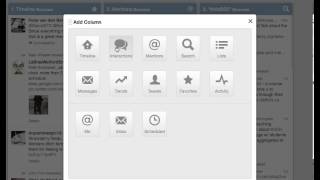
Hello 505. I've created another quick screencast to give you a sense of how you can follow the OLTD505 hashtag or really any other hashtag that you'd like to follow. I'm using a tool called Tweetdeck. This time you can go to tweetdeck.com or it does resolve to web.tweetdeck.com you will need a Tweetdeck account. They are free and it just basically links right with your regular Twitter account. So this may look complicated at first, but it's actually a lot easier to follow this Twitter this way than perhaps another way. Especially hashtags, especially if you follow multiple hashtags. So when you get this installed it'll bring up timeline, mentions and direct messages. So your kind of private messages. Now I've deleted that column just to give me more space here because I don't really need to show that one. So what I'm going to show you right now is how do you add a column to track a hashtag? So where it says add column here, it'll actually give you a number of different options. So you can add a timeline, any types of interactions. That's what I've just shown up here. So we've got timeline and interactions. Mentions. Interactions would include things like people who favorite your tweets, people who retweet you. For instance. Mentions are just when someone uses your the letter and your username, the symbol and your username. There's lists that you can follow, like the OLTD505 Twitter list for instance, if you wanted to see follow a list that way. And there's other things as well. So there's your direct messages, there's tweets by a particular individual and so on, or favorites. For instance. I'm going to use the search button because that's what we really want to track with. So if I click on search, I can just Type in the OLTD 505 hashtag and it automatically or it should show you what there is and you can click on add column and then basically you have a column there. So if you wanted to add another one, say if your thing is science, I'm going to go to search and I'm going to type in Sci chat. That seems to be a very common one for science related chat. And I can add another column and you'll see there's a fourth column there and you can actually just scroll back and forth with your mouse. I believe there's probably arrows you can use as well. Or if you wanted to follow other hashtags as well. I don't know, let's see, Math Chat. And that would be another subject related one. I can think of other ones. Like for instance in higher ed, that's a pretty popular one. Of course there's a lot of other hashtags you can find as well, but that just gives you a few. Of course you can follow anything like the Saskatchewan Riders, Rough Riders. So I think SAS Riders. I'm not sure if it's even being used much at this time of year or out of season, but you know, sports and that sort of thing you can follow as well. So this is tweetdeck. It's a really nice way to follow hashtags, especially if you go to like a conference, for instance, they're using a hashtag. So for instance, if some of you are going to the D2L conference, I'm assuming that there might be something like D2L fusion, which is a hashtag that you could follow at a conference. A really great way to see what people are talking about. You can even click on users and get a sense of who these people are. And of course you can check them out, decide to follow them, and so on. So this is actually the way I prefer to read Twitter versus the regular web interface. So it's nice. You can also even tweet from here as well. Anyway, if you have any other questions, as always, you can email me@khorosmail.com.