EASY Meta Ads AI Campaign Build & Launch (Step by Step Guide)
Depesh Mandalia walks through Ad Signals AI, a tool that scrapes a client website, auto-generates audience segments and ad copy in multiple frameworks, creates hooks and images, then bulk-uploads everything to Meta Ads Manager with UTM tracking and compliance checks built in.
Chapters
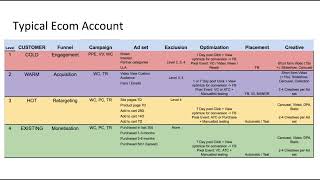
Hey. So we're going to jump straight in to creating our avatar, our campaign, setup our ads and everything, using Ad Signals AI and using the account from Country Proud usa. So what we're going to do here is show you an example of going through a website and building an avatar, creating the ad copy and just how fast it is with AI and hopefully how good it is as well. And now what we start off with is inside of the Ad Signals AI app. It's been set up so you kind of follow the process that's been set up inside the BPM method, but you can of course go through it in whichever way you need. Now, because we don't have anything set up for this client, I'm going to go ahead and start with creating a project. Because a project is a placeholder where we can hold our client data and our information and it just makes it easier for the AI to actually use the, the assets. And I'll show you one of the cool ways we do that as well. So here I'm just creating the project. You can put description if you want. I'll leave that out as well. So we create the project. So that's now set up. That's the first thing we need to do now. We can go ahead and add things into the project. So the very first thing, and this is built on the BPM method. So it's a process we've used for 10 years or however long the avatar or the ideal customer profile, whatever you want to call it, is your first start base to helping the AI in this case understand who you're targeting. Now, we would do this anyway before we were using AI because it helps to understand not only who your prospect is and how you can help them, but sometimes what their pain points are, what their emotional triggers are. And we mash all of those things together to create an avatar. So if I go back maybe three or four years before we start to use AI, we would create this manually, would go through the website, read the content, understand who the avatar is and things like that. Kind of just do that now automatically through AI. And one of the easiest ways to do that is actually just literally control A. In fact, let me just close this down. So control A, control C. I'm literally just copying everything from the home page here. So I haven't actually read it properly. So I'm just gonna have a quick scan through to see what's here. Popular collections. It's got some names here, speciality collections, unique. So this is good. These are some of the core features They've got some text. I'm just seeing if there's anything around who they are. So that's who they are. Customer reviews. This is great. So I'm just, literally just copying it all and I'm going to paste that into my target audience. Now you might look at that, I can kind of delete out a few things like that. You might look at that and say, well, is that really ideal to create the target audience? Of course it's better if you can type in, you know exactly who you're targeting. I'm just showing you the shortcut here. I could go in and kind of figure out who the target market is and you know, do some research and look at the categories and all that kind of stuff. And it wouldn't be very difficult to find out who the ideal market is for this. And it'd be like people that like wall are and all that kind of stuff. But the reason I'm showing you this is to show you how powerful the AI can actually just determine all of that for you. So I'm just going to put that into the target audience. The other thing we need is to show the offer as well. So really what we're trying to do here is it doesn't have to be exactly what your offer is, so it literally has to be something which is descriptive enough for the AI to figure things out. So I might say, for example, let's go back to the homepage I saw. I think something which would have been ideal for this. I think that's probably it. Let me just scroll down and I'm showing you the process live. And this is kind of me just recording it as I go through because this is the process I go through and I'm narrating this as well. So it takes a bit longer, but it's so much quicker this way as well. And I'll show you as well. Here it is. So we design customers from birthdays. Like that's pretty much the offer. That's what I would take. So I put that in and then I would also pull out in the. Put that in as well. So that, that, that's the offer. So we design custom metal art for every possible occasion, etc, etc, whatever, whatever. So like again, I'm just trying to show you the bare bones and this takes seconds, it's taking me minutes because I'm talking through it. But literally just copy the homepage. You can take a landing page, a sales page, most people have a really good about us page and you know, you can just pull that Data. And I think there's probably enough on the homepage where I can just kind of say, this is okay, that's the offer. I don't have any compliance problems here. Language is, you know, same as the input. I need to change that. So I'm going to click on Build Avatar right now. So what this is actually doing is it's following the process I've created called the 5W avatar process. What are we selling? Who are we selling to? What the emotional triggers, what the functional or logical triggers, and what are the Objections? They're the 5W avatars, and you'll see them listed out here. But then what the AI does is go even deeper. And this is how we run the process as well. So we create those five W's first of all, put them in a spreadsheet, write them down. After some research. It take maybe 20, 30 minutes of research and writing. Once we've got those down, then we would actually layer in some additional parts of trying to understand our avatar. And that's what the AI is doing here as well. So what would take us maybe about 20 to 40 minutes to create one avatar, we can kind of do that within. It'll probably take another 10 or 20 seconds to finish. So on average, it's about 30 seconds to 60 seconds to build a fully thought out avatar. And what the AI is doing in the background is it starts with the simple stuff like who are we targeting, what's the offer? And things like that. And then one by one, it breaks down additional things that we need. Now when you're looking at these results, you don't need all of this. Like, you don't even need to read all this. We program this in such a way that these are all specifically built so that when we're creating ad targeting the. When we're creating ad copy and creative ideas and things like that, this is almost like saying, you know, back in the day, you know, I was born in the 80s, back in the day we had computers where you just stick a disk into the computer and that gave it the program and the, the way of what to do, what it needs to do. Kind of consider this like that. So this is a disk that goes into your AI production and, and it kind of gives it the blueprint of what to do so you can read it and, you know, you can go through it and there'll be some cool or interesting things that maybe you didn't think about as well. Interests is home improvement, DIY projects, American history. They're obvious. But I didn't have to put the thinking into it. They prioritize homemade American products before after kind of story internal dialogues, money lies and money truths. Like they might believe that all personalize of customer is prohibitively expensive money truth. Investing in high quality American made art is a wise decision, etc. Etc. Fear around generic or imported products might not embody their value. You know, ordering from China versus usa so that they're all things that in the background that AI is specifically going through kind of block by block and really thinking about. And that's really where the time comes in to create something like this. So that's all good. So now that it's created, you can go back and edit and say well, this wasn't quite what I wanted and stuff and you can be a lot more specific. So often what we do and you know, if I was running this as a project for myself or creating a client production, we would probably end up creating maybe four or five different avatars and very specific ones. So for example, I would go into here and say one avatar would be family. So for me it'd be kind of a mum with kids that wants to kind of make the house feel homely. Another one might be, yeah, okay, so faith as well, like psalms and proverbs, that would be a second avatar. Third avatar would be seasonal. So you know, we're coming up to Christmas. Halloween is kind of gone, but Christmas. So that's three already. Patriotics is another one for. For him, like gifting is another one. So already you've got four or five different avatar ideas and I would put that in here as well. So I've just gone for a generic avatar just to get started. So I'm now going to save that and I will call it generic avatar. Like that's pretty much it. Save it to country proud. Now that that's done. Now what I would do is take that into the second stage which is now to create my ad targeting. So what we do here is we go into here, find our avatar, what's our target country? This is important because now that we created our avatar, this part of the AI will go into meta ads and find interests that we can target. Now you can have an argument between do interests still work, behaviors look alikes, Should I just go broad? It's entirely up to you. This is just there as a cool project or call feature on the side if you want to use interests. I still use them because I often come through here and I look at the results that come through and I'm like, that was a Good idea. I didn't think about that. So I'm going to go and generate those results. Result number one is always broad. I always recommend doing broad testing. Doesn't matter what niche and stuff you're in now. Broad depends on what your kind of boundaries are. So if you're only targeting one city, one town, one demographic, one gender, a group of ages, then you know, broad is within your scope there. Broad for this brand would be literally this us 18 plus male, male and female. Like that any, anyone in that kind of sphere should be able to buy. So when the AI is going through this process, it's coming up with 10 ideally uniquely different target ideas. So number one will always be generic, number two to nine and 10 will be interest based and also looking at behaviors as well. Okay, cool. So this validation warning is actually quite pertinent because what this says is we tried to. So there's two parts of this AI. Number one is the AI goes and finds interest that it believes that alive inside meta. The second part actually validates if they actually are because, because there are a lot of these are country specific as well. And you know, the AI doesn't have that kind of knowledge. So so now it says, you know, just, just kind of warnings to say review and, and check out to see what's happening there. So now we look at our results. So broad audience. By the way, it also names the ad set exactly as you see it here. This is my ad set naming preference, the targeting type, the specific targeting, gender, age, things like that and the event that's going to go in the. So when it creates this ad set, you can change it once it's in Ads Manager. But this is just kind of just making it easier for you to see what's going on. So it said demographic 25 to 55. That's entirely up to you. I think that's, that's fair. I mean you could say the 18 to 25. Are they really into wall art? That's an argument you can have and you can always edit that as well. So it's, it's come back with the audience estimate 25, 55 gender, all that's a sizable market. So like that's fine. It also goes through reasoning for each of the ad sets. So pure broad targeting to test the algorithm without constraints, expected performance as well and then a suggested budget. This is the minimum target. So this is not. You should absolutely spend this. If you spend more, great. But it's just kind of giving you a boundary. So for every ad set it creates, it Gives you the feedback as well. And that's the process that's going on in the background. You can then copy those details to clipboard if you want to, you know, update a document. Let's say you're working with clients and things like that. Or you can save it. And I'm going to save it here. So it's been saved to the project that's already been selected. So that's all good. Number two, home improvement enthusiasts. So we'll skip over this. So interest, home improvement and DIY behaviors, home decor shoppers. Now, this is all dependent on really what does come out of meta ads. I'm not entirely sure home decor shoppers is a behavior that comes in, but I know home improvement does exist for meta diy. I'm not so sure. So these are things which you can, you know, you can save and kind of bring up and things like that. So patriotic families, interests, American history, patriotism. This is always a good one. Engaged shoppers. These are people who have generally hit the Shop now button in the last 30 days. So it's not necessarily buyers. I think some people get mistaken with that, just people that are engaging in shopping. So they've clicked the Shop now button in an ad. So I'm just going to save that one. And it's basically ranked these based on which ones it thinks you should go for. Family gatherings and traditions. Okay. It's okay. Support local artisans, support local businesses. Like that's a. That's a good one. You can kind of like the way I'd recommend to run these is these are all ad sets and the ads inside them can be specific towards it. So for example, I think I saw a message that said, you know, where it was, weather produced, family run, etc. They're all things that if you know something about the audience, then you can kind of use to your own advantage as well. Then you've got holiday decor enthusiasts, American Pride, custom decor seekers. There's a few others here as well. So yeah, anyway, well, I think I've saved two. I'll save one more as well. So I've got three. I think I've got three ad sets now saved. And that's pretty much it. So like it will give you some insights and things like that. So now we've got our ad sets and we've got our avatar, which by the way, all of these ad sets were created from our avatar. So when we created our avatar and you know, it took 60 seconds, give or take, that became the base to create this. So I selected the generic Avatar, that's the only one I've got. But you can do this process for all the different avatars you've got. So you've got, you know, specific avatar ad sets set up for your avatars. Why is that relevant now? Let's say for example, this is a generic avatar. If the avatar number two was mums that want to make their house feel homely, then all of these ad sets would have been tailored around that. And the benefit is the more tailored your ad set is on the targeting, then the more specific the ads can be on who you're speaking to as well. And I'll show you what that means shortly as well. So now we've got an avatar, we've got our targeting. Next we can go and create some ads. So here I'm going to select meta ads, I'm going to select my project, I'm going to set my avatar and just for now I'm going to just put. So the offer for example is I'm just going to put something based on. So here I do recommend just going a bit more specific as well. So I'm going to actually go for gifters looking for a unique and personalized wall art gift for their significant other. Maybe I'll just put that and I don't know if there's any offers on the website. Let's have a quick look. So go to USA Holiday art. Merry Christmas. So I don't think there's any price discounts and that's absolutely fine. Let's have a look at this product. Let's read the ad copy. So if there's anything here. Okay. So I mean that's, that's fine. So gift is looking for a unique and personalized wall like gift for their significant other this Christmas. So this is a very specific offer for right now. As I'm putting this together. I'm going to write that and I'm going to save it as well. So that means I can actually use it in future and I can load up multiple offers and very quickly create the offer. I'm going to just for now just do the default ad copy and I'm not going to go through advanced options. So I'm just going to show you what the base looks like. I don't know, I don't know how it's going to come out. So now what this is doing is taking the ad copy and some default settings on creating the ad itself. It's meta ad specific is for this project and it's for this specific avatar. Focusing on this offer and it's going to use its default knowledge that we've built into the AI to write this ad copy. So here. Stop wasting money on forgettable cookie cutter gifts this Christmas. Make a statement that lasts. Custom metal art handcraft in the usa. This is I like this mass produced junk ends up in the attic. True legacy hangs on the wall for generations. Like that's powerful for me. So our customers worry about the quality. Don't sell for the ordinary. See what real American made art feels like. Only $5 shipping anywhere in the USA. Discover how you can give a gift that matters. I don't know about you, I don't know about your copy standards. Mine are quite high and I would literally run this. This is awesome. Give a gift that honors family, country and legacy. Perfect. So here I you can do publish. I don't recommend publishing it here because it's like publishing one ad at a time. Save it and then come back to it and we can do bulk updates. So I'm going to save that ad. I really like that one. Now let's try. Let's just try the other frameworks and just see what happens. There are advanced options you can play around with. Copy format writers, word counts, creativity levels. I'm just going to leave that for now. I want to see what, what comes back with these other frameworks. So default. It gives the AI the ability to think about the right format based on the avatar, based on the offer and the ad platform. So we're kind of giving it a lot more freedom with these copywriting frameworks which are all good you're saying right? Only use this framework. So here now the AI will come back with five different copywriting frameworks and then we can kind of see if it works or not. So this is ADA Attraction, interest, desire and action. So let's cut to the chase. Most holiday gifts end up forgotten, but not this one. Imagine a piece of. So this is the attraction. This is interest. Imagine a piece of wall art. Imagine this is the desire. So proud families all across the country are swapping out mass produced decor. And then the action ready to show what matters. I see how your story becomes our only $5. I think that's good. Personally, I don't think it's as good as the other one. Turn patriotism. Patriotism into art. Create a family legacy this Christmas. I think that's pretty good. BAB is the before and after bridge. So before for years families have settled for mass produced items after. And then this is the bridge. And then this one here is so what it does is we highlight the features, advantages and benefits. So every piece is forged from durable American steel precision cotton. This isn't your run of the mill as a result etc. So this is okay. 4ps is problem promises, pride and proof. So for those seeking a gift actually means something, one that won't be tossed aside or forgotten. Here's the reality. Most options out there fall flat. So our custom metal art is designed to support family pride and patriotism. This is good as well. And then this is pain, hope and solution for those frustrated by mass produced home decor lacking hot there's hope many discover etc customer it's okay. So if we go back like I just want to upload a few just as an example. So I'm just going to add that I'll put this one as well. That was okay. So we just picked out three here and that's cool. So that's all good. Now just to kind of show you how quick it is, I'm going to change the copywriting style. So by default is Dan Kennedy. Is this exactly how Dan Kennedy writes? Not exactly. And he'll probably come here and absolutely trash it because he's a complete pro. But what I've done with each of these AI copywriters is try and pull out the essence of how they write. And this has taken years to get right because we've been running this AI system for many years as well is pretty good. So I can One of the ones I like for example is this guy here called Billboard Ben. I'm going to increase the creativity and go and let him fly. So Billboard Ben, the way we program this specific copywriter is minimize the number of words, maximize the impact just like you would for a billboard. And what that enables you to do is often like it doesn't suit every brand and we'll see kind of what comes out here. But. But the AI is said is told to be really economical with the use of words but really choose the most impactful ones as well. So let's go to the default first. Blank walls don't tell your story. That is a pretty cool hook. Imagine a custom metal art piece crafted right here in the USA that shouts out your family's spirit and faith. Handmade, personalized, hard as the land we love and only five dollar shipping. That for me is a cool ad. I'm going to save that. So let's put that back into country. Proud Ada Ever feel like store bought store bought gifts missed the mark? So I'm just looking at headlines here. Many families hang up generic Mass made pieces, never quite feeling at home. Forged from sturdy American steel and personalized to your wishes. This isn't just wall art, it's a statement. Every piece is handcrafted by skilled artists, making it one of a kind and built to last for countless family gatherings. And make your walls and figure it all. That one's okay. So let's save that one. 4ps that's okay for homes for pride and tradition. Generic decor doesn't. Just doesn't measure up. So that's okay as well. So that's that one there. Let's go with. I like Don, obviously I like mine as well, but I'm going to go with Don Draper for this one here because I also like this style. So Don Draper's style, if you've watched Mad Men is more kind of more aligned with Ogilvy. I reckon. So. I mean, if I was going to choose, I probably. And where's Mr. I think the Don Draper was combined with some of Ogilvy's best work. But I think, believe it or not, a lot of people know Don Draper more than Ogilvy, but it's very similar. It's like really getting to the heart of the brand and trying to get across the feeling as well. So. So here if you have a look, there's nothing quite like a gift that tells your story. Handcraft in the usa, Our personalized metal wall art captures a pride. This isn't just decor, symbol of everything. It's a gift that you'll remind for years. Ready? Yes. I like that one. That's pretty good. So I'm going to save that. And by the way, you may or may not notice, yes, you can create these in Chat GPT, but imagine all the prompting that you're going to have to do and all the copy and pasting, all that kind of stuff, we've taken that away. So. So you don't have to worry about all that. So this is all just, I've set the avatar. It knows, you know, what the offer is. I don't even have to worry about that. I can just keep jamming with the AI copywriter and you'll notice this copy isn't maybe what you'd get as generic copy from chatgpt or, you know, Gemini or whatever it is. We've spent a long time making sure that what's produced is. So we, we have multiple things going on. Number one is the copy is produced from what's here. Number two, the copy is checked from a kind of creative strategist viewpoint. Again within the AI as well. It's like passing it from AI to AI. And the third thing we do, which I didn't mention, is we check for compliance. Now none of these ads have come up with any kind of compliance problems. It would actually be below this framework notes. Nothing has come back because there's nothing really against compliance. And I can. Oh, here we go. So this one is. Okay, so let's see what the compliance recommendation is. Our compliance has found some issues. So fear shame uses fear based or shame inducing language. Now I wouldn't worry about it for this side. I don't think it's necessarily that bad. So for those tired of mass produced, you can looking for site can feel endless for many Discover. Yeah, so like this part here is identified as potentially borderline non compliant. I don't think it's a problem. But we've gone deep into understanding the ads policy side of meta and made sure when the copy's produced we consider it. So it's not a case of just not writing the copy if it's not compliant. What we've actually found is in some cases like this, it is compliant, but it's still worth highlighting. So if you go to the bottom, it says it falls under fear and shame. It will kind of tell you, you know, uses fear based or shame inducing language. Meta might flag that. But honestly, this is quite a tame ad. I'm going to save this anyway. I don't know if I did, but it's a very tame ad. Now if it's health, if it's finance, if it's housing, all that kind of stuff, you absolutely need to be super careful. This is ecom. There's nothing there. It's not like I'm just trying to think of an example for a wall art company that would be non compliant. You'd have to kind of struggle for that. But you know, there may be something that comes up. So it's always worth having a look in our compliance engine. First of all. So within my ad agency we would do this. The copy would come through from a copywriter, human copywriter, that would then go to the ad strategist who has experience of the platform compliance. That person would then check it line by line and make sure it's compliant and then pass it to a media buyer to go and upload into ads Manager. This is all doing it for you and it's doing it within seconds. So like it takes out so much stress of worrying and things like that. If you are in compliance heavy niches then it just means that you don't have to worry as much. It's not going to be 100% perfect. But it just means that when you're running this process, those ads at least you get some feedback into kind of what's potentially worth noting or not. So now at this stage, we've got our avatar, got a targeting, we've got ad copy. The other thing I'm going to actually produce here, and I'll explain later, is hook and angles. So if I come back here and we go back into our project and we load our offer and our avatar and I'm literally just going to do generate, what this actually does is helps us later on and I'll show you how that will help later on to create landing page headlines, landing page copy and things like that. Because what we've done now is, and this is a process again, we're replicating for how we run things manually. You know, human driven is when we create the 5W avatar, we also create hooks and angles that will help us with copy and creative and landing pages later on. So here for example, break free from bland decor that lacks meaning. Why settle for mass produce when your legacy deserves better? Concern about quality, Your fears that are unfounded. Personalized art doesn't have to break the bank. If you remember from our avatar, one of the fears is potentially personalized art is expensive. Your home should echo your patriotism, not your frustrations. Don't let doubt rob you of an extraordinary gift. Art can be both beautiful and deeply personal and. And your home deserves to sell a story as rich as your family's history. These are all awesome, if I might say so myself. I'm going to save that to the project as well. I'm going to show you how that looks later. So I'm just going to save it as generic avatar and save content. So that process took me many minutes, 20 minutes or so because I'm just kind of narrating it. But the whole thing, it doesn't take more than five or 10 minutes. So now you're at this stage, you're actually ready to upload. There is ad spinner which takes existing ads and creates new variants. Very fast. Ad Writer, which takes copy, you can put in in particular, this is great for compliance. So you can put headlines and copy and actually check if something is compliant or not. So that's all we need for now. So we've gone through the create ads process now let's just go and upload. So this part of it, you can upload your ad sets and your ads in bulk for format. So I have access to the ad account here. And now the next part of it I'm going to show you how we upload our ad sets in bulk. Now, before I go ahead and do that, one thing I will also advise on is when you look at campaign structures, so you know there's various campaigns that are running here, some of them are switched off, some of them are still active. The structure doesn't really follow how I would like to see things up. So how I like to set things up is based on the four funnel system. So if I go into this client here, which, okay, I'm gonna have to resync that. So go into user settings. Let's resync my assets because I think the ad account has not been pulled in because I literally just added it because the ad account was just added. So let me just get that actually called in. So actually I had to go into Meta business suite, add myself as a user and I just kind of load it up and loaded this video. So this is actually a good thing just to show you how some of it works in the background as well. So you come in, you connect your meta account and now I should be able to see that load up as well. Let's have a look. Country Proud. There we go. So what I like to do in my campaign structures and I've broken this section down by the different types of ads we run. So ZCom, VSL, Low Ticket, Legion, just the testing and just lead gen as well. So I'm going to click on Ecom just to show you the structure. So within the BPM method what we teach is there are four levels of targeting. Top of funnel is cold, mid funnel is warm, bottom of funnel is hot. So they're all people pre purchase. And then you've got level four, which is existing customers. So we get we when we set up a new campaign structure for a client, generally this is what we do is just set these up one by one based on a defined structure. Well, now you can kind of literally just install it in seconds. So I don't think there's anything so you can say, right, I don't want certain things, but for this structure I'm just going to set everything up and the client can decide if they want to use it in future or not. So if I just do install, we can see how quickly it installs. Now bear in mind this process would require us to go into Ads Manager, create a campaign name it, maybe duplicate it, create the second one name the third one, do all the settings and things like that. It's kind of done. I don't know how long that took, maybe 20 seconds, but that's it. I can go. In fact, I don't need to do that. I can just refresh this. And these are all kind of just called BPM underscore. So I can also just really quickly search for bpm. And there are all my ad sets and just to kind of prove that they were literally just created, I can go and look at. Oh, there's no activity that's handy. Okay. So from pending to inactive, created by me literally just now I didn't actually create it. It was done through the API in the background using my login. But just to show it was actually literally just created and it is the exact structure. I think that's probably the format that is in here. Ads library, ppe, vv, etc. So I'm not going to explain all the different structures. It's all in the BPM method. And if you're part of ad signals or you've got ad signals AI, you've got the BPM method training or you can go and buy the book on Amazon which will explain all this in detail. But for this purpose I just want to show you how fast it is to create these ad sets. But now we've got ad sets and then how fast it is to create ad. Now we've got campaigns. I can show you how fast it is to create our ad sets. So I'm literally just going to go through the process here. So when I'm uploading these ad sets, I'm going to put them into just for the sake of following the actual process we go through, when I do my testing, I would put them into phase one. So phase one testing for me is I've got some ad sets and some ads. I want to see if the ad sets work. Phase two is I've got working ad sets. Like my audience is a proven. Now I want to test creative copy, landing pages, funnels, etc, Phase three is in scaling but I'm going to install them here on this phase one. Now what I need to do is find the right pixel. So if I go here and find something with some spend, really important to make sure that you're actually using the right pixel. And the easiest way to do that is go and look at live ad. So country usa Andre. Okay, so that's already selected. So he's pulled out four pixels. Obviously I don't know which one is the right one. I haven't usually I'd audit an account Properly if it was a proper client project. This is part of our ad signals community and kind of part of the community knowledge base that we're building as well. So you can see it's loaded three targeting recommendations, which is what we created earlier. I've got the right pixel. I can choose the event. I'll just leave that on purchase for now. Usually when we're doing testing we use add to cart and the reason is fast rapid testing. We're not necessarily starting off saying we want to generate sales. We just want to know if this ad in the ad set's working. So I'll use add to cart for now probably. Before I do that, I need to check if the pixel is firing as it should. Let's refresh. No pixel found. Okay, that's not cool. Let's go back to the homepage. Just make sure. Okay that pixel's there. Let's go here. Pixel's still there. Okay, so pixel's not firing. So I mean that's, that's something worth noting. And still no pixel. Let's go to view cart. So no, no add to car pixel. Let's go to checkout. It's opened in the shop app so I have to reload, see if our event pixel is loading. Okay. So no pixel there as well. So okay. So there's a side issue. Make sure you've got your pixels set up properly. For whatever reason, certain pixels are not. So I'm just going to assume the pixels are set up. They were set up. I'd use add to cart. I'm going to set my daily budget. We'll just set 50 a day. There were recommendations on the previous screen for testing on add to cart. I reckon. I recommend one day click and no day attribution. The reason is we want to do rapid testing and we only want people that are going to add to cart. So for that reason we just we not going after purchase. So there's no real consideration here. If someone views a product and add to cart, that's perfect. That's all we want. So one day click zero day attribution. I want all of my targeting here as well. So that's all fine. And that's pretty much it. So now just give it a quick check over, make sure all of our settings are okay. Click on create. So what this will do is take each of the ad sets and it will fire it into the into Ads Manager and just create it for you there. And then once it's in there, if you have other attributes you want to edit and Things like that. Then you can go and edit it inside the ad set. So it's created the three ad sets inside this campaign which I selected. These are the three ad sets we created can go to view in Ads Manager. I always recommend doing this just to make sure things are okay. So we could click on edit here you can see the naming convention at the top is, you know, as we had it as well, it's inside the right campaign here we just make sure it all matches 30 to 55, all genders. There's our targeting. Same with the patriotic. There's, you know the, the targeting is there, you can check it through and then we've got our broad audience. So now let's go and click on bulk ads uploader. So as you saw before, we create some ads. Now I'm just going to go and fill those three ad sets with ads and just show you how super fast and easy it actually is. So now very simple builder process here. So in select our project, first of all I'm going to click next, I'm going to select our ads so it will load up all of the ads that we've created just for the sake of it. I'm just going to select all you can obviously select the specific ones by ad set and things like that. I just want to show you how cool and how fast it is. You can filter, you can search and things like that. So now I'm going to click next I've got my seven ads selected. Going to select my ad sets which I can do here. Select my campaign once that's loaded up all of the campaigns from inside that as well. So if we type in our search keyword there, select the campaign. We can now select our brand new created ad set. So you can see it's gone into the, the targets in there, it's pulled out the ad sets and because we're creating multiple ads, it's going to go in and create those for that. Let's select our page. Let's. For now I'm just going to send it to the home page just to kind of show you how it works. You can obviously select the different landing pages and things as you need to and then you can select the URL tracking parameters. Now if you're not using Google Analytics, you don't need this. This is kind of what I put in for my preference. And also most people should be using Google Analytics. It's free. And what this does is allows you to pull in specific data data for every single ad and ad set you run. As well, we've also included the basic High Ross and Wicked Reports tags. You can take those out if you don't need them as well. Have them as you want. And one cool thing that we've done at the ad level is also we've disabled as many of the Advantage plus enhancements as we could. Now you might like them, you might, you know, swear by them. I right now do not like them. So I actually had this coded in where I could disable as many of them as we can. There's a few that still creep in because Metro doing their best to force people to use many of their AI tools and things like that. So you can check this if you want them all enabled. I disable them all. I'd recommend disable them all and then go back and select anything that you want from there as well. But yeah, just, just be mindful of what's in there as well. So I've selected the basics there. I'm going to click next. So now we need to assign creative. So for this one you can customize it per ad. This is obviously better if you're going through the process of, you know, creating a feeling for each of your ads that you're creating or you can do select all. So for example, it will load up an ad and you know, you can pull out a video or an image specifically. So let's say for example, this image here, if we're doing something related on faith, then that might be a relevant one and it depends on kind of what speed that you want to move at and kind of how you want to process this. So looking for a gift that truly honors family and country, the way I would kind of do this is twofold. Number one, if I've got ads in inside of Ads Manager, I want to reuse, I do that. But actually I want to show you something else here now before I'm going to just duplicate this, I can open up a second window and here on the left hand side, I'm going to start a new chat. What we've actually built here is not just processes to run your ads and create your ads and research and things like that. What we also have is the ability to have a conversation with the BPM method AI. This has all my book material, case studies, frameworks, all that kind of stuff built into it. So this is not just to chat GPT, it's a custom, it's experience which is being built on how we run ads. So the cool thing here is let's say for example, we want to actually Create some new ads. If you know, before we create some hooks and angles and we have an avatar, I can actually put those in and say as my, I could just say I want to create AI generated static images for my ads. I'm including some hooks and angles plus the avatar and some of the ad copy. So the cool thing here is you can actually just select the items that you've created. So I've got my avatar, I'm going to put my broad targeting in because that's what I'm going to focus on and then I'm going to put some of the ads in. So I'm just randomly selecting these. You can kind of obviously do this how you want as well. But I think seven is good and it's included those in the chat. And the cool thing is I don't need to copy and paste, I only need to tell it exactly. You know, here's the ad copy I want to use, it's just included. So I can go and have that chat right now. And what this will do is it uses open AI in the background, so chat GPT but it's using context. This is the biggest thing between having good results from AI and not is contrast context. We're pre filling that for you. So you've already gone through the creation process. Now we can jam on ideas on creative. So I've asked for AI generated static images and what it will do is in the background it's going through its material in the BPM method, how should I frame it, what kind of case studies do we have and things like that. Then it's looking at what I've sent over which are obviously the assets here and then it's formulating a response from, from all of that. So in particular what I do is I at the moment and you know this is always under testing, I use Google's AI studio, specifically Nano Banana to actually create my creatives and in order to do so I take the, the ad angles and the prompting from the, the AI scripts that come up. So that, that's one approach and I'll show you another one as well. So if I duplicate this again, again if we go into projects and let's go into content and I want to look at this. So now if we go to our avatar, so I'm just going to copy my avatar copy here. So whilst it's kind of done this whole big thing here, I want to go and actually just show you how to do it in inside of Google Nano Banana. So what I'm going to do is say I'm going to paste my avatar and hooks, angles ideas. I want you to act as my creative strategist to come up with 5 high converting add angles to create images from and for you to create some actual images. So let's just paste that in. So whilst that's running we can go back and I think there was a slight. I'm going to change the prompt here because it's actually pulled out. I want to create AI generated static images for my ads, create some ideas for this. So I'm going to re pitch that because it's actually gone through and created a new avatar for us because it's got confused but we'll skip over that for now. Teething bugs and all that kind of stuff. So let's go back into Nano. So the cool thing about this is I, I think the image generation right now at least is better inside of Nano than it is inside of some of the other apps out there. There are many, many you can go for and we'll see some of the examples that come out and you can kind of judge it yourself. So here are five ad angles designed to resonate with your audience. Number one, the legacy builder. So hook more than decor, it's a testament to your family's enduring legacy. Emphasizes emotional value, call to action is craft, etc. So let's have a look at this. That looks pretty cool actually. So more than decor, it's a testament to your family's enduring legacy. I don't know why it's replicate or repeated the five dollar shopping shipping but that for me is a pretty good ad. This one here, the Miller home. Transform your home into proud beacon. Transform your home into ae proud baon beacon of American spirit and family values. Discover yours today. Only $5 shipping. That one's probably something I, I like but I would copy this into Canva and just make some edits. You can go back into the app and kind of change that if you need to. Crafted with pride. Built to last. This is actually the production process. So invest in American made quality that stands of should be stands the test of time. Just lick your family's values. Okay, let's not lick our values values But I think his design concepts are really good. So I would say okay, take angle one and so what do we say about this one? So more than decor, it's a testament to your families and your own legacy. So we want to just take off, take angle one and remove the what we saying the shipping text that appears bottom right because we already have it in the center. And the reason I'm saying we already have it is because it might just end up taking both. So let's just see what it comes up with right there. So in the meantime, I'm coming back to the BPM method AI. Here are some AI generated static image creative ideas. So at the moment it doesn't create images. That's in a future release. I'll just say that quietly. But for now, you'd have to kind of take that into another app. So warm family home setting with metal art. The reason I wanted these is because I want to test and show you the contrast as well. So let's see. Ad angle one Legacy builder revised. Okay, that's all good. That's a pretty good ad, I think. Like, that is something I would use. So you can save that and you can upload that if you want. I think that's a pretty good ad, to be honest. That's. I don't know why it's made this error at the bottom. So only $5 shipping shop now, so that's a bit of an error. So I'd say, okay, good. Create three more different versions based on the same concept. So, like, what I'm showing you here is the process of very fast iteration. Now, it's not 100 perfect, and you can very easily take this into Canva and edit that copy out, or you can just work with AI to get it right as well. But what I've showed you is in not that much time at all, I've got my campaigns, my ad sets, and my ad copy. And very quickly, if I didn't have images, I can create them very quickly as well. So you can. This is a very iterative, fast and I think a creative process as well. So, you know, we do have some good creatives and I think I'd probably just pick from here. I mean, these are branded and properly signed off. If I was working with a client, I'd have to get them to read this, sign it off, make sure it's polished, and things like that. The other way of creating it is. So I would, for example, copy that and say, now create images for each of these ideas. And I just paste it in. So let's delete that bit. Let's delete that and just let it run like there's two ways of doing it. So in the first example you saw, I pasted in the avatar and the hooks and angles and kind of just let it decide what could do based on that. The second approach is I'm actually going a step Further, I'm jamming with the AI and based on the content to give me a bit more and then let's see what it comes up with. And you can kind of both of them work just as well as each other to be honest. So here are the images. So number one, it's actually just I think still working. Okay, so that's still working. So number one, looking for a gift that truly honors family and country. Like that. That's good. I think, you know, I'd always inspect the people and make sure there are no clues that this is AI generated and you know, they've all got the right number of fingers and feet and stuff like that. I think this is pretty good. I don't think there's any edit that I'd want to make on that. And actually I'd argue this is better because it's more easier to see in, in the newsfeed. So looking for a gift that truly honors family and country. I think that's pretty good. So you can download that and kind of send that into Ads Manager quite easily. Let's get rid of that. It's still. Oh no, it's actually finished. Where did the. Okay, good. Now do the other six just to complete the set and get it to do its thing. So there's the example I would use to create images and you can go through an iterative process there for this one just to kind of show it's being uploaded. I'm just going to go for setting them all the same one just to show you the process. I would recommend that you go through and create the image per ad. And the reason is that it's going to be a lot more relevant for the end product. So when you have an ad and it's kind of like looking for a gift that truly honors family and country, you come into this. What resonates with that? So family and country, that's a good ad. So they might do select on that. Make this Christmas unforgettable American art. Then you look at this and say is there something more Christmassy? Is there something more gift related and things like that. Like I think these are all pretty good. Like, like I like the range of these ones. So let's just say we might select that and then you might go in and patriotize and meets craft, etc. Etc. So you can go through one by one. And I'm just going to use the same creative for all just to get it updated. So I like bright contrast color. So I'm just going to select that one then I can hit next and just double check. Everything is set as it needs to. You can edit, you know, on this page as you need to. And let's click publish. Now there's 42 ads being published here, so I don't know how long it is per ad. Find out. Maybe we can do a calculation on how that is. And whilst it's doing that we can actually see what Google's coming up with. So it looks like he's doing one ad at a time. Sometimes it does flood through and give you more ads, but it's just a quirk. And by the way, I mean AI Studio, like this is the back end of it, this is not the user side of it and you can play with other settings on the right hand side. Okay, so spelling mistake. Patriotism meets craft. Personalized metal art for gifting. Handcrafted America Built to last. Like I like this ad. So it says The Harrison established 1978. So there's a few errors there. I'm just going to say okay, next and just get it to create a few more. The gist of the process. And here we're going through and so it says ads published, the seven means for the ads that went through. So let's see. Okay, so I, I see what's happened. So 21 was successful because three ad sets times seven ads is seven is 21. 21 failed because I think it picked up phantom ad sets. I'm not worried about that. So it actually did work. That's a bug. I'll, I'll get assorted, but it's no problem. Seven ads all got published in. And you can see here. So this is this ad and it tells you which ad set it got loaded into. So I can then just load up Ads Manager and see where it's actually ended up. So let's just have a check in on that. There it is. It's got the right page. Looking for a gift that truly honors family and country. Nice looking ad. It didn't pick up the Instagram, but that's because I had, I didn't request access to it. But that's fine. It's just using the Facebook page as a URL and copy and things like that. And right at the bottom we've got the right pixel and we've got the UTM tracking. So very quickly you can see it uploaded the ads. It's all there. By default we always publish into a kind of paused state. So if I search for BPM again it goes into the campaign. We go into here, go into the Ad set and into ads. And then it's kind of loaded up everything so you can kind of see. So if we go into the broad, okay, I did make a amend. Let's get rid of my edit. So go back into there. Audience testing. We go into broad and there are our seven ads and we can kind of preview them, make sure everything is okay. Different copy, same creative, things like that. So that. That's super fast and super easy. I could have done the whole thing in 10 minutes, but obviously I took a bit longer. And. And by the way, that includes like creating the images as well, which is super fast as well. And you can see that the image side of it isn't 100 perfect. And that's partly why we don't yet have image generation here, because it's just not 100 there. Even some of these tools that you get out there that creates text and images in one, they still do struggle. I don't think there's. Maybe there are a few that do a hundred percent accurate, but I don't think yet AI for. I don't know why. It just can't seem to get the text right in creative. So I think like from our logical point of view, obviously it knows how to write and how to spell. It should just be able to do it here. Believe it or not, it's actually trying to design the text, if that makes sense. So it's not like we would go into Canva and just type in turn patriotism into art. It's actually trying to design that. And it's just a slightly different way of thinking Canva make it so much easier. I would recommend what I would do here is just come up with the image. So for example, if you take that image, if it was a good image, this obviously the wrong the Miller family re. I don't know what that means, but the image is good. Take it to Canva and make the edit. Then I'll do a future video on that. For some reason, the text isn't quite where it needs to be here. And that's pretty much it. So in that process, we've gone through and create your avatar, create our targeting, creating our ad copy and angles and hooks. We've come in and create the campaign structure, the ad sets and the ads and actually we're ready to launch. So, you know, once you've tested all the or checked through it all, we're in the testing phase. We've got, you know, 15 a day budget, things like that. It's all ready to be tested and ready to go, then you can come back and use the other tools to analyze and optimize and look at attribution and things that come later on. But literally, to Launch is maybe 10 to 15 minutes, maybe 20 minutes max. If you want to say that you're kind of newer to this, if you're not new to meta ads and this process, probably five to 10 minutes, realistically, to get it all launched and get it all set up. So that's pretty much it. That's the process. Super simple, super fast, and hopefully gives you confidence to go in and do it for yourself.
More from Depesh
[Q&A] $4.3Million from $270k Ad Spend using The Ascension Path Model (APM) [AOA Podcast Part 2]
How I Made $4.3Million from $270k Ad Spend using The Ascension Path Model (APM) [AOA Podcast Part 1]
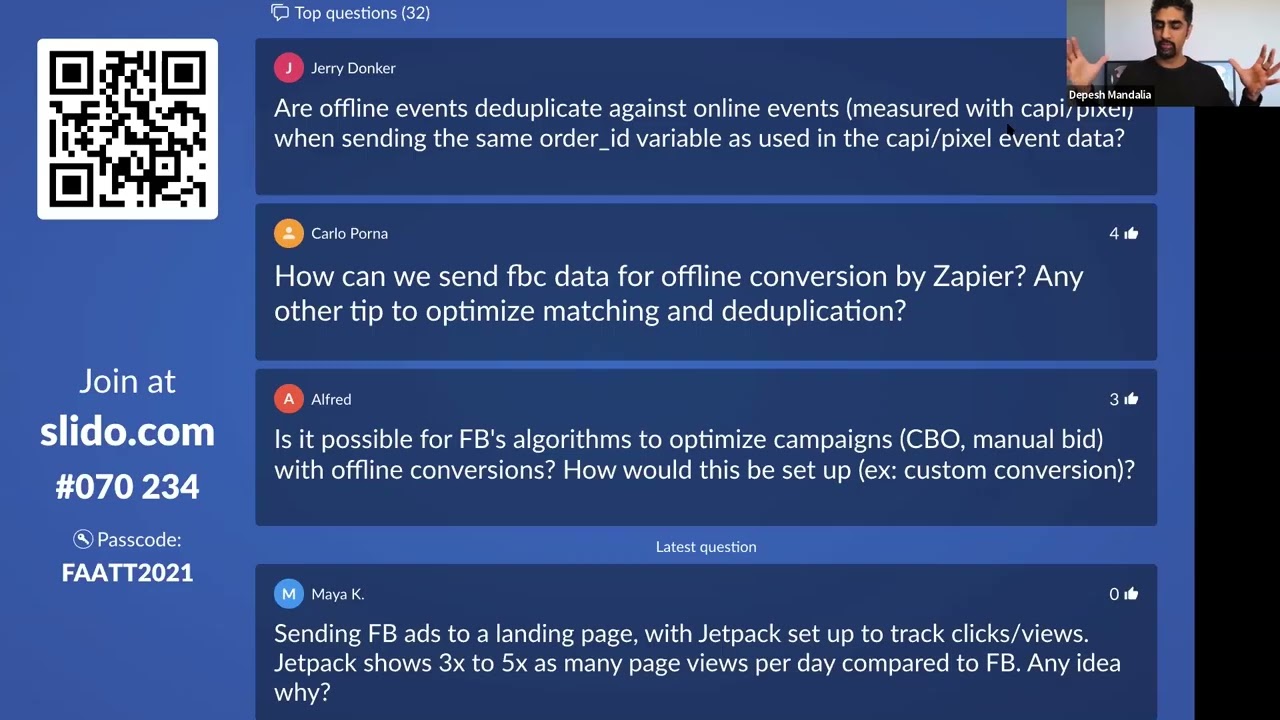
AI BUILDS FACEBOOK AD CAMPAIGNS 10x FASTER (Real Account Walkthrough) - The BPM Method
I Built a $1,000 Ad Landing Page in 10 Minutes Using AI (PRINT Money Using This)
60 Meta Ads Created & LAUNCHED in under 15 Minutes (Without Touching Ads Manager!)