The Meta Ads INFINITE Ad Engine - Groundbreaking Ad Creation!
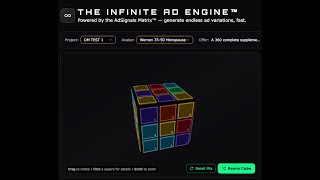
AdSignals Infinite Ad Engine generates 54 Meta ads in minutes using a "cube" system: six ad angles paired with nine hooks each. The tool handles copywriting, compliance checks, and publishes directly to Meta Ads Manager, letting you reuse the same blueprint endlessly without recreating offers or avatars.
Chapters
What if you could create 54 high-quality ads within minutes that are not only ready for Meta ads, but absolutely going to crush it for you with the new Andromeda update? And that's exactly what I'm going to show you in the next 10 minutes or so, is how we are using the Infinite Ad Engine to create as many ads as we want for any niche at any time of the day. Without worrying about whether it's going to work for Andromeda, completely ready to go and be installed straight into Ads Manager. Let's go check it out. So here we are inside the AdSignals app. Just going to refresh this. And I'm going to show you how the engine works by first showing you one that I've saved earlier. We'll just get rid of the helper guide, which you can use as well. So this cube here, I created it to demonstrate for one of the past clients. On how to create the cube. And as you can see on the left-hand side, the cube has generated hooks for different types of angles that we have. And each of the hooks, which are the 9 you can see on the right-hand side, relate to that particular angle. So this is Desire and Outcome hooks. And then what that enables us to do is for every angle, we can create 9 hooks. So there's 6 parts of the cube, we can select 6 angles, and then for each of the 9 blocks, we can select a hook. So that gives us 6 times 9, 54 potential ads from this as well. And you can see here, for example, painkiller is the kind of most immediate pain that someone's going through. Problem first ads, similar to painkiller, but kind of thinking more in terms of the problem facing the prospect as opposed to the kind of what they're concerned about. Here we have the supplement long-term goals for the prospect. So, you know, for menopausal women, they want to feel great, be more energetic and things like that. So we've generated all these hooks here. And we, let me just switch this around, find the next one. These are more kind of story-based. So real women, real results, skeptical about results, over 10,000 women. So it's kind of just giving a bit more social proof about it there as well. And here, if I look, if I click the Remix Cube button, What this actually does is to mix those ads up. Now, this is a key part of how Andromeda operates for Meta ads. The idea here, here is we don't want 9 of the same ads just dropped into an ad set. You want a range of ads dropped into an ad set. So here, if I create ads, I'll just show you the demonstration here. I've selected one side of the cube, which has a mix of ads, and you can see the 9 ads that I've generated, or 9 hooks I've generated. When I go to the next page, I can select the copywriting style. So there's different sets of styles and you can kind of click one and kind of hit the help just to see what that copywriter is about. I'm just going to select my own. And here you can see what kind of opportunities there are to frame the copy as well. Default is good enough in most cases. For this, I'm going to go problem-solution basis as well. From here, I can create 9 ads per CubeFace, and I've selected 2 frameworks. That's going to give me 18 ads. Uh, you can see I've got a bunch of AI credits here, so it doesn't actually take many credits to create these ads. And now if I click on generate, what I'm able to do is to create all of these ads all at once. So I've got 18 ads based on the angles, the hooks, the styles, and the framework. So What the system is now doing is one hook at a time. It's going through the system and writing the copy. So here, you know, worry about side effects, sleepless nights, etc. I think that's a good hook in terms of the copy. This one is good. You can kind of edit, preview, and things like that. But I'm quite happy with that as a first attempt at the ad. There's a few options here. You can edit it if you want. You can preview and you can copy. But this is a pretty decent effort from the AI. And the secret here is how we bring the offer and the audience together. Once the ad is created, you can then add your creative and that pulls through from your ad account as well. So this, I haven't selected an ad account yet. Here's another headline, hot flashes in the middle of the meeting. Another one here, the hot flashes never wait for a break. Another one here, meeting starts, hot flashes, etc. So these are really, really good hooks now. What the hook generator does, and this is where the power of the cube comes from, is it is working on core pain points related to where that prospect is in their journey, related to our offer as well. So here you can see a whole range of things. Now, this is quite interesting. This particular one, we have a compliance agent that works in the background that checks the copy before it's presented back and gives feedback as well. So We have a dual layer of security here. So the copywriter itself is trying to create ad-compliant copy. Sometimes it doesn't hit the mark and we have another agent on top, which is going through and assessing as well. So here you can see it's pulled out a few things. It says a satisfaction guarantee. So it doesn't say the product is guaranteed to work. So that's okay. Here it says your health can change. So I think this is okay. I just acknowledge it and move on, for example. And this one here, you can see now on this one, let me just see where, where the health claim is. So we can click on edit, and I can just show you how we can edit this particular ad here as well. Where is the your health part? I think, where is it now? So okay, so yeah, okay, I see it here. So investing in your health is not a luxury. So we can change that. So investing in your happiness, for example, so I can Type that in. Quick change. I don't think it's required for this compliance, but just to demonstrate this, click save and that's ready to be uploaded. So you can go through, read the feedback, decide if you want to do anything about it, make the edits. And you can see my 18 ads here are all produced and they're ready to go. I can select them all. I can deselect ads. Maybe I don't want all of them. Maybe some of them are not quite right. And this way you can create a whole batch of ads that are ready to go and be published. And then from here, you just select your ad account and details, and then you literally just publish that straight into your ad account. Now, with the kind of process I've showed you, and you know, got all the ads here, I'm going to take a step back now and show you how to actually create the cube. So this page here is where you would normally start. I loaded up a saved cube. So here, I'm selecting my avatar from my project, I'm selecting my offer, just to show you what went into that cube. Now I pre-created this and you can see the offer that I wrote in here just to give you an idea of the process and how simple it is. Because once you've created the avatar on the offer, it's just so easy and so fast to do, do the creation. Creating the avatar is simple. Just type in your audience and your offer and it will go off and create an avatar in the background that helps to create the hooks. The next part is then creating your angles. So you have 6 cube faces and you can define those how you want. So here, for example, I put competitor ads in the blue, identity-based in the red, painkiller, testimonial story, objection killer, for example. I can play around with that and that will help to create the batch of ads that I will be using to then push into my ad set for testing. For example, I can hit click here. What this does in the background, and this is the power of this cube. Is number one, the avatar we have created, we use a very specific and structured way of creating that avatar based on what I teach in The BPM Method. And it's got like 15 different data points that go into it. And what the AI is doing is using that against the ad angles to create 9 hooks per angle. And it's, it's a clever system. I, you know, I can say that as my own software, but I can also say what we've created is really quite clever as well. And it will go off and generate those hooks uniquely. Every time you run this, it's running those unique hooks. And that's the idea behind the Infinite Add engine. Every time you're running this, the AI does not fatigue. So you can see here, like, if you go and go back to the start of the video, these, these hooks will be different to what I showed you earlier on. And I can remix it and I can bring all these, um, different things together. I can regen it here if I want as well. So let's say we create this cube and I change the angle. I can do that here as well. So that's a really simple way of creating the ads. And essentially, once we've done this, the cube itself— and I'm just pausing it here just kind of while I explain it— the cube itself, once you've created it and you hit save, that cube is now generated and can be used forever. And the cool thing about this is every time you remix it, every time you kind of mix in new angles and things like that, you don't have to go through the process of selecting the avatar and the offer again. If it's your brand, if you're working with clients, like, that's now set, you're done. So you know, you know your avatar, you know your offer, you have to keep repeating that. This cube becomes like a, um, a blueprint for creating your ads. And every time you need a new batch, you just come in here, create the ads, create the angles, push them into your ad set, play around with the copywriters. Like, we have, I think, 7 or 8 different copywriting styles. We have 6 different ad frameworks. We have lots of different angles. There should be no end of ads that you are creating from this process. You should never suffer from ad fatigue again or being stuck with ideas. And this is the opportunity now to not just create endless ads, but do it in a way that's going to take advantage of Meta. So I hope that this gives you confidence to actually start thinking more about your landing page, your funnel, your offer, and worrying less about ads. This is just so much easier and faster to get published than ever before.
More from Depesh
[Q&A] $4.3Million from $270k Ad Spend using The Ascension Path Model (APM) [AOA Podcast Part 2]
How I Made $4.3Million from $270k Ad Spend using The Ascension Path Model (APM) [AOA Podcast Part 1]

AI BUILDS FACEBOOK AD CAMPAIGNS 10x FASTER (Real Account Walkthrough) - The BPM Method
I Built a $1,000 Ad Landing Page in 10 Minutes Using AI (PRINT Money Using This)
60 Meta Ads Created & LAUNCHED in under 15 Minutes (Without Touching Ads Manager!)