A hands-on YouTube tutorial by wise-echidna showing how to create quick branded mockups and icons using Recraft. The presenter (unsponsored) demonstrates Recraft’s "image set" and style system, including a custom style named "Product Fun", generates beverage-themed mockups (beach, studio, close-ups) and then switches to icon generation (3D isometric, vectors/SVG). The video highlights rapid iteration by duplicating and changing styles, exploring community "feed" styles, and notes a link in the description for free credits.
Questions this video answers
No — the speaker states the video is not sponsored.
"Product Fun"
Chapters
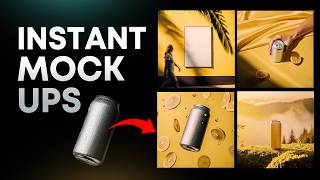
I want to show you how to create some quick mockups and icons in Recraft. This video is not sponsored but I've been using it lately. So you can see I created these. This mock up set for a company could be used for a drinking a kombucha or like an energy drink or something. And I really love the style of this. Now the way you do this is in Recraft they have something called an image set. Basically it will create a set of images that you can have in here and and all you got to do is just set the style. So I'm going to come in here and set styles. It works the same way as like other AI tools. You can come in and select a style or you can make your own style which is really cool. If you have like things you really like or you find on say Drupal or Cosmos or whatever, you can drag and drop it in and make a style. Now I did already make a style for this and I called it Product Fun. And you can see the images on Edit Style. I'll show you the images I used so you can see some of these images I found. So here are the results. You can see that all my prompts on the left hand side we've got some cinematic close ups. We've got some more product focused shots. We've got more of a beach vibe as well. So if I zoom in here we've got nice beach sunset set in the city skyline, soft blurred background, warm tones, luxury aesthetic moment of calm thing. I really like this. I like how it created a version with the black as well. As you can see this can looks a little bit smaller but I like this vinyl yellow aesthetic. This one looks pretty natural as well as you can see the face there you got the can do a bit of packaging on to make Porsche of young happy adult drinking. So you can see that we could did a cinematic photograph for this one just with simple white so we could add design on top. Light motion blur. Got a palm tree shadows and textured wall. It looks really good beach vibe got here just a splash photograph of an aluminum beverage. So we've added some citrus slices in there as well. Studio lighting, you can see the droplets on there. I like how the it blurred those back citrus slices as well. This one on the beach you got the apples and a few watermelons. As you can see, here's another version of it. So that was really cool. And then this one here is just a nice one. Travertine table looks premium. So in order to make these fun 3D icons. All you gotta do is click on the image set, go to style and we're gonna scroll down and we're gonna select 3D isometric icon. They've got some other great styles you can use as well. Now what we can do is just type in one word or you can do a more detailed prompt. And it's probably best to do a more detailed prompt. So I'm gonna click generate. I've got a boat, a vintage tv, juicy beef burger, a circus. Just by simple prompts we should be able to get something interesting. So I can zoom in here and I love how we get results within a few seconds. Really cool. That's nice. The vintage TV looks cool. Love the color there. This is cute. Look a little sailing boat on like some black water and a burger. That's really nice. And the cool thing is I can just duplicate this really fast and just change the style. So maybe we don't want 3D icons. Maybe we want vector icons or something. Let me go with this one. And I'm gonna click regenerate, duplicate, change style. This is the fastest way to create some good looking icons on brand. So if you have your own custom style with your brand then you'll make stuff super easy. So we got here, we got some icons here. We got this one. This style looks a little bit too bland and simple. This one looks fine. Love the colors here. This one plastic 3D. Look at the details. That's really fun. So you have full creative control. I just love how you can create stuff so fast and you know, it's just super fun to play around with this. And one thing I like about using Recraft is the feed from other people's creative styles. So if I come here and let me type icon in the feed section, you can see all these other people that have already created lots of styles. Like this one. Look will be pretty cool. Let's see that retro wave. Try that generate. Boom. Oh, look at that. That's beautiful. Well, I don't know why there's a person standing on that tree. Yeah, these are fun. Bit of grain. Then you can convert this to a vector or SVG and customize. Change the colors up. Yeah, this is a cool style. That's interesting. So you get totally different results within a few seconds. I'll put a link below. You can actually get some free credits. It's. It's totally free to play around with, so. But yeah, thanks so much for watching. If you want to see me create some other stuff with AI, I have a video here that shows you how to do some other branded web design stuff.