A short tutorial by Jeremy Mura describing a simple workflow to convert a flat white PNG logo into a 3D-styled logo using Adobe Firefly’s Composition feature. The process requires uploading the white PNG as a reference, supplying a style/reference image (no text), and prompting with “3D logo” to generate variations for presentations or client previews.
Chapters
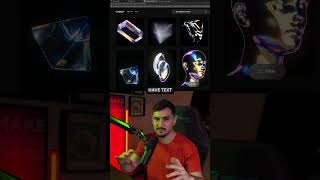
This is the cheat code I use to make any of my logo designs 3D. All you need is a white PNG version of your logo. You want to jump into Adobe Firefly. Go down to composition. You want to upload that logo file into there so it can use it as a reference. Go down to style and upload any image that you like. It could be a material, a texture, it could be a fun cute icon, it could be any type of images. Make sure that it doesn't have text and just focused on the detail and the style. Then all you got to do is just type in 3D logo and then what it will do is use that logo and it will create a 3D version of it in the style of that image you uploaded as a reference. And you can experiment, you can upload different images to create different styles. Whether it's this would be good for like a logo presentation or if you want to show the logo to a client in a fun way.