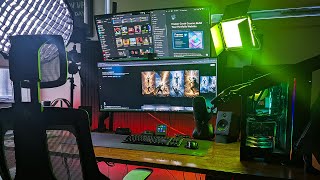
A 2025 desk-setup tour by Jeremy Mura describing ergonomic and tech upgrades to his home workspace focused on efficiency and speed. Jeremy walks through major components: Desky ergonomic pro chair and 2m melamine/rubberwood desk with Bluetooth controller and timer; Desky rippled footrest; lighting upgrades (Amaran T4C 1m RGB tube, Amaran 100D desk-mounted, Neewer LED rim light); audio and capture gear (Shure SM7B, Envato high-profile arm, Focusrite interface, Sony A7 III camera, Logitech Brio 4K webcam); input devices (Logitech G TKL keyboard, Logitech G502X mouse, MX Creative Console), XP-Pen tablet; displays (LG 38" ultrawide 3860×1600 144Hz; Prism+ 100Hz); and accessories (Philips 1000i air purifier, monitor felt pads, cable clips, mounts). He emphasizes comfort, adjustability, and workflow speed and links products in the video description.
Questions this video answers
February 19, 2025
Desky ergonomic pro chair
2 meter melamine/rubberwood desk from Desky
Amaran T4C, 1 meter light tube
Sony A7 III
Chapters
Hey, it's Jeremy. And welcome to my desk setup for 2025. I've done a few updates, a few upgrades, and I want to share with you one of my favorite places in the world, my workspace. This is where I get all my creative work done, my design work, my content, basically everything on a day to day basis. I'm here for crazy hours of the day and my main goal with this space is always about efficiency and speed. So I can create content as fast as possible as well as be inspired to work every day and not having to, you know, always be moving things around and cleaning up and things like that and just keeping it real. And so a few of the new things that I've got. And let's start off with the chair I got from Desky. It's the ergonomic pro chair from Desky. It is an office chair that supports your back with a lumbar support. You, you can easily adjust it with this little turning knob at the back. You've also got two armrests where you can lay your arms and it actually does also go backwards and you can just lock it in by clicking the bar on the side. It's really easy to lower the height and adjust it for the back headrest and also the armrest as well. Now some other parts are feel a little bit plasticky. I wish they would be like either aluminium or maybe a different material. But overall the comfort of the foam bottom works really well. And I had no complaints about the bottom construction of it. And the mesh feels high quality as well. Like it feels strong and sturdy when I've leaned back into it. So no issues there. Now I also have the Desky rippled footrest, but having this footrest allows me to easily just move my feet up and down and I can adjust it. It's got a couple of screws at the bottom which I can tighten if I want, but I just leave it pretty loose so I can move my foot up and down just so I'm not, not completely still and getting that blood flow in my legs just to be ergonomical. Now when it comes to the desk, I actually do have the 2 meter melanin or rubberwood desk from Desky as well. I've also updated the switches on the side so I've got the new Bluetooth controller which has a little LCD screen. So I actually like that because I can see the numbers clearly. And one of the cool features now they have is they've got a few extra buttons that have a really nice tactile Feel really like sturdy and solid. But they actually have the feature of a timer. So if I want to stand up, say for 30 minutes or maybe an hour, I can actually set that timer and it'll automatically go back down. Now, I think that's pretty cool. It just saves me having to press the button and maybe if I take a break, come back, then I know, hey, it's time to sit down. So I love that feature and obviously you can lock it and you can also set the different heights, what with the four buttons. So, yeah, I'm really digging this. Next is the lighting. Now, I was struggling with some of my YouTube videos. Not looking really good from behind, so I wasn't being separated from the background. But with the Amaran T4C, it's a 1 meter light tube that has a great build quality. And I love this little light tube because it gives me all colors of the rainbow. Literally, I can do whatever color I want. And it actually works with the Sidus Link app. I. I also did get this little Amaran stand for the bottom so I can place it so it doesn't fall over or anything. You know, I've got kids, I don't want them to run over and tip it over. So it just helps it be more stable. Now, the Amaran 100D, I'm still using that light, but what I've done, instead of mounting it on a tripod on the side, it was just taking way too much space and it felt like my room was a bit clogged because it is a pretty small room. But what I did is I mounted it on my desk with this solid aluminium desk mount. And it goes pretty high. It goes more than 45cm up and I can adjust it on the sides. They've got these adjustable knobs so I can tighten it. Now, for my secondary light, I've got the Neewer LED light. If you just search it up on Amazon, you'll find it. I've put all the links in the description, by the way. They're all Amazon links, but also a few extra links as well. You can check out some of the products I'm using. This newer light is good. It gives a bit of a rim light or a side light for my face. It can do any color and it can also do no color as well. It's got a little knob that I can turn on the back and a one switch and I've also mounted that as well. This one is a newer branded one that once again goes about 60cm and I can twist the knobs and easily adjust it. But it's pretty sturdy, it holds. The LED is pretty light, so I don't have to adjust it too much. It just stays there and it's just nice to have another extra light there. Now onto some of the other things on my desk. I actually upgraded from my Rode PSA mount for my microphone. My short SM7B. I got the Envato high profile arm. I thought about getting the low profile, but I realized it wouldn't fit on my desk because I've got my computer there and you need like space below and I think it would have hit some things. So I got the high form arm. It's easy to extend, it's got a lot of length and it also hides the cables under these little clips here. It's pretty, pretty solid. And the only sort of downside to it is you gotta really twist the knob hard to tighten it when you're moving it because it's got a ball head mount. Troll7sm7b. Still using the same mic, working great. And that's used with the focusrite. Still using the Focusrite. It's attached to my desk. No complaints there. It works perfectly with the audio and the cable. I just ran it through and it goes onto my desk. So no complaints there. It's working really well. Now if I go right into the middle of my desk, I've got the Logitech G TKL keyboard. I love this keyboard because it's just got a nice simple form factor. And I love the extra function buttons, mostly using the Logitech G502X as well. Even though these are sort of gaming items, I do sometimes use them for work. It pairs perfectly with the MX Creative console which I've been using for around four months now. It's basically an LCD screen which I can program to do smart actions. So it's super cool. And it also comes with this dial pad that has a nice tube tactile rotating dial and I can use it to zoom in. It's got also a roller key and it also has an action ring so I can have even more actions that you can stack on. And this works as a secondary cable. When I'm deep in my design projects and I need a bit of extra speed and I pull those out and use that. Now you probably have seen some other things on my desk I've got these little clips that I got from Amazon to hold my cables. I've got three cables. When it comes to audio rocking the Audio eight engine, A plus or a two plus. I Think all around great PC speakers. Now if I want to focus and get into some, you know, sketching, designing, I actually got the XP Pen. It's basically a drawing tablet that works as an Android so it can use apps from Google Play. I can download any Android app and I can connect it to Miro and I can start doing sketches in there and I could use it if I want to do a presentation or if I want to do some art. I can download any of the drawing apps as well as well. Now when it comes to the camera stand, once again, I do have a newer desk mount that holds the camera. And then I've also bought this rotating flat head extension so I can rotate the camera. I bought a new newer LCD screen. It works so I can actually see the shot of me. And so yeah, the Sony A7 III, I've had this for many years now. It just works great. It's a workhorse. Do photo, photos, video editing, everything. So just, just love it. Now for my Pixel Perfect webcam, I'm using the ultra wide Logitech MX Brio 4K. It's got an 8.5 megapixel sensor, a Carl Zeus, a Sony sensor in there, but overall it's a great webcam that I would recommend to anyone. Now I'm still rocking these same monitors. I've got the LG Ultra Wide 3860 x 1600 resolution, 144Hz, 38 inch and no complaints. It's a great monitor. It's an IPS panel. It's got really great colors, good contrast, good lighting. It also has hdr typically don't use that though. Great for productivity, editing, designing, bit of everything really. Gaming, it's just amazing. And then for the other monitor, I'm still using the Prism plus, which is an ultra wide monitor, 100Hz, still rocking the same mounts as I had before. The links will be in the product list, the description and I haven't had any issues with monitors falling over or any of that. Everything is sturdy and tight. Now for my backdrop, I actually did get these felt pads for the back of my monitor. I was sick of looking at this white wall. I should have bought more pads because I could only fill a certain area. But when I look now, it's just like had that contrast between my monitor and the backdrop. So it just looks nice. Especially if I do videos like short stories on Instagram. Now I've also gotten a air purifier from Philips. It's at the 1000i. So yeah, that's basically everything. So thanks for joining me for this quick desk tour and I hope you use it to be more productive and build your workspace. Make it more clean, functional, efficient and get some ideas. But let me know in the comments below if you feel like I can make this even better. How can I upgrade it even more? If you have some suggestions of some products that you get, just put in the comments and I'll add it to my list. Thanks so much for watching. If you do want to see a breakdown of the MX Creative Console or any other workspace related things, actually got a video playlist you can watch right here on the screen. Check it out. Talk to you soon.