This Operations System Helped Me Scale to $900k/Mo
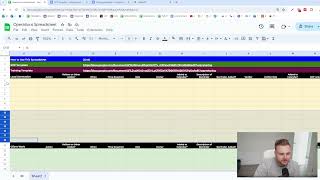
Matthew Larson shows how to build a spreadsheet command center to scale operations. Each task gets an owner, dependencies, timing, and a linked SOP so you can delegate and verify work without being the bottleneck.
Chapters
Hey there. If you've never watched one of my videos before, my name is Matthew Larson and I am the founder of A Thousand X Leads. A lot of people, especially when they're trying to grow their business, they have a lot of trouble with operations. And because they have a lot of trouble with operations, I'm making this video to show you how I would create an operations base or operations spreadsheet or whatever you want to call it, something that's easy to access, very quick to edit, that everybody can reference, and basically a command center for your entire business. So that's what I'm going to do in this video. So just copy what I do. You know, whatever you want to do, this is how you do it. And I'm going to start from scratch to take away all the excuses like, oh, I don't have a template or all that kind of stuff. This is going to be from absolute scratch. So the first thing we want to do is we'll go something of this nature. We'll Change this to 40. That's probably a bit much, but whatever, because you know, this is going to be an internal resource that people are going to access. We're going to need to have instructions with it as well. So what we will do here, something like how to use this spreadsheet, SOP template, training template. Let's get another one here. Let's make this black. And we want to make the entire thing, or not the entire thing, but this thing for sure. We want to have this with like, just like that. So we're going to put the. We're going to eventually have a link here. We're eventually going to have a link here, and we're going to have a link here. So I also have a Google document opened with the, you know, we'll call this the SOP template. We'll get back to that later. We will put that here. There we go. And let's also make a training template. So essentially this video that you're watching now will probably go to how to use a spreadsheet after. But you might make a separate one that's like simplified but. But regardless what is going on here, regardless, like this is what you would be doing. So the training template. And there we go. We'll go operations spreadsheet and we'll type. We'll make it proper. We'll make it definitely proper. So here we're going to have. We're going to have a few different types. So what we're going to go here is lead generation. We're going to make that like that. We are going to do the exact same thing down here, but we're going to do client work and we're going to do the exact same thing down here, but we're going to do employee. We're just going to call it employees for now. So the reason we would do something of this nature is because, like these are the three main things that you'd be doing operations for. Type thing. And we're just going to actually make this black just because it looks weird with two different colors just like this. So what we're going to be doing. So this is going to be the lead generation part, if that makes sense. We can also make like this. We can make the writing and I'll show you that. So in a spreadsheet, how do you make the writing go, you know, flipped 90 degrees. So select the cell. Home orientation. So we might go something like this. Where's that orientation? So home. So format, text, rotation. We could do something like this as well. Where we have it and then this kind of goes down. Doesn't look great. But I don't know, we don't need to do that. We'll just leave it like that. But you could have it like one thing rotated horizontally here if you wish. So be more like. If you really wanted it to be like that, you could do rotation. We could do rotate it up and then it would be like this. We could do that. We'll just do that. Just for the sake of argument. We'll do it like that. So then we can basically take that part here. What we'd want to do is probably make that a bit bigger. We don't want to make it bigger, but we also want to like overflow it instead or do it something like lead and then generation and have it rotated like that just so it's not, you know, huge type thing. Looks pretty. Pretty shit, not gonna lie. But what are you gonna do? Let's not do that. We don't need to do that. It's just not going to be necessary. Lead generation. So what we'd want to do here is we would have something like, you know, what should we call it? Let's call it the action. So we'll make this category like that. We will do the action will be something like reliant on other action. We'll have something like when, something like time required. Something like role, something like owner, something like added to calendar. And I'm just going to do. Just going to go through this and whip it quick, you know. Description. No, no. What should we do like something like description of reminder? Something like reminder added? Yeah, we'll just go like that. Verifier, Verifier role added to calendar. We're gonna go something like the. What would you call it? We're gonna go SOP link training, link completion criteria, maybe what to do when complete. Something like that. That would be like the basis of our operations spreadsheet here. So let's go back and this. These two things can be way shorter and kind of made them too big at the start. Let's just go back to the normal size. We also can make them something like this. So lead generation. So let's go here because we're going to need to kind of change up this stuff. So relying on other actions. We will wrap that. So let's actually wrap all of it and then let's center them. So under this part here we can kind of put what I would call like the crate or the, the category. So like this is the lead generation section for sure. So we'll kind of just. Let's. Let's just kind of make these separate backgrounds so it's visually easier to think about. And in this kind of spreadsheet, like if you're making something of this nature, which you should. This is like a spreadsheet that really only covers, how would you say, stuff that is like operating like ongoing. This is not, you know, there's certain things like a lead magnet where, you know, it's like a one time construction. You wouldn't put that on this spreadsheet. It would just be stuff that needs to be operating, needs to be ongoing, you know, etc. So let's go here, let's. Let's put this in here, put this in here. So you would make this. And this can be dependent on your business, but you make all of this stuff like if there's a thousand tasks, like you would just duplicate it. Something. Not like that. Definitely not like that. But you could add as many tasks as you want to. Right. So what do we do? What should we do here? Lead generation, client work. Let's make this. Yeah, we'll just do it like that. So what should we do? We want to go to add it to calendar. We want to make like a checkbox type thing in here. So where do you do that? Insert checkbox. Because this is like. Is this done yes or no type thing? So we're going to do a checkbox there, a checkbox there, checkbox there, checkbox there. Just because we copy and paste it, we got to make it the correct color again. So let's do that. And then these checkboxes are a bit big I would say, you know, you could just make them six size instead because. So let's go through the different things here because this is what I always do. You know, the action is like what is the task? And then it's kind of important in some ways is like is this task reliant on another action or task? You know, for example, like I want to put some Facebook ads in my account. Like that's reliant on the action of you made the Facebook ads type thing. When would be like, you know what if there's a date, if there's like times per week, if there's time, you know, time required 15 minutes, however long it takes roll. So the role and owner. So for me, role, like if I were talking about me and a thousand X leads, the role would be founder, the owner would be Matt. So the role is the role, the owner is the actual person, if that makes sense. It needs to be added to a calendar because if it's not added to a calendar, it's not getting done. It's just a law of human nature. There needs to be a reminder to do this. So the description of the reminder. So it might be a slack workflow, you know, is the reminder exist? Yes. Yes. Is there the verifier? You know, it's kind of like when people in this election there's poll watchers. But who's watching the poll watcher? Right. If it's, you know, you need someone to verify that it's getting done. So my partner's name's Leo. He's also a founder. Is verifying that this gets done. Part of his. Part of his calendar. Is that in there? Yes. Great. You know, let's just put a task here. So paid ads create new ad creatives. Let's kind of, let's kind of make these a bit smaller here. Reliant on other action. I'm going to go with no when. Three new ones every Monday. Let's wrap the whole sheet here. Time required 60 minutes. Let me zoom in a bit. A little bit. So hopefully you can see this kind of SOP link. So what I would do is I would take this template which doesn't exist. Once I made the sop, it's going to be in there. Once I've made the training, it's going to be linked there. What to do when complete publish, slash schedule campaign and tell Leo completion criteria. Ads perfect, edited, uploaded or edited and finalized. That is the completion criteria. So this is like what you be doing for everything. Everything you do that is an ongoing situation. You would be doing something of that nature. So let's go to the SOP template for a sec. So what would I do for that? There's a few different things that you could do. So let's go to. Oops, we shouldn't have wrapped this overflow. Do something like so SOP template. So what would I would do something like task name. Obviously change it to Montserrat because that's the most aristocratic font. What would I do? Something like task description, video description, step by step, instructions, training. What else would I do? Probably put an example, other important links, information. In some cases you put like a picture of what it should look like. You know, the completion criteria checklist, if that's what you want to call it. I know what to do when done. So what you do here is you're gonna probably do something like this. Then you'd have your actual, just, you know, you're gonna have your insert text here, etc. That would be your description. So this is what the template would look like. And then I'm gonna do one where essentially do this and just to show you type thing. So this is what your template would look like if they were copy and paste or if they were making a copy. You make a copy. SOP for paid ad creatives. You make a copy just like that. And then this copy would be the one that goes into here. So for these ones we will clip them so it doesn't completely destroy our entire thing, but just like that. And then training, training is important because training is not the same thing as. Training is not the same thing as SOPs. Like an SOP standard operating procedure. Like you okay, SOP for writing a tweet is okay, I open up Hype Fury, I go to this tab, I write the tweet in here, I schedule it like that's a procedure. That's not how to write a good tweet. That's actually going to like get us results and get us clients. So we want to have a description, we want to have a video description, we want to have a top 10 list of resources. We want to have a swipe file or examples, for example. Like examples, for example, we're going to have a criteria framework and we're going to have what to do when you are done to verify it. This is going to be something like, you know, when you're first learning. I'm not going to let you write tweets on My account. By your own. On your own. I'm gonna. You're gonna write them, and I'm gonna tell you if it's good or not. And if it's not, you're gonna have to redo it. Right. So let's just go like this and keep going like this. So this would be said training template that is right here. Or I think it's the purple one technically, but. So for these ones, we want to make our spreadsheet look pretty. Though how it looks is just way more important than how it actually works. Of course, it's not about winning or losing. It's about looking good. So training for paid ad creatives, this is kind of what we would be doing here. Viewer. You don't, like. You don't want to just give people access to these because they could change it. Unless it's their role to, like, make their SOPs. You don't really do that. So let's say the paid ads, that's the category. The. Let's make this one more yellow, because I like yellow. Let's make this one more green too, just to signify that they're different. Like, this is a different from the rest type thing. So we need to know the task. We need to know if it's relying on other tasks. We need to know when to do it. We need to know how long it should take, because we can't just have people taking 600 minutes to make these ad creatives. We need to know the role of the person doing it, who that specific person is. Because something like an assistant, you could have multiple assistants or, you know, founder, multiple founders. This has to be added to the calculator of the. Or the calendar of the person. What is the description of the reminder? It's a Slack workflow. Is that reminder added? Who's verifying this? And is that added to their calendar? What is the sop? What is the training? What is the completion criteria? Like, what would you. You know, how do you know when you're done and what to do when you are done? So that's kind of a. A decent way to get started, I would say. So now what you would do. And I'm gonna, like, I'm not gonna probably do the. I'll do one of these as an example. But what you would do here is, you know, now we have to. Now we have to, you know, create ad campaigns. What else do we have to do? We have to do a B test landing page. What else do we have to do? Like, there's a lot of Stuff that we might be doing. So film YouTube video, edit YouTube video, make YouTube thumbnail schedule post YouTube video. What's another one? Film short form video edit short form video schedule post short form video write tweets, LinkedIn posts, Instagram posts. What's another one? Build cold email list, Upload cold email list, reply to cold emails. We need to. This is where you would have like these can get pretty extensive. So and you know, this is paid ads. This is paid ads YouTube. This is where like that category comes into play. Short form Twitter cold email update. Cold email CRM. Write newsletter, post in group run, live workshop, create case study, film client testimonial update, CRM. And then whatever you have, right? Like there's going to be. And then however you classify these is going to be up to you. Then you just have as many as there is, basically. So let's go here. Let's make these six because they don't need to be that big. Let's make all of these six for now, to be honest. Hopefully you can still. I'm going to zoom in a bit. Hopefully you can still kind of see what I'm putting in here. But you need to do all of this, right? Like you need to take every single thing that you could possibly think of. So communication, Communication communicator. You know, project management. You need to do every single subcategory or whatever you want to refer to these as morning check in, you know, evening check in. Update project management tool. And then you would just go literally adding every single task to this over and over and over again until you have just a master, master tool. And that's how this works. Like that is how you do your operations. Like that. So let's say create ad campaigns. Yes. Add creatives every Monday. Timer every Monday. 10 minutes. Founder Matt is that on my calendar? Yes. Slack workflow Leo Founder Edit YouTube video Edit yes Film YouTube video Mun Wednesday Friday I don't know how long this would take. Let's just go 60 minutes. Contractor Brian. Manual Check in Matt Founder like that kind of stuff. And then you just go through it and through it and through it and through it. So let's see another one. Reply to Cold Emails Yes. Send cold emails when 9am and 4pm Daily time required 15 minutes. Role Assistant Name Yannick Added to calendar yes Reminder Slack workflow Reminder Yes. It's added Verifier Matt Verify Role Founder So that's like how you would do it. This is exactly how you be doing it. So what are some other ones that you'd have down here you'd have something like create sop, create training, create completion criteria, create what to do when complete. Create reminders, add tasks to calendars, get verifier to add task to calendar. Make this way less big. And then okay, this is the stuff that needs to be done. Or I guess this is actually should be over here. But you know, whatever. Don't know how to use my own tool. Training, training, training. Or I guess this would be more like operations and then your employee training. You know, give feedback to assistant like different roles, give feedback to contractor, give feedback to appointment setter. So you'd have absolutely everything for every single thing you could do. We'll call these ones training. When you would do it, is it out in your calendar, is there a reminder, is there a verifier to besides yourself to ensure that this is done? Because you know who's watching, who's watching the poll watchers type thing. That's like what you got to think of to yourself with like in this context. So let's go to the sop like what I would do here is, let's go down here. We will go to another page to leave this as it is. Let's go to this one actually. So SOP for paid ad creatives like you get pretty in depth with this creating Facebook ads. We create static image and video image and video ad creatives to use to promote our offers on Facebook. The better the ad creative is, the more money we will make. Video description. You know, insert link of you talking about this. So step number one or step by step instructions and this is going to be kind of, you know, different or incomplete or me winging it. Insert link to training document example. Insert link to swipe file folder of winning ads. Picture of what it should look like. It's kind of going to be a tough one but you know, this is going to be a tough one tough one to do because there are thousands of different ways what to do. Upload to ad account schedule campaign notify the verifier. So the insert link to the training document. So I guess in this case we could actually have this training document. So we could do it like that and we could schedule it like that For a swipe file of winning ads. Let's just go to Google Drive and let's just do it as if we were actually doing this. So we have a folder or a new folder. Winning ad creatives. Let's go to this folder. Let's get share. Let's do this and we'll have a View link here once it updates. So we'll actually have this because we want to do this properly. Let's just go and take a random loom here just to make. This is not like you would record the loom, but let's just pretend that this is the loom. We can pretend it's okay. Other important links and information. It's an interesting one. There is a very strong 3 second hook. There is a strong value prop. There are subtitles added in. If it is a video ad underneath the chin because many people won't unmute it. What is some other stuff that we could do as a completion criteria here? We're just going to do that. There is background music. It is cropped to 1, 1 and 9, 16, two different versions. The ad is focused around making them more money or saving them time. Like and this is. I'm not going to go any further than that because this is on the import. Like this is really. You take a lot of time to do this. So resources, guides, you know, other important information, manuals, troubleshooting. Then you'd have like link. Something like that. Just. We're just going to leave it at that for this case. So step by step instructions. Determine which, which offer you are going to create the ad for. Script out five versions of a three second hook. Script out the rest of the ad using, you know, guidelines. List of hooks. Film all five versions of the hook. Reshoot any if you are not 100% satisfied. These are not drafts or raw footage. They should be complete and usable in actual ads. Film the rest of the video. Film the rest of the ad. Same thing, finalized footage. Edit the ad together. Each hook to the rest of the ad to create five versions. Edit. Add subtitles to the ad. If you are talking, they should be beneath your chin. Add background footage. Trim. Crop out any parts of the ad that are not 100% necessary. Get feedback from Matt on the ad. Finalize the ad. Export the final version. Upload to Google Drive. Upload to Facebook Ad Manager. So like that would be step by step instructions in this case. So this is what an SOP would look like really. So hopefully that makes sense. The training is going to be different. And basically this is how you make an ad like it. You know, these are the steps involved. These are the sop, the operating procedure. But this is not like how to do an actual good ad. Right? So it's very important. So here we're also going to insert the list of examples, Send the ad to Matt and get his approval before you consider it finalized. And complete. So the description. Let's. Let's go back and put the. We're just going to use this loom link just because we don't need to. We don't have. I don't have a video of it. So kind of butchered this training template a little bit. So let's go down here and let's basically go here and re. Reset it because this was the template remember. So we should be using this one here. Task name Creating Facebook Ad Creatives this document will show you how to create great ad creatives. This is very, very important because paid ads are one of the best ways to scale. This document will be specific to Facebook ad Video Creatives. I'll just do something like that. So resource number one Name link Resources. We'll put these on like a bullet point. 3, 4, 5, 6, 7, 8, 9, 10. This is just one way to do it. This is how I usually do it. I'd also put something. Now that I think about it when I'm doing my own trainings. We're gonna go summary of all 10 resources. We're going to put document link because just because that's what Very good thing to be doing. Examples criteria framework I would. Must have a great 3 second hook. Must clearly explain how it will make them more money or save them time. Within the first few seconds we're going to put a. Within the first five seconds. Must have subtitles for those who are not unmuting the video. You know, criteria, criteria, criteria. And then we'll have a visual graphic illustration framework added to this. So let's go to my Miro board. I don't have any for this specific example but we just do something for this video. You might have a. You know here we'll just copy and paste this one. This is not the one I would be using here but that's life. So you'd have something like this but a framework that they can use to visualize. And that's how you would do your training. So you'd have your sop, your training, your operations spreadsheet. For each one you would insert the SOP and the training. We could probably make these calendar things more narrow just to get a better view of the entire sheet at once. So let's do that because I like to have my entire sheet viewable without having to scroll which is one of them things that I like. And this is my spreadsheet so I can do whatever I want with it. But so owner 75 verifier 75 verifier role 75, roll 75. So now I can see from the very left all the way to the right of my spreadsheet. And if this has a thousand things after a while, then. Then it has a thousand things after a while. It's just one of those things. So this is exactly how you would create an operations spreadsheet for your business or your agency. This is exactly how you create SOPs and trainings. So it's very, very important to scale that you have something like this that's easily shareable with your entire team. You know, it's like the bible. It's like the command center or the main base or the headquarters for everyone. Like when you are training, when you have all of these employees and you're scaling, you're not going to have time to answer all these questions, reference the damn operation spreadsheet and don't bother me type thing. That's what kind of energy you should have. And it should be possible because, you know, it should be possible in the sense that this should be so complete and so good that they can just reference it and then that's basically it. Like they don't need anything else for it. It's just how it is. So I'm just going to add creatives. Just keep these separate. Create creatives. No, no, just like that. Just a perfect operations spreadsheet. Got to love the perfectness of it. So that's all there is to it. You're just going to have an operations spreadsheet just like this one. And I hope this was helpful and I'll see you in the next video.
More from Matthew



Everything I Would Change About This Ecom Email Marketing Agency (3 HOUR LIVE AUDIT)

Everything I Would Change About This Meta Ads Training Business (3 HOUR LIVE AUDIT)