Use This Input Tracker To Increase Focus & Productivity By 100%
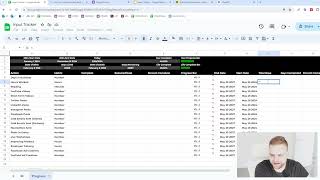
Matthew Larson shows how to build an input tracker in Google Sheets and Forms to measure daily activity like cold emails, social posts, and hours worked. Tracking inputs matters because people overestimate what they actually do, and results lag far behind the work. The tutorial covers formulas, progress bars, and linking forms to sheets so you can see what you're really doing.
Chapters
Hey there, my name is Matthew Larson. If you've never watched one of my videos, and in this video I'm going to show you how to make an input tracker in Google sheets to track things like your how many cold emails you're sending, how many Twitter posts you're making, how much time you're spending reading how much X, Y and Z. And I'm going to do that for a few different reasons. The first is because without tracking, you don't know for sure. And most people greatly overestimate how much they actually do. It's kind of like the opposite of calories. In the real world, everybody underestimates how many calories they eat, and in here they overestimate how much work they do. Second reason is what gets measured can be improved. You can't improve something in terms of volume if you don't even know how many you're doing to start with. The third reason is there's always a lag between actions and results. And most people can't handle this lag period. For something you do today, you might not see any results for 90 or 120 or 180 days down the road. And most people just can't stomach that. And that's why they give up so fast. If it's not instant, they don't want it. Right. You'll make a very sizable personal transformation when you start viewing the actual work and the actual inputs as the goal or end result. And time will always catch up. Do it long enough and you will get the Reward plan for 3ish years in the future. And anything less is not ideal. And have an easy way to add or keep track of the inputs of this tracker. So we're going to use Google Forms for that and sync it to the sheet. But without further ado, let's get started. So what I'm going to do here is I have a spreadsheet. I'll call it something like the input tracker. And I'm going to do quite a few different things to this. So at the very top we can maybe do something like the first six rows we will double the size and just copy exactly what I'm doing. If you want to, I guess, you know you're under no obligation to do anything. So here I'm going to go 20, 24. Oops. And I'm going to also make the text white here. And I'm also going to. Before we actually go too much further, I'm going to delete a lot of these rows and a lot of these columns because we don't actually need all of them and I kind of like to keep it tight. So let's do something of this nature. 2024 start date 2024 end date. We're going to go today. So if you don't know how to do spreadsheets and I'm going to make this video, assuming you don't know anything, you can use Google sheets for ChatGPT for a lot of this. So 2024 end date 2024 start date. I'm going to just make these essentially an eight. So January 1, 2024 of course, Dec 1, 2024. Maybe we could also even make these a bit smaller today. So you go in chat gbt. What would be the function for today in Google Sheets or something like that? Let's see what it comes up with. So just like this, oops, there we go. And today is in fact May 29th. So let's fix that up a bit. But we want to make this as a date. So number will go date. How do you do that? Anyways, we'll come back to that later. But how do you do make that a date? That is a good question. So let's go to is showing 05, 292024 in Google Sheets. How would I make this say the date like May 29, 2024. And this is called figuring it out. You know it's just, I know it's a lost art, but most people just don't really even do this in the custom field type month month. We're going to leave it for now because I don't even know. So what we're going to do now is we're going to do basically a percentage of the year complete tracker. So let's go here year complete and we're going to basically go C2 divided by. Or what would we do here? What would we actually do? No, we'd have to do C2 minus A2. Oops. And then we'd have to divide that. What we divide that to B2 minus A2. Yeah, that was what we do. And then we'd take this and we would do a percent and then we're going to go like a year progress bar. And I've already googled the code for progress bar in Google Sheets. So go to the first one, see if we can do this here. So percent bar in E2. Oh my gosh. We did it. Think of it. That we did a year progress bar. Can you absolutely believe it? Instead of wasting years trying to figure it out or saying I don't know how to do that. We just did it in five seconds by googling it. I know just a truly novel concept that a lot of people simply don't think of. So I like to do it this way because for a few reasons, I find it particularly motivating to see how much of the year is already done and, you know, wasting, basically wasting your time. So another thing that I like to do would be something like, you know, date of birth. This is getting kind of dark, but I find it extremely motivating. So I was born February 8, 1996. So days lived. So what would that be? What would I have to do? I'd have to do today minus a five. So I've lived for basically 10,338 days. So if I did, you know, date of death, for example, and I wanted it to be February 8, 2096, let's say I wanted to live to a, you know, that year, like 100 years old, days remaining. So what would I do for days remaining? I would do something like, well, date of death minus days lived. So C5, minus B5. And I do this to like a number. No, that's not it. What would I have to do? What would I do here? So days live, days remaining, days of death minus C2, days remaining. So maybe. But after today. So C2. Yeah, that makes sense. So I've lived for 10,338 days and I have to do. And I have 26,187 days remaining. So life complete. So what would I do here? I would do. What did I do here? I did something like what would it, what would that be? C5. So B5 divided by D5 plus B5. Yeah, something like that. And then I do that as a percentage and I would just copy in life complete bar. Now I take this code and just basically Change that to E5. Oops. Not like that. Definitely not like that. So look, this is how much of my life is basically over. And if I was to change this to something else. Right. Or let's go, let's do this. So total, total years. Yeah, we could just leave it for now. But if I was changing my date of death, like if I wanted to, if I was living to 70 instead, 2066, I would have 40% of my life's already done. If I was living to 50, for example, you know, I've already half my life done. So I find this extremely motivating. You can do that if you want or not. I choose to do it and I don't need to explain myself to you. It's just something that I find motivating and puts things in some pretty good perspective. So let's make these all the same size here. Not like that. Again, not like that. 25. Oh my God, this is really smacking me here. So this is just something that I like to do before I even get started. So let's make these 150 each. Date of death, date, lived, all of that kind of stuff. Maybe I'll put these, something like that. We could also make these a bit, you know, gray so it's a different color. So something like that. So look at how many days I have remaining. I've already 28% through my life. Assuming I live to 100 years old. The years already 40.82% complete. Like, better get started. So I always want to do something like this because I find it extremely motivating. So let's go to progress here and now let's go to something. Let's insert a row below here and let's resize this. So let's think of what are inputs. So action, we'll call it action metric. We'll do how many, we've done how many. Like required slash, goal, percent complete progress bar, end date. What can we do? Start date, total days, total days, days completed, percent complete progress bar, actions per day or something like that. And if we do like, you know, something of this nature, like that's going to be a pretty good result, I would say. So what would be some actions that we would do for, you know, a B2B business? What could we do? Like, we could do something like number of days, oops, and I gotta change this to black text. Now. Go days. In business. We could go something like hours worked, minutes, or reading YouTube videos, short form videos, Twitter posts, LinkedIn posts, Instagram post, Facebook posts, cold emails sent, clients, cold emails sent, partners. Let's do that a little bit. What could be another one? Newsletters sent, posts in group, live workshops, sales calls. Well, we can't track, we can't really track a sales call. So that's kind of cheating. But you know, hours spent improving product, hours spent on employee training. We could do something like that. We, it's just an example. So we don't need to do tons and tons and tons of them. But another one will be Facebook ad creatives, YouTube ad creatives. So we want to get a pretty good amount, I would say. But we don't need to be insane about it. You know, this is more of an example than anything. So days and bitch days in business. Number, hours, minutes, number. These are kind of all numbers, hours, hours. So let's kind of. Because. Yeah, let's do that. So these would be inputs. They have nothing to do with, you know, how much like the outputs, they're purely the. If you do the cause law of cause and effect, they're the cause. You know, we can't control how many sales calls we booked or how much money we make, etc. But we can control how many or how much we have to do. Basically. What am I trying to say? We can control our actions on our inputs and stuff like that. So F6. Or it should be E6 rather. There we go. So I'm going to basically drag this down. There we go. Can delete the rest of these just to keep it tidy. So what can we do now? Like we could probably make these a little bit thinner. Just because we want to be able to see the entire thing. So what would be an end date? So today is May 29, 2024. So I might just. For these ones, let's just go hours worked. May 29, 2027. Let's just essentially drag that down for all of these. That was a big fail. And the start date is going to be May 29, 2024. So the total days between these. And you can change these. Like I'm just doing it for today. You change it for like whenever you started type thing. Right. But for the purposes of this video, I'm just going to make it pretty, pretty clear. So G7 minus H7. So 1095 days, basically. So what would I do for days completed? It would have to be something to do with today. So today is in C2. So it'd be C2 minus C2 minus. What would that be? H8? No, not H8. C2 minus the start date, I guess. Right. So let's make the start date May 1st because it's. Or this is just going to be zero. So May, let's go 1-1-2024 for the start date type thing. Because if we don't do that then we do days complete. It'll just show zero for example, and like kind of defeats the purpose. So C2 minus H7. So 149 days have been done, basically. So C2 minus H7, C2 minus H8 and then hopefully I can drag this down. Okay, guess not minus H9. So like setting this up is going to be annoying as hell, but once you get it all set up, you're going to be golden. You're going to be golden. I tell you, it's a little pain. So we're doing it this way with the formulas because then tomorrow it's going to add the next formula. If you just added the numbers manually, you'd have to change it every day. But this is going to be a living, breathing, dynamic spreadsheet. Very nice. I know. So there we go. Something like this. Let's get the right font there. What is with this purple color? So days in business. So I'm going to add this. So start, you know, start date of business for myself. That would be February 19, 2024. So days in business, start date and total days. Like there's no end date in business. But this is like such a nice, such a nice thing to track, to just put in perspective because, you know, a lot of the time people. Today is my hundredth day in business. Lucky me. A lot of the time people like, oh my God, I'm not succeeding. How long have you been in business? I don't know. Okay, I checked. I've been in business six months. Like, no, no shit. So I've actually put that in the days completed here and it also put that here. And then if I want to be in business for 5 years, that's 1825 days. So I would go C2 divided by D2 or not C6 divided by D6 rather. If I could do math, that would be perfect. So basically, if I have want to be in business for five years, I'm 5% of the way there. And the end date would be H2 plus 300 or 1825 or H6 divided by 8 plus 1825. So that would be how I would do that. And then I would go, yeah, basically like that. So 1825 days. Days completed, percent complete. In terms of the. In terms of the actual. What am I trying to say? You know, one day percent complete. So this percent complete here is going to be more along the lines of let's get it proper here. This percent complete here is going to be more along the lines of what progress you've made. Let's go progress bar and we're going to go time bar. That makes sense. So percent complete will be. How would you do this? How would you do percent complete? Just the formula. Yeah, just be the formula. So J6 divided by I6. And then we're going to take this progress bar and put it here. So this will be K6. And I do it like this. I like to do it in this manner. Because then you have both, right? You have the bar to judge your actions. And then you have the actual, like time bar. So you can see, like if I've only done 5% and it's 10% of the way to the end time period, for example, like, I need to do something here, I need to actually work harder or something like that. Right. I think it's just very nice to do it this way. So I'm going to make these a bit shorter or narrower so we can kind of see. So we can hopefully kind of see what we're going to be doing like on all of these. So let's try to make these a bit narrower just so we can see all of it. Actions per day. Want to be able to see all of this within like a single view without having to scroll. That's how I like it. At least you can do whatever you want. But if I have it like this, I can see absolutely everything that I'm doing. You know, look at what is my progress in a snapshot type thing. So let's go. So for hours. What we want to do first is we have to manually put in, you know, what we want to do each day type thing. So if I Want to send 1500 cold emails, 1500 cold emails I want to spend. So if you were doing it on a weekly basis and I want to do three newsletters per week or whatever, we do three divided by seven. So 0.428 for YouTube, 0.428 for this one. I want to do it on every weekday. So that would be 0.714. This one, I want to do it once per week. So we're doing 0.142. And this is like actions per day. So if you're not doing them every day, it's going to be a basically percentage. I want to improve the product every weekday. So that would be again, the 0.714. Same with the employee training. And I want to do three new ad creatives per week. So I believe that is the four to eight. So what this is going to do is going to basically we're going to multiply the total days by the number required. So then we can kind of just do it like that, if that makes sense. So what formula will we need for this? We would have something like the end date times. Would it have to be the end date times today times the column? Oops. Let's try that and see if that makes sense. So the end date G7 times C2 times M7? No, that can't be right. Or no, minus minus C2 times M7 is that right? No, that's not right. G I don't get it. What am I thinking here? G7 so required goal or should be I7. Let's see that. Definitely not. So how many days it would be or. No, it could just be total days. I7 what am I doing with the today part? I7 Times M7 so I need to read for 6200. M7 yeah, we're up to work for 6200 hours. That makes sense. So this is what I would have to do as basically. This is what I have to do for a number of inputs. So if I wanted to send 1500 cold emails per day here times 1244 days, that's how many cold emails I would send. And then I have my progress bar. So If I made 50, you know, 5,000, you know, it's going to start tracking like that. So very nice. But we're going to have to do these separately. So what do we want to do for the percent complete here? Let's just drag it down like that. So now we have to do it this way. And the way that I would do it is essentially I'm going to make a few different forms here. So let's duplicate this three times. So this is going to be the work form, Work form. I'm going to go put it video. This is going to be the reading form. And this is going to be the. We could do it end of day, we could do it end of week, let's do it weekly form video. So what I want to do here is, you know, what would you do? Date plus hour, you know, example May 29th hour one. What did you do this hour? What was your focus level out of 10? How will you improve it for the next hour? So we have something like a form like this where we have our Google. We're going to link it to the sheet, we're going to select the existing spreadsheet here and we're going to find our input tracker and we're going to put insert here and then we have our sheet just like this. So what we would do is now our form submission. If you submit that form, it'll go in here. So work let's make it look a little nicer. So what should we do here? We'll put it Montserrat, we'll make it black for the title here and we'll make these essentially longer. We will go here or something like that. Make these 400 or something. And then at the very bottom we'll do right here we will like make this the sum hours worked. Or we could go hours worked here. And what we do is every submission will be an hour. So we're going to go equals sum B2 to be whatever. So when we, you know, answer, answer, answer. Actually we have to do count, not sum, I believe. Is that not true? What would you have to be doing there? Like. What would we be doing there? Work. Count. Is it not count? And then we go to chat gbt. If I wanted to count all the answers in column be of a Google sheet, how would I add them up? Would it be some? These are not numeric. I got to do count A. Maybe. Just count A. There we go. So what I'm going to do here now is I'm going to go to hours worked and go, what would it be? What would that formula be? It would be like exclamation mark or no, it would be equals work exclamation mark and then a 101. So now every time I submit this form. So let's go to the form submit. So we go to. We'll go take this. So the work form. We could make a new. So work form. We'll go something like this. So type URL, go work form. So every time you go to this document. Oops. So May 29th hour seven or hour eight, whatever. What did I do? Made a YouTube video about an input tracker. Pretty focused. You know, you can't really not focus when you're doing that. So now my submission should be right here. And now it says it should say four here. So it should say just go B B 2 to B. So now it says four and now it's four here. So it's dynamically updated. If we just kept filling out that form, you know it's going to change at the bottom 17 it's going to change in here. So we can always keep track of the actual hours that we're working. So I'm going to just leave some in there just because. So the next thing we want to do is a reading form. So forms. I have some perfectionist in me where I like to just make the spreadsheet perfect. So bear with me here. So something like this. So now we need to do that reading form. So let's get the URL here. So that reading form and then weekly form and we might add something like when after every hour of work, after reading Friday afternoon before leaving office or something like that. Like when would you fill these out type thing just for some clear instructions all around to talk about exactly what we're Doing here? So now my reading form. I. What book did you read? How many minutes did you read? Timed timer. If it's not timed, it doesn't count. What lessons from the reading session would you like to remember? Something like that. So if we go back now and we fill out that reading form. Oops, we have to link it first actually. So link to sheet. Select existing sheet Input tracker. It's going to open up here and we're going to change this title to reading. We are going to just like we did equals work here equals reading 102 or a 102 and there's nothing there but we go to a 100 or a 101. So sum equals how many minutes did you read? So in this case it would be a sum because it's going to be an actual minute amount. So let's say we did 50, 60, 22, 14, 1388 or some something like that. Again, let's just make this look a little better because this is going to be a spreadsheet we're going to be using at our company. We might as well make it look, look good. Little perfectionist vibes never hurt anybody, to be honest. Timestamp. So let's take this and make it black like that. So now we'll see the sum was 247 because we did that right. We've added up all the numbers here. So now the needs to be a 101, not a 102. Now we have 247 minutes of reading. If we once we did, let's just go, let's just 150,000 minutes just to show you what it looks like. Now our progress. Oh, now we've achieved our goal. It was important to see how the progress bar goes as well. So now our progress bar. We're only 18% 8 or 20, 12% through the year and already 18%. Very good. So let's just leave it at that for now. And now this is the last one. So we need to make the week form the weekly form here and we. It's kind of, I think it's very important here. That we match it to the actual things like in order in the spreadsheet order. Short form videos. So this would be like a number that you've made this week when you're filling it out. Friday Short form videos Twitter LinkedIn Instagram Facebook. Facebook cold emails clients cold emails partners newsletters cold emails clients cold emails partners. What the. Newsletters group live workshop group live workshop product improvement hours employee training hours facebook ads YouTube ads. So let's get the link here and we'll put it in the forms as well. And then we will link this to the spreadsheet. Input tracker. So we'll rename this as Weekly. It's going to be a little bit of a different one, more complicated to set up in the extent that would you say there's a bunch of different form fields in the same one. So we need to. Basically how would we do it? We need to go to the bottom here. We'll take this to be black with the white text. But what we got to do here is we gotta basically do sum B2 to B. But we have to have an end here. So it's gonna double count it. That's why. And we need to make it the column to the left thing here, because if we don't, it's going to get all jumbled up. YouTube. So basically what we'd want to do is copy and paste this, but put it one column to the left because if we put it in the same column, it's going to count them improperly. And you could just take my word for that. So short form videos. So this is always going to count. See this is 02 to 0100. But that columns to the right, N2 to N100. So what we got to do next is. And let's just fill some of these out, Fill them out with a couple of ones to start. These are just random numbers, so don't think too much into this. But see, we have the actual numbers. Now let's make these. And now we need to sync them to the spreadsheet. So it's always going to be equals weekly or the form names. And then A101. So A101 and now this will be equals weekly. B weekly B101. Let's see if we can drag it down. No, we can't. No, we cannot. So C101 and this is why it was important to make them in the same order on the form where you'd have to go like it just makes it easier to set up because I would have to essentially go back and do this, like verify which column it's in. So let's see if we can do it now. No, we still can. Great, excellent. So F G and then we have H and then we have I and then we have K. And then we have L and then we have M and then we have N and then we have O and then we have P. I believe. Is that not true here? So I think we screwed it up here somewhere. Abcdefg did we screw it up somewhere here? We must have. Did I miss something here? Okay, where did I screw this up? How could I possibly have screwed this up? So weekly A101 weekly B101 weekly C101. So we're going to copy and paste that. D101 weekly e101f101abcdefg101h101i101k101l101m101n101. Where did I screw this up? M101. So I'm employee training. I think I missed something here, but whatever. Cold emails, newsletters, Live workshop. Definitely missed two columns here, But this is what you would be doing. So I don't know where I missed these columns. Doesn't really make sense to me. Cold emails, partners, newsletters, groups, Live Workshop. Improving product, Facebook ads. There should be two more spots here, but this is really like. This is what you'd be doing. So we'll go over here. So 1, 2, 3, 4, 5, 6, 7, 8, 9, 10, 11, 12, 13, 14, 15. 1, 2, 3, 4th, 5, 6, 7,8, 9, 10, 11,12, 13, 14. So I missed one. 1, 2, 3, 4, 5, 6, 7, 8, 9, 10, 11, 12, 13, 14, 15. Which one did I miss? Twitter, LinkedIn, Facebook. Oh, I missed Instagram. That's why. And if you miss one, you have to essentially redo all of them. You have to relink the entire form. So that's fun. That's just great. That's just great, isn't it? So let's go to right here. We missed Instagram, So we have to. If you screw it up like I did, we have to unlink the form and click unlink. And in this thing, it's going to go weekly here we can just delete that. And now we have to link the same thing again. And now we have to basically do that again. No problem. No problem. We're happy to do it. It's just one of those things. You know how it. Now we can go down to the sum, or we can go like this. And we'll go sum B2 to B99. Just like that. And we'll put some of them random numbers in there again. And we'll go like this. Will not go like that. So annoying. And now we can do the exact same thing again. See, doesn't always go smoothly here. That's a little troubleshoot action. Action for you. So now let's go back. Let's go back. So weekly A101. There we go. Weekly. I'm going to copy and paste that. B101. I'm going to copy and Paste that. C101. D101. E101. F101. G101. H101. I101. K101. ABCDEFGHIJ Did I screw that up? It should be J101. Can't do the Alphabet properly. L101. M101. N101. Oh, 101. So there we did it properly. Look at us. Look at us. So what you'd want to do is basically see weekly work and reading and then form bookmarks to your thing. So then every time you open it up or whatever you do, you can submit it and it will automatically input it into your form here. So now you have a dynamic tracker. The dates are going to change, the percentage is going to change over here. And then every time you submit any of the forms, they are going to do the same thing. Essentially they are going to. Just like that. Every time you submit any of these forms, they're going to basically do the exact same thing here. And just a nice easy way to track what we're going to be doing here. Because, you know, it's very important that we are tracking properly. Very, very important. Because if we go back to the start without tracking, we don't know for sure what gets measured can be improved. There's going to be a lag in action between the results. So we can give ourselves a little dopamine source by filling out these forms. So if we go back and let's just, let's go like this. We're going to go like this. We're going to close tabs to the right. We'll open up each of these and see and ensure that they work. So now we have them bookmarked up here. YouTube videos for the week. Four, we're just going to put random numbers. We filled out that 1. 5am Club 60 to wake up at 5am May 29 hour. 8. YouTube 10. So now we can go see our form here. I just submitted that. We can go see our form here and we can go see our stuff here. And all of the stuff has changed that we. If we did it, let's see Twitter D103. We got to change these to. This is not right. This is not the right formula because it's going to always put it in the other one. So B. So b to b100. No, that's not how you would do it. How would you do this? What formula would you be using? So let's go to sum B2 to B100. It's fine for now, but you try to make a formula that accounts for the new ones and then. Or you could just update it every single time. So timestamp. The thing I think the problem here is, and why this is not a problem and why it's is if we fill it out. I think those are only there because of the fact that I manually added them, I think. On an actual form. Yeah, on the actual form it'll put it beneath. So that's not actually a problem, just one of those things. So that's how you would do it. That's how you would make this form and this tracker where you can actually see what actions you're taking in your business and actually improve them. And that is a very exciting thing in my opinion because a lot of people just go 100% blind and they don't actually do anything proper. So if you make a tracker like this, all of the information you could find with a quick Google search or with ChatGPT, follow exactly what I did, even the troubleshooting parts and I'll see you in the next video.
More from Matthew







Everything I Would Change About This Ecom Email Marketing Agency (3 HOUR LIVE AUDIT)

Everything I Would Change About This Meta Ads Training Business (3 HOUR LIVE AUDIT)