 eCommerce, point-of-sale (POS), ERP and Data Analytics platform for retail and restaurant businesses
New Additions - AI Product Recommendation on OrderUp by SalesVu
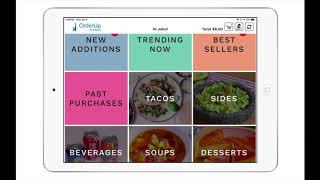
A short SalesVu Technical Support YouTube tutorial (Apr 2020) showing the "New Additions" recommendation category on the OrderUp self-ordering kiosk. The speaker explains that the New Additions category appears at the left top of the kiosk main screen and automatically contains newly created products (which also remain in their original categories). The video shows how to enable the feature via the SalesVu dashboard (salesv.com → Settings → three dots → Recommendation Settings → Enable Recommendation for New Additions) and notes that new products remain in that category by default for seven days (this retention value can be changed).
Questions this video answers
At the left top of the main screen where regular categories are displayed.
On salesv.com go to Settings → click the three dots at the top right → select Recommendation Settings → enable "Recommendation for New Additions."
Seven days (configurable to any number of days).










