 eCommerce, point-of-sale (POS), ERP and Data Analytics platform for retail and restaurant businesses
New Additions - AI Product Recommendation on the POS
2 Apr 2020
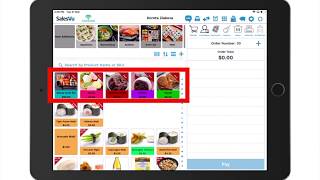
SalesVu's AI product recommendation feature automatically highlights new items in a dedicated category for seven days. Learn how to enable it, adjust the duration, and manage settings through the Sales View Management Portal.
Questions this video answers
April 2, 2020.
Seven days.
In the New Product (New Additions) category and on top of the default Point of Sale screen; they also remain in their original assigned category.
In the Sales View Management Portal: Click Settings → three dots → Recommendation Settings → scroll to Point of Sale App Settings → toggle the setting on or off, then click Save.










