 eCommerce, point-of-sale (POS), ERP and Data Analytics platform for retail and restaurant businesses
Past Purchases - AI Product Recommendation on OrderUp by SalesVu
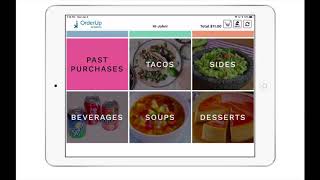
This short SalesVu Technical Support video (April 2020) demonstrates the Order App feature that surfaces a Past Purchases category and suggests additional products based on a customer’s recent purchase history. The speaker walks through the customer-facing flow (on the Order App: tap home, enter name and loyalty phone, choose Dine in) and explains that Past Purchases shows all products bought within the last 30 days. The system suggests frequently co‑purchased items with a note “you might also like” and a purchase button. The video also provides admin steps to enable the feature on salesvu.com (Settings → three-dot menu → Recommendation Settings → Enable Recommendation for Past Purchases → Save and sync).
Questions this video answers
30 days.
"you might also like".
On the Order app home screen: enter name and loyalty phone, select Dine in — Past Purchases appears as a category.
On salesvu.com: go to Settings → click the three dots at the top right → Recommendation Settings → Enable Recommendation for Past Purchases → Save and sync OrderUp with salesvu.com.










