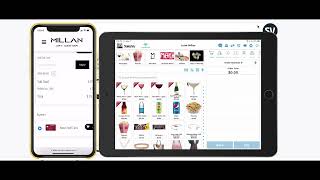
Luisa walks through SalesVu's pre-ordering system for events: customers book time slots and pick up orders online, or scan QR codes at tables for direct delivery. The setup cuts lines, reduces staff burden during intermissions, and works for theaters, venues, and arts organizations.
Welcome. In today's video, I will be walking you through SalesVu pre ordering solutions and back of the house operations with a live demonstration. We're gonna talk about how pre ordering helps your clients order food, drinks, snacks and merch from anywhere at any moment. And more importantly, how this helps you increase your sales. Today we're gonna talk about two different solutions. The first one pre ordering for pickup and events and the second one QR code on premise Ordering Pickup and events Customers that will attend the show or the event can pre order from your website. You can use SalesView to create this website or if you already have one, you can create a specific shopping page. For today I'll be Luisa and I'm very excited about the upcoming show. The theater sent me a link to pre order my drinks online which I love since I hate waiting in line. Also, thanks to SalesVu AI Engine, I can also order the best products that are trending right now. Since this is not my first show here, I already have an account. This helps me complete my transaction in a quick and easy way without retyping my information. Since my seat is in the second floor, I'll order my drinks to pick up at the bar that is closest to me. This way I won't miss the beginning of the show. Now I will select the event that I'm tending and the hour as well. This is very important since there could be multiple shows during the day and we don't want things to get mixed up. After that, I'll choose my order to be ready for the pre show. Finally, I can select the payment method and add discounts. It can be gift cards or credit cards. Then the screen will show me the tip screen with percentages that can also be customized. What will happen in the back of the house is that the printer in the designated area will receive the order and the POSF station will show a pop up message with the online order received. I can also see this order from a kds. This app is going to show me the exact information of each one of them. I can also filter by pre order events, the time slots and you can also search the customer by their information. As a cashier, I will note that there is an order that I need to prepare. As a manager, something you can do days in advance of the event is check the sales that are happening. I can filter the orders by date, event and to make it even more specific by timeslots. All you need to do is go to advanced options, scroll down to pre order events and then to event time slots. These reports can be exported in a CSV file or you can print it on premise. QR Code Online Ordering this second solution can be done from the backend. We can create the table layout for you. You can also see this layout on the POS to keep track of all your tables and we're able to create QR codes for each one of them as well. All you need to do is go to the QR code ordering section and follow the five simple steps. After you create them, you can print and put them on the place you want them to be allocated. Let's say that today I will be ordering from my table before the show. I see the QR code and I use my phone to scan it. This will show automatically the website shopping page and it will have the same flow that it did for the pre ordering solutions. So I'm only going to scroll through the categories and select some products. For this example, all I need to do is tap on them and then once I'm done, all I need to do is tap on the shopping cart and then proceed to the checkout page. It will show me my same information, but this time it's going to show me the delivery preference. Since the QR code is created for every specific table, the customer doesn't need to add any extra information. Finally, all you need to do is select the payment method and finish my transaction. I'm going to continue with a gift card, select the tip that I want to leave and proceed to continue. Once this is done, I can see the receipt from my phone and from the kds I can see again the order to conclude this feature is directed to any arts and culture organization, venues, theaters or performing arts centers to relieve the pain of limited volunteer staff for events, long queue lines, improve intermission rush, enhance the parent experience and most importantly, increase sales with omnichannels. Thank you.
 eCommerce, point-of-sale (POS), ERP and Data Analytics platform for retail and restaurant businesses