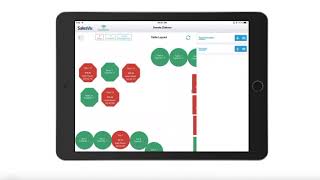
SalesVu is an iPad point-of-sale system that handles barcode scanning, multiple payment types, and employee clock-ins. Its cloud reporting add-on tracks sales, profit margins, customer loyalty, and labor costs from anywhere.
SalesVU Point of Sale is an iPad based point of sale that allows you to quickly and easily check out your customers. Whether you own a restaurant, a bar, a brewery, a retail store, a salon or a spa, or even a professional service, you can ring up items easily by simply tapping on them and adding them to the order. In a retail environment, you can use a barcode scanner or even your iPad's camera to scan the product barcode. Your products can have modifiers which can carry extra charges. With SalesVU, you can accept cash, credit cards, EMV, chip cards, checks and gift cards. You can also split the payment by order amount or by the products in the order. Aside from the checkout functionality, you can view your current shift's detail and close out the shift. Some of our more advanced features include a loyalty program that rewards your customers based on their real purchase amounts and not just based on the number of their visits. In a restaurant environment, you can manage your orders using a visual table map. Your employees can clock in and out using their unique PIN numbers. You can also process returns and exchanges for loyalty cash directly in the app. Furthermore, you can keep a database of your customers directly in the app, so you can easily and quickly assign orders to your loyal customers and even add new customers on the fly if needed. If you want more remote management and reporting functionality, you can subscribe to SalesVu's advanced cloud solution and access reports that will give you extra information. Our sales report will show you your sales data broken down by products or categories and even cross reference by time of day and week or even throughout the year. In addition to the sales reports, you can run a report on your average ticket size and see its evolution over time. You can even view this report broken down by employees to see who has the largest average ticket sale. You can keep an eye on your profitability in the Inventory section using our profitability report, you can run a report on your profit margin which you can view as a percentage or a currency value for a specific time period, even broken down by products or by categories. In addition to this report, you can view your cost of goods sold, your total cost of interest, inventory and historical purchase order costs and prices of your products. With the customer report, you can run a list or a report of your customers based on their purchase amount, their purchase frequency, last time they made a purchase, and based on your own customer groups. You can also create custom fields that you can use as filters for the report. Lastly, you can use our employee management feature to view the labor report which is a great base for your payroll. Here you can see the hours worked by each employee and the compensation earned working these hours. In addition to the hourly or salary wage, you can also set up commission. Each product or category of products can have different commission rates for different employees. Download the SalesVU point of sale app from the App Store today and contact us via chat, email or phone 247 if we have any questions questions, we'll be happy to help you get up and running.
 eCommerce, point-of-sale (POS), ERP and Data Analytics platform for retail and restaurant businesses