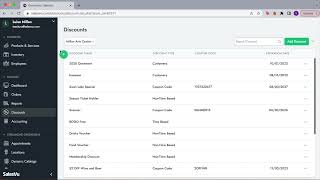
This YouTube tutorial (SalesVu Technical Support) demonstrates how to create and manage discounts in the SalesVu WebPortal. The speaker shows available discount types, then performs a step-by-step live demo creating a coupon code for a specific location (Milan Art Center), using example settings: name "fall 2022", 20% off applied to the Beverages category, maximum usage 10, valid for one week, with an auto-generated 10-character coupon code. The video is instructional and focused on backend discount configuration and UI workflow (select location → Add Discount → set parameters → save).
Questions this video answers
fall 2022
Coupon code
20%
Beverages
10
So let's talk about discounts. So discounts, many other features can be also selected by the location. So I'm going to click on the right location. And then as you can see in here we have different discount types. We have coupon codes, non time based, time based. We have also received discounts for the next day. Coupon code. And all of this can be done from the back end. We have multiple articles that explain how these discounts can be created. But for this example I'm going to show you how to create a coupon code. So what I'm going to do in here is simply click on add discount or you can also click on the plus icon. And I'm going to come in here and I'm going to select the discount name. So for example we're going to go with fall 2022. 2022 we're going to select the discount type. So this is going to be a coupon code. The percentage, we're going to go with a 20%. And if you want it to be by product level or order level, it's completely up to you. In here we can select the product details. What would this coupon code will be applied for? We can select the category. So in this case I just want it to be applied for my beverages and then I'm gonna click on continue. I can apply the discount to one product in order or all the product in order. So I'm just gonna go with all of it. The maximum usage I can go with maybe 10. In this case the start date and then the end date. I want this to be only for one week. And then the coupon code, you can just leave this field empty and then a random text 10 digit code will be created. So that's what I'm going to do in here. And I'm just going to click on save and that's it. Now we have our fall discount created for our location of Milan Art Center.
 eCommerce, point-of-sale (POS), ERP and Data Analytics platform for retail and restaurant businesses