SalesVu's Welcome app manages salon waitlists and payments in one place. Set up floor plans, text customers when their table's ready, take online bookings, and process payments. Access reports and manage everything remotely from SalesVue Cloud.
Welcome is a completely free waitlist management app designed to increase your salon's customer turn rate and satisfaction. You can now switch from your old pen and paper system and configure your different floor plans with chairs, rooms and stylist stations directly in the app. In just a few minutes, as your customers arrive, add them to the waitlist by entering their stylist preference or service and by adding an estimated wait time. Our free app allows you to save your customer contact information so you can easily and quickly take care of your loyal customers by selecting them from this list. Or you can add a new customer on the fly. Once the stylist is ready, you can notify the customer by text and then seat them immediately to occupy the station on the virtual floor plan. You can add appointments directly on the welcome app in the Appointment section when the customers call in to schedule an appointment. You can also publish a reservation widget to your website, your own branded app, or your townview page so your customers can make online reservations. When a customer makes an online appointment, the appointment will appear in the welcome app immediately.
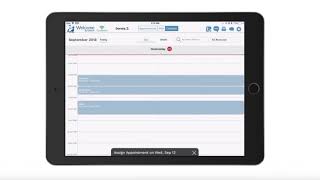
You'll be able to see this appointment here in the Calendar section. The Calendar section will give you an overview of all your appointments for any day or week at a glance. You can also add appointments directly from the appointment calendar simply by tapping on the desired time. The calendar allows you to manage any existing bookings. You can reschedule the appointment, notify the customer about the appointment, cancel it checkout and more. The welcome app has a fully integrated point of sale functionality through which you can charge customers for services and accept payments. If the customer had a reservation, the service they received will be pre populated here. If this is a walk in customer, you can simply tap on a that the customer received to add it to.
The order.
Then tap on pay to accept the payment. If you selected a customer, this sale will be attributed to this customer and saved in their order history.
Aside from browsing the scheduled appointments in the app, you can also browse your scheduled appointments in this comprehensive color coded calendar in SalesVue Cloud. With SalesView Cloud you will also gain access to our point of sale with which you can process sales and then view the sales report that will show you your sales data broken down by services or categories and even cross referenced by time of day and week or even throughout the year. Download the welcome by Sales Re app from the App Store today and contact us via chat or email or phone 24.
7.
If you have any questions, we'll be happy to help you get up and running.
 eCommerce, point-of-sale (POS), ERP and Data Analytics platform for retail and restaurant businesses