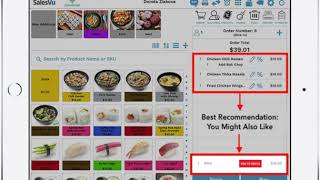
SalesVu's AI recommendation feature analyzes what customers bought together and suggests related products at checkout. Learn how to turn it on or off in your Management Portal settings.
In this video, I'm going to show you the you might also like Product Recommendation in the POS app, the algorithm behind this product recommendation will search the entire purchase history and find all the products that are frequently bought together with all the items in the current order. It will then determine if there is one product or products that are frequently bought together with all the items in the current order. It will then select a single product from those products that the customer is most likely to add to their order and recommend it as the you might also like suggestion. You can show or hide this product recommendation by changing a setting in the Sales View Management Portal. Click on Settings. Click on the three dots, click on Recommendation Settings, scroll down to POS App Settings, and turn this setting on or off. Click on Save.
 eCommerce, point-of-sale (POS), ERP and Data Analytics platform for retail and restaurant businesses