building a lead generation ai agent w/ grok bot while i walk
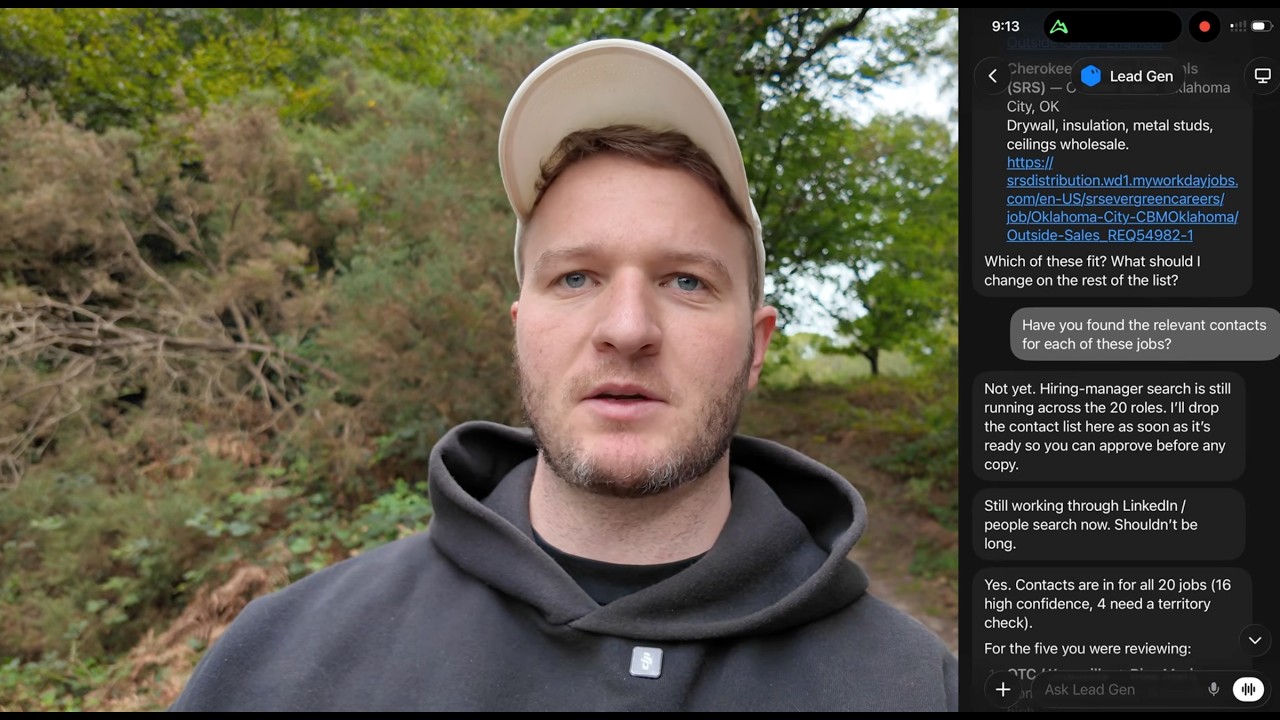
George Foley builds a lead-generation AI agent on iPhone using GrokBot, connecting ExaSearch for LinkedIn job postings, Supabase to store contacts, and HeyReach to send outreach messages. The agent finds hiring contacts from job ads, matches candidates, and queues personalized messages for approval before sending.
Chapters
Today we're going to be using GrokBot on my iPhone to build an AI agent that generates leads on demand. I'm George Foley. I've helped over 500 6 and 7-figure agency owners build using AI. First thing we're going to do here to get started is I'm going to go to the plus icon in the top right-hand corner and select new bot. This one I'm just going to name it lead generation. And then hit create. If you haven't used GroqBot before, the reason this is amazing is because what this agent now has is it has access to a computer. So it works in the cloud, it's on a server, and basically anything a human could do from a desk, from a computer, GroqBot can now do because it can control a whole computer without you having to set it up and manage the server and everything like that. To get started, I always just drop a voice note telling it exactly what I want to build and put together. For this one here, we're going to use a few different tools, so I'll walk you through that first. So the first tool we're going to use is a tool called Exa, E-X-A, ExaSearch. And you can actually get this for free. And basically it's like a better search tool for AI. So it's almost like a Google search, but it can find LinkedIn profiles, find leads. So we're going to use that to help do the prospecting. We're also going to be using Superbase, which is like my CRM ATS. So I would connect your CRM, connect ExaSearch, and then the final tool you want to connect is your outreach tool, which I'm going to be using HeyReach today. After you've got those like laid out, you know, just think through them conceptually, what you need to connect. We can put our first prompt together. So you can see I've plugged in the first prompt here, which is, you are a lead generation agent. Your job is to find jobs advertised on LinkedIn, find contacts that are hiring for jobs, Then connect with them and send them a message to do this. You'll use 3 tools. The first is ExaSearch, which will then help you identify the leads, store them in Superbase, which is a CRM. It's then going to go through and connect with them on HeyReach. So that's, that's the 3 tools there. I've given it the task of creating an MVP. So that's like the minimum viable product, which is just a good way to test this before, you know, trying to do it at scale. So it's going to find 20 leads. I've given it our niche, our industry. If you want these prompts, all of them will be available in the description below. But let's see how this runs. So we can see it's come back. It said 17 new companies have been found, 20 open jobs, 20 live job ads, and it's added them to the CRM. So now we'll follow up. Please share 5 example jobs here so I can see and qualify these. Great, it's come through with the leads. So OTC Industries, that sounds pretty good. Industrial Automation Sales Rep, perfect. Material Handling Inc. Force Equipment. Have you found the relevant contacts for each of these jobs? We can, we can see it's going to work through finding these hiring managers now. Cool, so now contacts are in for all 20 jobs, high confidence. 4 need a territory check. So very quickly we've gone from just creating an agent to now finding these relevant leads. You might wonder why would you want to track jobs? May or may not be relevant for your business, but in a lot of cases, if you can see they're hiring for a certain job, it's usually a good signal that they'll invest into that area. So if you were a lead generation company, reaching off the back of them hiring salespeople is probably a good move. If they're hiring AI people, then maybe they're interested in that type of software. And then if they're hiring into talent acquisition, then there's probably a good chance that you could sell recruitment services. So there's lots of different angles we can go with. You may even bypass the job part altogether. I'm not necessarily saying you have to do that, but this is just a good example of how we can do that so easily. So now that we've got the contacts, what we wanna do is I'm gonna actually create this from the perspective of a recruitment agency. So we're gonna match a candidate to these and then we're gonna sell on the candidate. via a LinkedIn message. The second part of this workflow is using Exa again, but to find candidates that perfectly match each job. So we want people in similar locations from similar industries, and ideally they match a few key points on the job description. We'll save those into a candidates table on Supabase, and then we're going to write copywriting for each person, each contact, saying we have a relevant candidate and describe the candidate and why they suit that role. Put that together now for the $20 and then I'll approve both the candidate and you can show me the copywriting for each. We'll hit send on that. So it's taking a bit longer. It's taking a few minutes here. It's best just to let this run. It's doing stuff behind the scenes. You've got to be a bit patient. Try not to like double message it unless you really have to, but we'll give it another few minutes to see what it brings back. Now I am getting impatient, impatient, so I'm going to give it a nudge here. What's the update on this? Okay, so we can see it's come back and it's actually said still in progress. I guess it's done the candidate list and then it's working on the copywriting or the outreach next. I probably should have separated these 2 because I've given it too much. It's not a huge deal, it's just taking like 5 minutes or so, which is fine in the scheme of things. But usually you want to chunk this down. So if you're doing this, first find the candidates and then create the copywriting afterwards. Don't try bundle too much together. Sweet. So we can see it's come back with the candidates in copywriting are ready for approval. Nothing's sent. It's got 34 now in the CRM. Score, 20 out of 20 jobs have a LinkedIn candidate, 18%— 18 high confidence rather, 2 medium. And then it's got the contacts, the candidates matched, the companies. So, Chris, relevant candidate for your Knoxville Tri-Cities TN sales reps search. It's given the candidate's name, which is not ideal. We probably don't want to do that. But as a starting point, this looks pretty good. So next, all we need to do is tweak the copywriting before this goes over to HeyReach. We need to make some tweaks to the copywriting. So the first thing I need you to adjust is remove the candidate's name from the messaging, remove any em dashes from the message, try and make it as short as possible. Keep it all on one line so it appears like a text message. And you need like 2 points, 1 or 2 points that really sell the candidate, like selling into the same industry, selling into the same client base, you know, something that makes it like they can't resist just hiring the candidate right now. Okay, so it's rewritten the messages. You can read these samples. Chris, have a try. Cities outside Sales Canada already selling forklifts and warehouse solutions. Yeah, that looks pretty good. Um, cool. So just another couple tweaks here before this is ready to go to HeyReach. So always start the message with, hey first name, then have an X, Y, and Z like you've done there. That's, that's good. Try and make it as like clear as possible, like that we're recommending a candidate for the role. Where you can. And then want an intro, change that to curious, something like curious to hear more. A/B test a few different variations of that, but like curious to see this, see their profile, curious to hear more, curious to— I can share a video explaining, I can share a voice note talking through their experience. Just try some of those. Let's see what it does with that. I think that's pretty much good to go then. So just to recap what we've done, we used Exa to find jobs advertised on LinkedIn. Exa then used a search to find the contacts at those companies, and then it found candidates for those jobs, and then it's written a personalized message for each person. The final step here is going to be pushing these into HeyReach, which is the outreach tool, and that will just send LinkedIn messages. Now I'm going to start this off pretty low and slow, maybe 20, 30 per day, just as a test. And I'll keep an eye on what's going out. And then once I'm happy with it, I can scale it up from there. It's nearly perfect, but it needs to be clearer. So, James saw you're hiring X, Y, and Z. I have a candidate who's X, Y, Z. More that format. Cool. It's come back with the final copy and I'm really happy with that. So that all looks good. That's great. Just ensure all of these are at the same standard and then push them into a HeyReach campaign, which is LinkedIn blank connection. Then once they accept, they get this message, put it into drafts, and then I can approve to send from HeyReach myself. That's pretty much the final step done on that. They'll go into HeyReach. Like I say, I'll approve them manually for the first few just to check the lead quality. Then once I'm happy, I can set up Grokbot to do that on a repeat schedule. All I need to do to say that is just to set that up is just say to run this every day at 9 AM, pull 30 leads and push them into the same workflow. Now this is a great demo of what Grok can do for a solopreneur or if you're setting this up for one person. If you need help setting this up against a proper organization, maybe you've got 10, 20, 30 people, you're thinking, how do I evenly distribute the leads? How do I manage it across multiple profiles? How do I not get the team pushing back on this? That's what I do. I've helped over 500 6 and 7 figure agencies implement things exactly like this. So if you need help or advisory consultations around this, my link's in the description below, or just drop a comment in the, in the channel here and I'll come back to you. I'll see you in the next one.