how i stay focused for 12 hours per day (entreprenuer productivity hacks)
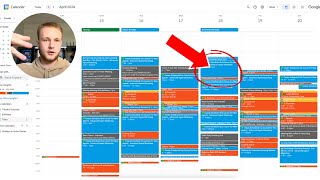
Timothy Schucker shares three practices for 12 hours of daily focus: remove your phone, time-block work in Google Calendar, and use Reclaim AI to automate scheduling so you stop making decisions about when to work.
Chapters
All right, guys, so in this video, I'm going to show you guys 3. The three things that allowed me to go from like, barely getting any work done, you know, playing speed chess on my phone while waiting for pages to load, working on my business, and scrolling on Facebook for hours, to now being able to focus and get 12 hours of work done every single day. And when I say that, I'm not just talking about, like, hey, you know, I start work at nine and I end work at nine. I mean, like, actual focused work, 12 hours in a day. So check it out. I'm about to show you guys the three things that I'm able to do that has allowed me to do this as I am building my business. All right, so I'm going to show you guys three things that you need to do that are going to allow you to get more out of your day. Because at the end of the day, right, we all have the same amount of hours. But, like, what you're doing in the time that you're awake, and not only that, but what you're doing in the time that you're working is going to determine how much money you're making and how fast your business is growing. So basically, step number one, honestly, I'm going to get into the Google Calendar, but step number one is to just take this thing, your phone, and leave it in a different room while you're working, right? If you're working in the same room that your phone is in, you're not getting anything done, right? I promise you, you're not. You might think you are, but I guarantee you, you're subconsciously checking your phone, like, every time you're waiting for a loading screen or just anything. You have to, have to, have to work with your phone in a separate room. So I'm not going to spend too much time on that. It's pretty simple. But that's going to make a massive difference on your day, right? The next thing is using Google Calendar to track your time, right? And what I used to do is I would like manually come in and say, like, okay, you know, made document on this, right? Or made YouTube video or whatever, you know, whatever I was working on, I would just come in here and manually, like time block it on the calendar. And I've been doing this for about the last year before I started doing this. Like, if you guys aren't blocking your time on your calendar in any shape or form, that is going to completely transform your life, right? Because it's like, it's the exact same thing. Of like, let's say, you know, I was getting fat or eating too much or whatever, and I had never stepped on a scale. If you start stepping on a scale, all of a sudden, you're going to realize, like, how big the problem is. So if you guys feel like you aren't getting, you know, as much done as you want to or as you need to, you need to, need to, need to track your time on a calendar, I cannot stress enough how important that is and how big of a difference is made in my life, because I would just spend time on just random shit. And also now I can go back and I can literally audit and look at my time for the last, you know, year, literally.
And I was traveling, so I had some inconsistencies in my work schedule. But as you guys can see, like about June of last year is when I started doing this. And since then, it's just been a total game changer because now I know, like, where's my time going? What am I spending it on? So on and so forth, right? So that was kind of like level one, and that helped me a lot. And I was able to work 60 hours a week doing that, but I would still spend a lot of time thinking about what to do instead of just doing it, right? And I got this from Sam Ovens. It's called decision fatigue. If you guys don't know who Sam Ovens is, like, look him up on YouTube. Watch his videos. Game changer. But decision fatigue is basically the idea that during your day, you only have so much, like, processing power in your brain. And. And so the more time that you spend making decisions, the less quality of decision making you're going to have, right? So if I wake up and I'm trying to decide, you know, oh, what the hell should I wear? Should I wear this, you know, designer belt with this shirt or, like, whatever, you know, your fancy is. It just takes all this energy away from my work. Oh, what should I go eat? You know, which car should I drive, right? What? Like, whatever the hell decision you're making, those are all taking. It's all taking energy away from your actual focus and your work. And so what happens is that people are constantly, throughout the workday, they're making decisions on what to work on, right? And you don't realize it, but that just absolutely saps your productivity and your focus and your energy. Because then instead of just doing something, you're trying to decide, well, what should I do? Right? The nice thing about having a job and having a boss is you always know what to do. They just tell you. They just tell you what to do. When you're an entrepreneur and a business owner, half of the battle is figuring out what should I be working on, and then it's figuring out when should I work on it, and then it's figuring out, you know, the actual doing of it. Right. And so what I have figured out and what I've found is I found this, this tool called Reclaim AI. Right, right. And basically what this is is it will plan out my entire day for me without me even thinking. So Today is the 21st of 2024. As you guys can see, my whole week all the way up to Thursday is planned out with tasks. I don't even have to think about what I'm going to do until Thursday. Right. And so the way that I actually do this, and I'll show you guys last week too, last week's already planned out, so I knew exactly what to do at all points in time. Hey, go do this, go do that. And then I, like, there's no question about what I'm doing or when I'm doing it. So what I basically have done is I've connected this with Asana, which is like a task management tool. So I come in on Asana, I go to my tasks and then I'll basically just create a task for myself. Right. So I'll show you guys, like, an example of how this works and I've integrated this all. Like, you guys can figure out how to do that? No, it's not rocket science, but I'll just go and create a new task. So add task. Let's just say, you know, make video.
For example, I can add a description saying what this task is actually about. I'll add like, links to documents that I'll need to use to save myself time later. And then I just go and I click schedule via Reclaim.
Let's say I estimate this to take about 45 minutes. I can set the priority. If it's like critical, like it has to be done asap. I put critical. If it's high priority, you know, like it should be done in the next few days. And it's like one of the top things I should work on. I put it here. Medium priority is like, you know, it should get done, but it's not like a must. And then low priorities, it doesn't really matter what. I can put a due date on it or I can do no due date. So let's say I do the due date of, you know, April 24, 2020. 4. So I'll just hit submit and then what's actually going to happen is in a few minutes it's going to pop up in my planner, right? And so while it's scheduling this, I'm going to show you guys kind of how reclaim works and some of the other things. The other thing is habits, right? So people spend so much time thinking about when they should, you know, have a lunch, right. Or, you know, I need to go to the gym, but when should I go.
When should I shower, right? When should I do like, when should I take the trash out? Like all of these little like random tasks that you do every single day or every single week. You can just go in and create a habit for it and it puts it on your calendar. So for example, last week, lunch, exercise, meditate at the end of the day, right? Lunch or exercise. Actually this day I think I doordashed so I wouldn't have to go get lunch. And it saved me some time. So exercise, shower.
Meditate, exercise, shower, meditate, exercise. Doesn't look like I showered on Thursday. But anyway, what this basically does is it will automatically put these things on your calendar and set time aside for them. So, for example, today I know that I have to take the trash out at five for my, you know, at the house. So I have all of these things that I don't even have to consider them. My mental ram is so open, then I can actually think about solving problems in my business and I can focus on working, you know, 60 hours a week. Right. And so the cool thing is too, when you start doing this, you can actually look at time insights. So this is next week. I already have like 30 hours planned of work. But this week, you know, you can see I worked, I had 13 hours of meetings and about 42.6 hours of actual work. So total, I worked about 55.6 hours. And I can go back and look at exactly what I was spending my time on. So let's check and see how we're doing on this task being planned out.
It looks like it's still scheduling. It might be taking a second here.
Boom. So it's scheduled. It ended up scheduling this for Thursday.
The 25th. Make video, made video. Right. So here's this task that we just put in. It's. It put in a 45 minute time slot and it told me to do this Thursday the 25th. So here would be my, my task to do. And now, you know, all I have to do is input all the tasks or all the things that come to mind. Of what I need to do and they just automatically get done because they get thrown into the schedule. So this has been an absolute game changer for me. This has allowed me to, you know, work 60 hours a week and not spend any time thinking about what to do because as soon as I think of something I need to do I just add it to the task list and it automatically puts it on my calendar and I'm able to just tackle it, you know that day. So ladies and gentlemen, hopefully you guys got value from this. Implement this asap. If you're not tracking your calendar it's basically, you know you might as well not be brushing your teeth. It's like that, that egregious. So I'm gonna include links to all these softwares that I talked about Asana and Reclaim. Click the link down below. I will use an affiliate link because you know, hell why not? It's a cool tool and yeah.