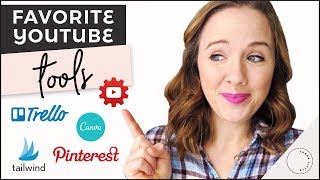
This is a YouTube video titled "Best Youtube Tools To Grow Your Channel in 2018" created in January 2018. The content features Trena Little presenting a detailed guide on eight different tools that help streamline and improve YouTube channel management, including graphic design, video research, email marketing, social media scheduling, project organization, file sharing, and YouTube management apps. The video is aimed at helping business owners save time and grow their channels effectively.
You really want to grow your YouTube channel, but it seems like a lot of work and you're starting to get overwhelmed by all these moving pieces. But in today's video, I've got eight tools for you to check out to make your YouTube workflow a lot easier and save you some time. Hey, guys, my name is Trena, and welcome back to another episode of Just a Tips here on my channel. I help lady business owners figure out this crazy online world so you can have more time to do the things you love. Let's face it, saving some time with our YouTube channel will allow us to have more fun or travel or hang out with our kids. So let me share with you the eight tools that I use to really minimize the time I'm spending here on YouTube. Now, when I first got started here on YouTube, my workflow was a mess. I was repeating things. I was writing things down on different notebooks that were all over the house. And so by doing this quite a few times, I'm over like 150 videos here on my channel. I really got a process now that flows, saves me time, and I'm not repeating the same things over and over. So tool number one is PicMonkey or Canva. These are two graphic design programs online. PicMonkey does now charge for you to use them, but Canva is still free. And what's great with canva is you can set up a template for your video thumbnails. And so then every time you create a new video, you're not recreating that thumbnail wheel. You already have a template. Just add a new picture, add some new text, maybe move around the template a little bit just so every single video doesn't look the exact same. Canva really saves you time by creating a couple templates and then plugging in new photos for each video and having that text ready to go. The next two tools I'm going to talk about are tools that help me research my videos, which is so important to grow here on YouTube is to research your videos before you even film them. So with Vidiq, you are able to see the tags of the first two most popular videos for a search result. With TubeBuddy, I really like to use the plugin that it has for each video so you can see its historical growth. So is this video taking off that you could possibly create a similar video and get traffic from suggested videos, or is it kind of dying down? You can also see how many video views it's getting per hour. You can, you can see its tags and then Vidiq also shows you what are the top referrers. You can look at this and see are there some industry experts sharing this person's video that you could reach out to to see if they could share your video as well? Is there forums that are talking about this topic that you could get in on and introduce your video to that forum as well? So these tools are really great to do some additional research with. TubeBuddy. I also pay for an upgraded version so I can use this tag Explorer so that I can find tags that work for me. What you're looking for for a tag is you want to find a keyword that has low competition but high search volume. Just take some research, just take some testing, clicking on some different tags and just trying to find that right keyword that you want to title your video and rank for. My next tool is ConvertKit, and this is my email system. I like to use ConvertKit to email my subscrib after I post a video. Sometimes YouTube doesn't send out notifications to everybody who subscribed to my channel. So by me sending out an email to my email subscribers, they're just reminded that I have a video or they see, oh, she has a new video. So I like to use my ConvertKit as kind of a reminder to let people see that I have a new video. And for my email subscribers, they get a little more insight on that video. So I write a little bit more, get a little personal, because my email people are like my VIP. They're like my inner BFFs. And so I give them a little more detail in that email I send out every single week. The next two tools are social media schedulers. And I use social media to really promote my videos, to get new people watching them. And one of the first ones that I want to talk about is Buffer. And I use Buffer to upload my Instagram posts. So. So I don't have time to go in, create an Instagram post, upload it, type in the captions. So what I'd like to do is one day schedule out as many Instagram posts as possible. Then Buffer is going to remind me it's time to post this Instagram post. It automatically copies the picture to Instagram, copies the caption to Instagram, and all you have to do is post. I also love using Buffer to upload my teaser clip for my YouTube video. And so I just upload it on my desktop, upload it to Buffer, and then Buffer schedules it for me, tells me when to post it, and it automatically goes to my Instagram. The other social media scheduler that I love is Tailwind. And I use Tailwind to schedule my Pinterest pins. If you watch any of my videos here on my channel, you know Pinterest is a huge traffic source for me. It's one of the top five places that bring people to my channel. So by using Tailwind, I'm able to pin over 30 pins a day to Pinterest. And the reason why you need to post more pins is because the more pins you post, the more Pinterest is going to promote your pins. It sees you as a power pinner. So I create pins for my videos and then schedule them on Pinterest to get more people aware of my content and over to my videos. The next tool you've heard me talk about plenty of times here is Trello. And I love to use Trello to keep all of my ideas together. So, so I will use a card to plan out everything I want about a video. I will put the working title in. I will research tags and put the tags in that card. I will research thumbnails, take screenshots of those thumbnails, or put notes in and how I want that thumbnail to look. I'll even start writing my script ideas in that card. This way I don't have notebooks with tags in this notebook and thumbnail ideas over here. I can keep it so organized that it keeps my flow easy and I'm not wasting time looking for everything. It also allows my team to see what to do. Do they need to add a thumbnail? Do they need to edit this video? Where are we at in the process? Trello is such a huge time saver for me. The next tool is Google Drive and I do pay for more storage on Google because I am uploading my videos for my video editor to get access. I am uploading my photos for my graphic designer to edit my thumbnails. This is just really where we can pass files and keep inform with each other on where we're at. I actually love Google Drive more than Dropbox. I also use Google Drive to add B roll footage or images that I want my video editor to use and also script my videos as well so he can see where I'm at, what text I want on that video. So Google Drive is a huge time saver for me. The next is an app I use on my phone. It's called Creator studio. It's by YouTube. And being a YouTube junkie, I love to just check my YouTube stats or if somebody says hey Trina, you spelled this title wrong. I know one time I spelled something wrong on my title and somebody posted a comment. I was not home so I couldn't really get into YouTube very quickly and easily. So with the creator app I could quickly go into my video fix that title so that misspell wasn't happening anymore and the creator app just allows you to comment quicker. You can click the app comment on videos and plus if I'm looking for a way to avoid a conversation out in public, just scroll through my YouTube stats right? So my question of the day for you is what are some of your favorite business tools or apps? Let me know down in the comments below. If you like this video. Don't forget to give it a thumbs up. Click the subscribe button because I'm posting videos every single week to help you here on YouTube. Thank you so much for watching and I will see you in the next video. Bye.