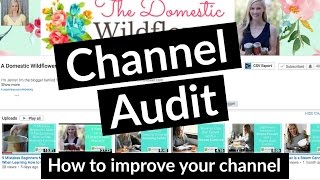
This is a YouTube video titled "Youtube Channel Audit - A Domestic Wildflower" created on May 15, 2017. The content features Trena Little conducting a detailed channel audit for her friend Jennifer's YouTube channel, Domestic Wildflower. Trena, a video content strategist, provides actionable advice on optimizing channel banners, thumbnails, descriptions, and overall channel customization to help grow the channel's audience and engagement. The video is instructional and aimed at online entrepreneurs looking to improve their video content strategy.
In today's video, I wanted to do something a little different and I wanted to do a channel audit. I want to walk you through the exact steps I do in a channel audit so that you can see what possibly you need to fix on your channel to improve it better, to gain more subscribers, and to grow your channel faster. So I'm just going to jump right in. My name is Trena Little. If you are new here and I'm a video content strategist. I help online entrepreneurs create a video content strategy that works for them and their business. Let's jump right on in to this channel audit. And this channel audit is going to be for my friend Jennifer of Domestic Wildflower. So the first thing that I do in my channel audit is to make sure their channel shows up in YouTube search results. So I typed in her channel name and let's see if it pops up. That is great. It is the first thing that pops up. So I know she's doing something right. She's optimizing her videos so that her videos are popping up when somebody searches them. So let's head over to her channel. And the first thing I'm going to talk about is the channel banner. So the channel banner looks pretty pixelated. If you see that and it's a bit busy, I would definitely simplify this a little bit more. I like the font of the domestic wildflower and I like that you have written that it's handmade food and craft, craft education. But that image overlaying the channel banner is a little bit pixelated and the flower on top of the flower background is just a bit. Maybe you could just take the white image and use the background that you have and put the domestic wildflower over top of that. Or somehow simplify it. Because this is your first impression on the viewer if they come to your channel. So you want to make sure that it's the best impression that you are giving them. I like the pictures. It shows who you are. So it's creating a connection with people. And like I said, I like your little tagline. One other thing I might add is your posting schedule. I have that on mine, although I haven't been sticking to it recently. But it's great for people who are new to you to know that you post consistently. And when you post content, I would definitely update your channel banner. One other thing, you don't have your channel links. This is a huge opportunity missed. You can add a link. If you go back to my channel, I'll show you. You can add a link to Your opt in you can see here on my channel banner I have a link to my free video script template. So all people have to do is click on that and I instantly get them on my email list. Then you can also add your Instagram, Facebook, Twitter, whatever, also right here on your channel banner to really get them to your other platforms. So I would definitely add that. You can add that in your about section. Let's go back to Jennifer's channel. So she also doesn't have her channel customization set up. So what you need to do, Jennifer, to fix this is there should be a little cog right beside your subscribe button that you can change to customization. So let me go back to my channel again and show you exactly how you can customize your channel setup. So like I said, this cog right here, click on that and make sure customize the layout of your channel is turned on. That way you're going to get this look that I have which where my videos are listed, I have playlists. You need to turn the customization on. So let's go back to your video, your channel. And so that's why we're not seeing an about section. Although this is showing a little bit about you. This is probably what you have in your about section and it looks good. I love that you are using handmade homemade food. Those are all part of your channel keywords. Simple canning, homemade cocktails. This is a great description of who you are. I would maybe add when you post new content. So if people are wanting to come back and see consistent content from you that they know and you have your links now remember you can add your links in the about section right below it. There's an option for you to add your links and that's when these icons right here will show up. So I would definitely update that. But great description about yourself in your about section. Again, since your channel is not set up for customization. That's why I'm not seeing the different tabs for the about the playlist and all of that stuff. So I can't really look at playlists. I do suggest having playlists because they are such a great opportunity to get people to binge watch your content and ultimately want to buy from you after they've watched your videos for so long. So definitely set up the customization. I like the consistency of your thumbnails. The only problem is you need to remember when when people are looking at your channel from mobile devices. These thumbnails are really tiny. So you need to really maximize the space that you have on them. I would take off this little branding that you have here because I can hardly even read it right now on desktop, let alone on mobile. So I would totally take that off. I think your text on your thumbnails is great. It's not too much. If you take this logo off, maybe you can make the text a little bit bigger to read. I like the consistency in all of the thumbnails, the picture of you beside the text. I think you're doing a great job branding your thumbnails. Like I said, I would just take off this little logo right down here. Let's go to one of your videos. I do suggest instead of having a still like this, having you as the first thing people see when they click on your video because you want them to connect with you instantly. And by this still image popping up is going to give them more of an opportunity to click off of it because they're not sure why they're looking at the thumbnail again. They just clicked on it. Now they're seeing again. So it gives them more of an opportunity to want to click off of your video and not stay for more. So I would definitely just go straight to your hook. Have a hook that's going to make people want to watch what you're about to show them. I also notice the coloring is a little bit yellow. Well, really yellow in this video. We talked about this before, but I would get some daylight balance light bulbs if you're going to film in the evening because these light bulbs will give more of a white light and more of a professional look when you are filming without having to spend a lot of money on specialized lighting equipment. So get some daylight balance light bulbs, put them in lamps around your video so that it just makes it look whiter. As far as the description box, you are doing a great job. I love that you reiterated the title and you have your checklist right here. The only problem is it's not clickable. So you need to have the HTTP full link for it to be clickable because people are more likely to click on it than to highlight, copy and paste it. So just make sure that this is the full clickable link. You got great stuff in here. Some other stuff that I might add in your description box is your social media links where they can find you. Make them clickable as well. Use the HTTP full address to make them clickable. If there's some other content you want to redirect them to if they liked your video. You also need to have your email address there because I know, Jennifer creates courses for canning. So maybe somebody is watching this video and they have a question about canning, they shoot Jenny the question, she answers it and they instantly realize, you know, I want to buy from her. I like that she responded to me personally and I want to buy her course. So it's a great opportunity to really sell your course or sell what it is that you have for sale to create that relationship with your viewers. I would just add your email in there as well for people to connect with. You are doing a great job, Jennifer. I think you are well on your way. For those that are wondering, this is a Vidiq plugin for Google Chrome and it shows me the tag tags that Jenny has used in her video and you'll see she's ranking for quite a few tags. Canning misinformation, she's number one. As home Candy rumors, she's number three. So you can tell that Jenny is definitely doing well with ranking her videos. I think she just needs to do a few things to improve her channel to really get her channel running and more subscribers. So if you want to be selected for a channel audit, make sure you click the link in the description box below and subscribe to this channel. So if I do pick your channel to audit you, you won't miss it. Don't forget to give this video some love. Share it like it, give it a big old thumbs up. Share it on Twitter, Pinterest, Facebook, wherever you're at. And as always, thank you guys so much for watching and I will catch you next week. Bye.