This is a YouTube video titled "Check out my Virchybike unboxing video! | Natalie Jill" created in January 2019. The content features Natalie Jill and Brooks engaging in a conversational unboxing and detailed tutorial of the Virtue Studio bike, discussing its features, setup, and realistic cycling experience. The video is informal and instructional, aimed at showcasing the product's capabilities and user experience.
My Bridgie bike is here. Better call him husband. Come on, muscles. Part one of the workout before the bike is set up. Handlebars, pedals, even a holder for the tablet.
It's awesome. It comes with all the tools, all the hardware, everything to put together. I mean, so far it's taken us, you know, maybe 10 minutes to get everything cleared out. Everything's in the recycling bin. You know, the packaging folds up nice. And just going to take a few minutes and put this together now.
So this is cool.
Look.
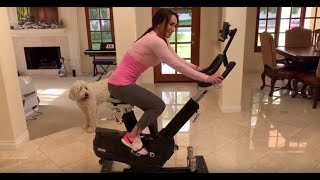
It's like it simulates riding a bike. The movement. Get the tablet holder up.
The action on. It's super smooth. And then, you know, we're charging the tablet, but, you know, so it's like you could lean around the corners. Whoa. But what I really like here is an get the tension up. You know, when you pop out of saddle, like on a regular bike or a regular stationary bike. Doesn't move. But I did triathlons for years. But when you climb a hill, you want to tour friends. And when you pop out a saddle, like the bike. So move. And this is what I really like is it's smooth. The action on.
You.
Say, that one looks like me, Victor, Vicky, Victor, Vicky.
Now your big finger's in the way. But Vicky and Victor look like me and Brooks.
Do you want to go race around the Alps on our bicycles? Victor and Vicky pedaling for the world championship.
All right. If I think I need to adjust the bike or grow a bigger bike, I think we need to adjust the bike. Simple, easy to adjust. Untwist it, push it down.
Now lean lights. Here is the dashboard for the. It's a pretty amazing app that they have here. So I'll basically start when you get in here, you got the Virtue Studio. And what they have is they have videos for everything. So here's the tutorial. So if you don't know how to set up the bike or what the cadence or the resistance is, they got tutorial videos for each thing. And they also have beginner classes, intermediate advanced Ironman, and then functional training classes. And what's really cool about that is say you're training for an Ironman triathlon and it's raining out. You can't get outdoors. You're a part of the country. You could actually use this to train because the bike is very realistic and simulates an actual bicycle because it's not fixed in the upright position. The other cool thing is on the homepage, you can do a test. You can test your fitness to see where you're at, so you can check out your maximum power, your anabolic, your FTP stuff. This is where you get your baselines and check your progress. They have single writing. You can write as a group and then there's also the group classes. What's really cool is the single writing. You can do routes where you could go to Google Maps anywhere in the world and write a route where you get to kind of see the map as you're writing. But what's really cool is the video mode and they're adding these all the time. So you've got different levels, you know, from very easy, easy, normal, hard, very hard. You've got championship and stuff like that. But here's one of my favorites, because that's why you get something like this is so you can have some really cool rides. So this one's in the French Alps, so you get this beautiful setting. 3, 2, 1. And I'm going to start pedaling. So you can hear the. You can hear the sound of like, you know, the chain going. I've got my little instructor to talking to me. I don't have my heart rate monitor connected at the moment, so I'm going to swipe him out of the way so you can hear like the sounds of a bike. And I've got a. If you had dipped in the. In the way, it's because I've got a. Like a black sheet so there's no glare for you. And then there you can hear the. You can hear it as I change gears and you can see the yellow line here where the bike is. So it gives me the grade, my power, which I was coasting for a second. When I'm going uphill, you know, there's my cadence, my calories, tells me how far I have to go, but just this really beautiful, realistic scenery. So just going to go ahead and exit out of this, get back to the home screen. But yeah, it's actually a very versatile, very flexible app. More things are coming all the time, especially as they're rolling out the American version. So I definitely love this. As someone who's done triathlons for years, you know, the bike is very realistic. The fact that you can rock side to side, you know, just like you would. It's not just a fixed vertical position is so key. So very smooth. Really, so far from the couple hours that I've spent on this, I absolutely love it.
Thanks, Brooks, for the tutorial. I'm ready to ride my virtue bike.