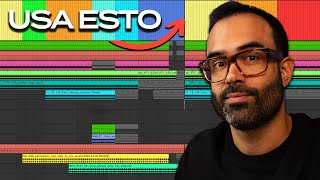
¡SUNO Studio YA Crea pistas Individuales! Ejemplo proyecto real y casos de uso
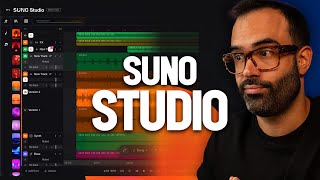
YouTube walkthrough (published/recorded around Sept 26, 2025) demonstrating SUNO Studio — SUNO’s new online AI-enabled digital audio workstation. The presenter shows the UI, creates an Afro House project, extracts stems from AI-generated and uploaded tracks, generates instrument and vocal tracks (pay-per-use via credits), and imports an external Ableton export to augment with AI-generated parts. He notes Premiere subscription is required to access Studio and praises improved sound quality and track-level coherence while pointing out some extraction errors and current limitations.
Questions this video answers
September 26 (presenter: "Today is September 26th")
Premiere plan (Pro is not enough)
50 credits (example: "If I were to click on detects right now and spend 50 credits, it would extract all the stems")
10 credits (example: "10 credits must be paid")
Sun recently announced its latest model of artificial intelligence for music creation, version 5Co, which, by the way, you can see a video of them testing here on the channel. But not content with that, two days later, they announced the launch of Sun Studio, something that many of us have been waiting for for a while now. Today is September 26th, so they announced this just yesterday, okay? And here I bring you a video of me testing it for the first time. For those who don't know what Suno Studio is, it's none other than DAO itself, the workstation that SUNO has created so that we have greater control when creating music or sounds. Creating tracks with artificial intelligence, and it will not only allow us better organization, better creation of styles within the music that we create, we're going to see it now, but it also begins to better solve something that we've been dragging since the beginning of suno. And if you've been watching my videos or other videos, or have been working with Suno for a while, you'll know that as a general rule, SUNO tends to think as a whole. It tends to create a complete song. It doesn't think by tracks. It's true that you can then extract those STMs directly with Suo using artificial intelligence, but since it's an extraction, it sometimes works better or worse. The thing is that on this occasion, we're going to be able to create adopt tracks directly for our own project. Projects that don't just have to be 100% created with artificial intelligence, but projects that you can upload by tracks from projects that you've created yourself on your computer, on your own Avalton, that is. You have a song created with Aylton, with Doji, with whatever, you export it in tracks, upload it to this Suno Dao, and you can start creating tracks from scratch that can fit together well and very well. Now let's see some examples with a project we're working on, okay? And it also creates them from scratch in a very clean way and with very good quality. And here, guys, is when things start to get really interesting, because now I really start to see the point of using suno. I won't bore you any longer. I won't give you any more hype, okay? You may or may not like this, but anyway, let's try it out. Let's go in and I'll show you a little bit about what you can do with this so that you can get rid of your initial fear and break the ice, okay? You'll see that it's quite easy to use. Okay, once you enter Sun Studio, it tells you here that, okay, we already have version five. And you'll see that here on the homepage it announces that Suno Studio is here. Something you need to know is that if you want to use it, you're going to have to work with a Premier plan. You had two paid plans, Pro and Premiere. Well, Pro isn't enough. You have to upgrade to Premiere, which in this case has an offer. If you pay monthly that for three months, you pay dollar per month. I don't know what happens after those three months. I've read the website from top to bottom and I haven't found any information about it. If you know anything about it, let me know in the comments below and that's it. And if not, I'll get in touch next week or whenever. Let's see what they have to say. But anyway, the thing is that once you join the first plan, which, which is still quite cheap, honestly, for the potential it has now, you'll see right here under Create, okay? Which is what we use, we've used up until now to create music together. We'll find the studio, okay? So let's click and enter Dao, which by the way, you'll see is a 100% online DAO, okay? It's an online application. You don't need to download anything. And it works like this. Look, if I press the one key on my keyboard, I'll open the Create section, okay? Which is the same section that we had here with what we've always created with suo, okay? Here you can write lyrics, styles, upload a reference, audio, a person that you've created, whatever you want, okay? If you press 2, you'll find the entire section of music that you've created with suo. Not just music, but also individual instrument tracks that you've created for different projects. Well, they'll be stored here, okay? It's like a list of all the samples that you create. And you can also have a filter section to start organizing them a little better. I missed a few things, but hey, I hope they improve this. And something that I really like is that we'll be able to work directly with projects, okay? If I go here to where it says my workspace here, I'll be able to access projects directly. Projects refer to what I'm putting together here because if I press number three, I can activate or deactivate the Tracks section, okay? This is like our Da, like Ableton life, where we have all the tracks and we can put an instrument on Each one of the tracks, okay? Obviously, in a very simple way, because we have, well, the panning, the volume and input. If I want to record something with my voice or an instrument, I want to record an instrument, I can also do that. But we can't do processing or crazy things, right? But we can mix different sounds. And this is one of the things that start to characterize it or start to call it a da, right? Like a digital workstation. So if I go here into one of these projects, for example, this one here, this one, for example, don't listen to me. I can see that all the tracks of a song that I created in the past are loaded.
Okay?
I'm not going to teach you this right now. We'll show it later. Because I want to create a song from scratch with you, okay? Because I think it's the easiest way for you to see how this works and to break the initial ice note that I still have some doubts because I tried it last night for the first time at all hours.
Okay?
Because these people are releasing versions for me at all hours of the night. So we'll come here to these two dots. Click on new project. And we'll come here to create music and we'll say, come on, let's do all the examples by doing Afro House. Well, we're going to put Afro House, which is actually coming out pretty well. We're going to do the lyrics with GPT Chaz, that is, write lyrics in English for Afro House with short and simple phrases. Create a structure design for suo.
Okay.
It's already created this for us here. It's just to see how it works sonically.
Okay.
I'm not going to get into whether we're going to go deeper with the lyrics or not. Okay, let's hit Create.
Okay.
And here we have different demos that he's made for me. Let's listen to how they are. Dan with the Set Me Free. Here we go. We have to talk about the leap in quality in terms of sound. Huh? Before all the demos he made for you were of a quality that you'd say, well, cool, but technically, it's not worth it. But this is starting to sound quite good technically.
In the spirit.
Let's try the other one next. No, I don't like this one.
Okay.
I'm going to stick with the second one. Let's drag it. We're going to take it here. What I've done so far, you could already see in the previous video in version 5. The fun part comes when we jump directly to the do. Okay, so let's focus here. I'm going to press 1 to remove this. I'll press 2 to remove the sounds part. We're already 100% on this. Notice that when I'm here, the extract stems thing comes up.
Okay.
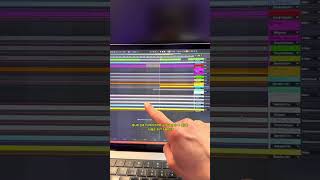
In addition to making sure the sound is on time is up to date right now we can work with bpms with the project time. But if I go here to extract all detected stems, it will extract them directly and everything that it is interpreting that can be extracted will appear down here. By the way, many of you have asked me when it will be possible to extract stems. Well, in fact, it already can. What happens is that not with this version, let's say, of extracting stems, but with the classic one. That is to say, if I go here to any track, either within the library or here, for example, here in snx, I click on the three dots and click on get sts. If I were to click on detects right now and spend 50 credits, it would extract all the stems again. Well, in this case, only from the Saint, that would extract a stem, right? But there's also a function next to it to be able to directly extract or lower the mid. Okay, so this is starting to get quite interesting. Let's click on insert all here. And now it's directly passing you to dow all this song that it's created, but by tracks. Logically, it's extracted with artificial intelligence. It's not going to sound like the version created as a whole. But anyway, we already have all these tracks directly differentiated. The percussion here, the bass here. Well, some sounds are a bit botched. The extraction fails quite a bit. Okay, but things get interesting, as I said, because if I go down here and tell it track, I can tell it. Look, I don't really like this synth. Let's create something else. So I'm going to tell it that in this part, that's the upbeat right here. You're going to create it. We come here, look, create some keys for me to see what sounds like. So here I can put melancholic, deep, energetic, for example. And we're going to click create. 10 credits must be paid. Okay, Here you pay based on the tracks you generate. Okay, here we have our keys. Let's see what it has done for us. Let's solo and first listen to the sound. Just two instruments, a harmony and the plucking on top.
Wow.
Let's see how it sounds together.
Sam. Wow. Have.
You noticed how the melody of the voice follows the plucking that has been Done here. This is very cool. And here there is a kind of pause because at first I muted this track, the synth track. Let's see how it all sounds together. By the way, I realized that there is a metronome. I had the metronome activated. Very complete, huh? Much better than I thought. It drives me crazy. Not only the coherence with which they create the sounds, but also the sound quality. It's not 100% quality like a song that I would release right now, or what I consider to be top quality for a releasable pro song, but it's very, very, very close. In fact, one of the cool things about this creation by Tracks is that if we come here, we can find the thick lanes, okay? That is to say, it generates different tests for you. That is when it has made. When it has created the song, it has generated different versions that you can then choose. Look, one version would be this one.
Okay?
Which is the one we have listened to. But then we have version two.
Okay?
More piano. Thicker.
Oh.
My. Free.
Oh, wow.
Okay.
Okay, let's do another test. Because I was excited. This is something that we have to test. Well, a little guitar. Let's put it on. Melancholic Soul. Create. We are going to have to learn to better transmit what we want to the artificial intelligence. And for that, I think it is very important to cultivate the background, the knowledge of musical sounds of different genres, to be able to transmit it and translate it into words. Something that you may have felt or had in your head you have some reference for, but you don't know how to express it. Perhaps expressing this in certain words, knowing the vocabulary could be the difference between making the most of these types of tools or not. It may seem silly, but this is probably the task we need to focus on now. Among other things, right? And that doesn't mean you shouldn't stop learning to make music and play instruments and to produce from scratch, which is separate. Let's see what kind of guitar he's made. Look at it, look at it. A very clean guitar. Very clean.
Look.
Excuse me for stopping. But both in the keys and in this track, there are actually several tracks. He doesn't make a single instrument, a single musician playing an instrument at the same time, but rather generates two tracks. In the previous one, he generated the finger picking and then some chords in the background. Here I think there are two guitars too. I would like them to be truly individual. So that if here you make a conjunction, a mix between two, then you can identify them both separately. But of Course, I understand that this is like something that needs to be done in cohesion, otherwise it will be difficult for him to do things individually. See here, there are two guitars, There is no one here. He has already gone crazy because we have selected a fragment that is already included in the draw. So look here, he is already going crazy. So we would only stick with this. Let's quickly see the other version.
Ah, oh.
Okay.
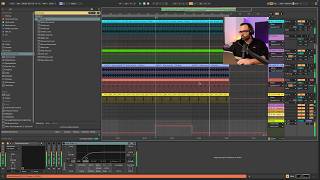
Let's go back to the project section because as I was saying before, one of the interesting things is that we can work on projects created by ourselves in our own dao. So here I have an example in which I uploaded a song that I was producing and that you heard in the previous video of Suno version 5, which was a project that I was doing in Ableton Life. Okay, this is a project I have here where I was using a vocal at the time and I said let's upload it and see what it would do. Okay, this project sounded like this and without the vocals, I exported it and uploaded it here. Okay, Once I exported that fragment without the vocals, I uploaded it here to Sun Studio and did the same process. I came here, extracted the stems, and here below we have them. So this is very interesting because it can allow you to create tracks that you didn't have before in your real project. Like for example, here I had come and done the same thing. I had created a new track, I had clicked on guitar and I had named, well, look, the same as before, Melancholic, Pluggy and Soul. In fact, if you go to any track that you have created here, here on the right, it will tell you the prompt that you have used, which is something very interesting to remember. Hey, well how did I create it? What prompt did I tell it to create that track? And here it does something similar. It creates different stakes for you. In fact, he's made more versions here than. Look at that cool guitar. Let's see how the guitar sounds with the project. You have different versions too. They sound really juicy. You have some a little more dark, let's say, or more clothes that fit better in this project. Others in which he solos here with the rock stars. Another version that's more stable with less solo, more arpeggiating, so to speak. Another more plucky. And we can also create individual voices. That is to say before, in the first example, we created an entire project, a set of an entire song that included vocals, which we added to the lyrics with chgpt. But here you can come open a track, tell it to add vocals, put the vibe you want to. And here, write some lyrics which are the ones I've written here, which I've also done. I did it with CHGPT and it creates, well, a voice for me. Look how it can fit in with this project. It's like this. Feel the draw, feel the sun spirit. And now another one comes in. The other one doesn't sound good. This one that comes in here is a voice that we created in the previous video, which if you haven't seen it, I'll leave it here from the SUNO version C review video. Look, Alex, but I can't create the entire project here and work peacefully. No problem. This is a testing ground. If you like this voice, right click download at WAP or get midi. Well, in the case of an instrument that can work with MIDI notes, you come here to Ableton and drag it like another sample.
Okay?
And here you have like a small studio, intern, agent, professional musician, call it whatever you want, that creates sounds for your project. If you want to download all these tracks, you come here, click on Download full sound. If you want to download the muddy track with each individual track, click on muddy track and there you have it. You can change the layout here if you want to have it a little different, organized, different if you want to have the tracks down here. And this is basically what I've been able to explore. As I said, this came out last night. I haven't had much time either as I investigate a little more and see different use cases. I'll share it here with you if you're already using it or using it in a different way. I'd also really appreciate it if you shared it down below in the comments so we can all learn. And anyway, let me know what you think about this. Logically. Every time I share these things, many of you also write to me worried about where this is going. It's enough for another video. It's a debate, honestly quite extensive and honestly, I'm not sure what I really think, but a priori I'm enjoying it. Okay, it looks good. At least the power that we have in our hands right now. Now, philosophically, where could it end up taking us? Well, it's enough to sit around a campfire and chat. Not for one night, but many. Anyway, have a good weekend and see you next time.