Colin Brown explains OpenAI's privacy policies across subscription tiers: Free/Plus/Pro can opt out of training, while Business and Enterprise plans never use conversations for training. He recommends consultants use placeholders for client data, prefer Enterprise plans for sensitive work, and take advantage of ChatGPT-5's new temporary chat mode, which prevents chats from appearing in history or training.
Chapters
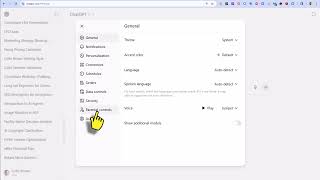
The number one question that people ask me about when it comes to AI chatbots is, "If I upload my client data, will the AI store the data and learn from it? Is my client's data protected?" Many consultants are understandably concerned about uploading client information into ChatGPT. The biggest fear is that sensitive, identifiable data could be exposed, shared with others, or even used to train future AI models. Let's clear up those concerns by looking at how OpenAI manages privacy and what safeguards are in place. So does ChatGPT learn from my data? Well, that depends on your version. By default, ChatGPT does not learn from your conversations with the Business and Enterprise plans. OpenAI no longer uses Business or Enterprise customer conversations to train its models. For the Free, Plus and Pro accounts, you can turn the option labeled "Improve the model for everyone" off, which prevents your data from being saved or reviewed. Even when this option is on, your conversations are used only to improve the service through human review, and any personal identifiers are removed. Key takeaway: this system isn't learning from your client's secrets and then reusing them elsewhere. If you use Microsoft's Copilot, the AI does not learn from your conversations by default, so you're safe. And since Microsoft could see all your data in any spreadsheet you save to the cloud, you can trust Microsoft's privacy and security. Also note, for you techies out there, if you use OpenAI's API key, your uploaded data is always protected by default. So here's the privacy controls you can use in ChatGPT. You can go to Your account, click on settings, data controls, and you'll see right here it says improve the model for everyone. If you click on that, you can simply turn that off. When turned off, your chats are not saved to history and are not used to improve the model. For the enterprise and business plans, it's designed for professional use. The conversations are never used for training, and it also offers additional admin controls, domain verification, and audit logs. As far as data retention, for the free, plus, and pro accounts, OpenAI retains data for a limited time to monitor for misuse and then deletes it. For business and enterprise, retention is customizable or may be zero retention. The key takeaway: you can decide how much, if any, data is stored and reviewed. Now for the best practices for consultants. I recommend you never paste client identifiable information such as names, addresses, account numbers, etc. into ChatGPT. I always use placeholders or pseudonyms like Client A or Company B when working through valuation, marketing, or consulting scenarios. I also redact any sensitive fields before uploading documents. If you need to analyze client-specific data, consider using ChatGPT Enterprise or API solutions which guarantee stricter privacy and data handling. The key takeaway here is you're in control. Protecting client confidentiality is about your process as much as the platform. How do you reassure clients? When a client asks, "Will my data end up in ChatGPT?" here's a simple answer: "No, ChatGPT does not train on your private information. I take extra steps to remove client identifiers, and I use privacy controls to ensure your data stays confidential." So there you have it. ChatGPT is a powerful tool, but like any tool, it's only as safe as how we use it. By keeping identifiable information out of the system, using history controls, and relying on enterprise-grade and business features when necessary, we can take advantage of AI while protecting our clients' trust and privacy. Now, one of the main reasons I wanted to create this video was to show you a new feature in ChatGPT-5. You'll see up here in the corner, It says turn on temporary chat. If you click on that, you'll see it says this chat won't appear in history, use or update ChatGPT's memory, or be used to train our models. For safety purposes, we may keep a copy of this chat for up to 30 days. So this is like turning on an incognito mode, and you can use this safely to upload anything while this temporary chat is turned on. There's your AI tip for the day.