In this 2015 talk, Guillermo Rauch, creator of Socket.IO, walks through the evolution of real‑time web applications and shares the lessons learned from building chat systems at scale. He begins by defining what makes an app truly real‑time: minimal latency and automatic data updates without user interaction. He explains how early Socket.IO “Hello‑World” examples solved the push problem but introduced new complexities around scalability, code size, and maintainability. Rauch then examines three major shifts that have reshaped real‑time development: (1) a clearer definition of real‑time, (2) the rise of ES6 language features and modern build tools (Babel, modules, arrow functions, let/const) that reduce bugs and bundle size, and (3) a new programming model he calls “pure UI,” where the UI is a pure function of application state. He demonstrates optimistic UI updates, negative‑latency prediction, and the need for conflict‑resolution and synchronization strategies akin to Git. He argues for server‑side rendering of the initial view to minimize TCP’s slow‑start penalty, and for declarative data‑to‑UI mapping that lets the UI drive data fetching. He shows how a designer‑driven state map can be expressed as JSON, enabling fuzz testing, time‑travel debugging, and automatic UI simulation. The talk then pivots to the future of Socket.IO: migrating the codebase to ES6, supporting legacy browsers via polyfills, adding observable‑style subscriptions to reduce unnecessary event traffic, building the Evolution dashboard, Insights middleware for real‑time analytics, peer‑to‑peer transport, and a unified documentation platform. Throughout, he stresses the importance of keeping the client bundle tiny, loading only what the UI needs, and using HTTP/2 server push where possible. The session ends with a lively Q&A covering functional DOM, prediction via machine learning, HTTP/2 impact on Socket.IO, and practical advice on what data to preload for a Twitter‑like web app.
Chapters
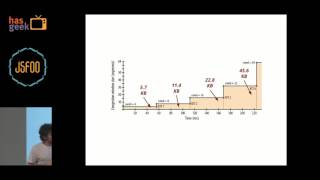
Hello, everyone. My name is Guillermo Rauch. I'm the creator of Socket.IO, ng-io, and the founder of a few companies in the past. You can find me on Twitter on twitter.com/rauchg, and I occasionally blog about the things that we've been learning at our different projects on rauchg.com. My experience in the last 5 years has done a lot with Node.js, JavaScript, and a bunch of open source frameworks. In particular, what we focused on early on was making this idea of real-time collaboration and real-time communication, namely chat applications, very easy to write. So our Hello World application when we introduced Socket.IO back in the day, was basically the most minimal server that would allow you to emit events back and forth, and with these events you would be able to create any sort of application, but particularly it was really easy to create a chat application. So not only would you be able to emit events, you would also be able to broadcast events, and then we started adding functionality relating to rooms and subscriptions, and things that come up always in the context of messaging systems. But something that we noticed over time was a lot of what we enabled very easily also needed a lot of extra functionality, a lot of extra patterns, and a lot of new ideas to evolve to become maintainable and scalable. In particular, when you're working with potentially larger code bases, when you're working with larger teams, when you're working with applications that are growing beyond the scope of what you had originally planned. So this talk is going to be about the main ideas that have changed both in the JavaScript ecosystem and in our own thinking about how to design these systems. Not only just chat applications, but any sort of very basically real-time, a live application. The changes that we've noticed, especially those things that we would do differently if we were starting over again, are in basically 3 key aspects. One of them is the definition. When we started this project and we said we were going to solve the problem of creating real-time applications, no one was quite sure what real-time really referred— I think everyone had a slightly different idea. Then the second big change, especially over the last year or two, has been the emergence of new language features, the emergence of really sophisticated build systems that have shaped our codebases differently. And then finally, and perhaps more importantly, the programming model that we use to basically create a complex UI that is constantly updating. The way we think about data flow, the way we think about making local changes to the application that are synchronized later on have all changed. I'll discuss these three concepts for which I published three essays over 2015. All of these concepts that I'll be discussing today, you can expand on by going to these websites. So in terms of the definition, one of the most important things to me has been trying to really understand what makes a real-time application real-time, or what doesn't make it so. And I've come to the conclusion that there are two key aspects that make a real-time application. Remembering these two ideas throughout the development cycle or even throughout the process of you coming up with a product that you want to make real time are really great indicators of whether your application will be as successful and as fast as possible. So the— the very basic idea is data updates have to be communicated to the user with minimal latency. Essentially, the user has to feel like the data is alive, that the application is alive, that everything is changing really fast. And secondly, these data changes have to happen without the user interacting with the application in order to claim new data. So if the user is suspecting that the data is not alive and they have to think about pressing a refresh button, then your application will not be as fast, will not be as real-time as possible. So these two ideas that the The application needs to communicate with minimal latency, as fast as you can possibly make it. The changes to data have to happen without user interaction if possible. If it doesn't have to do with input, if someone else changed the data, those changes have to be communicated without forcing a UI interaction. Basically, it boils down to your application being fast and self-updating.. So provided that you maintain these two concepts throughout the development cycle, your application will be real-time. Self-updating is something that we solved through Socket.IO pretty easily and pretty successfully, because the idea of pushing data from the server to the client, which used to be really complicated— really, it involved writing polling code, it involved mixing and matching transport code with your own business logic, we solved really elegantly with introducing events. But what has happened throughout this process is that we've sacrificed and we've been unable to define really what makes an application fast. So the idea of exploring what makes an application fast is really interesting because what has happened in the development of this really rich self-updating web applications has been that in order to make the application feel real-time once it's loaded, we've sacrificed how long it takes to load initially. So the idea of a single-page app that has been getting a lot of popularity over time basically boils down to the idea that you render just one page, which contains actually no data. It only— it's a shell onto which scripts, styles, and later on, when those scripts load, data are loaded onto. So this is an extraction of a popular JavaScript framework and the pages that it produces. As you can see, the markup is actually less than the Google Analytics code. This is the entirety of the single-page application once you analyze the code that is shipped to the user. And this is a very clear example of the idea that when we're actually trying to enable the creation of these real-time applications, there is so much to load that that time that it takes to load initially has been sacrificed. And it's a really bad idea to do this, because if we think about how TCP works, that initial load time is actually the most crucial to user experience. So if you're trying to make your application fast, you have to take into consideration that a TCP connection will start slowly. When a new user comes to a certain URL or opens an application, the TCP socket will start consuming data slowly as to avoid congestion. This roughly describes over time— here the x-axis represents time— how much data a typical TCP connection is able to ingest. Nowadays, 8 segments at a time is pretty common in most deployments. Roughly, it means that the 14 kilobytes that you first ship to the user tend to be the most important in trying to seek this idea of creating a really fast application. So therefore, if we're maintaining the invariant that we want a fast and self-updating application, The most optimal real-time application will necessarily render some or all of its data on the server and convey to the user, for example, through precomputed HTML. So if we have server-side rendering, JavaScript is still very fundamental on the UI side of things. In particular, JavaScript is what is going to enable us to later on, when that code is loaded, when that initial markup is loaded from the server, to pick up on the interaction, and this idea of masking latency will be enabled to us. The idea of masking latency is very important because when we're communicating, we have a fundamental boundary. We have a fundamental limitation of how fast data can be exchanged. In physical terms, that would be the speed of light. So it seems at first sight that maybe it's not as relevant to us, but if we consider even just like trying to communicate from the West Coast in the US to the East Coast of the US, we find through a simple back-of-the-envelope calculation that the best possible case scenario tends to be around 100 milliseconds. With everything considered. 100 milliseconds is actually quite a bit. It's the threshold at which a user considers something to be immediate. And that's, of course, the best-case scenario, and there are greater distances to consider. So how do we overcome this? How do we defeat this limitation? So one thing we can do is debunk general relativity and invent faster-than-light communication. Which would be awesome. If anyone wants to do it, let's hack on it later on. Or the other two things that we can do that are very, very relevant to that JavaScript-based user interaction is, one, we can make optimistic changes to the UI, and two— which optimistic changes, as we'll see, are very, very important to chat applications in particular— and two, we can enable prediction. So optimistic changes means zero latency, or the latency of how fast you can update the UI, how fast you can update the screen, basically. Prediction means negative latency. So these are the two fundamental ways that we can ignore that intrinsic network time that will be spent sending packets back and forth. So this is an example of iMessage. I particularly like this example because I was talking to myself. Not because I enjoy talking to myself, but as you can see, if— you can clearly see that the first message is optimistic because the echo, the gray message, comes later on. So the network round trip actually took quite a bit more time. To the user, it's a really great feeling, though, to see that reaction immediately on the screen. So basically, there was zero latency from the time I pressed Enter to getting that reaction on the screen. And then even the idea of actually conveying how long it's taking is enabled by a different part of the UI. So this is a very successful example of optimistic changes to the UI. The basic idea, again, is to— the user input will react immediately. The problem that this creates, though, and that weren't existing in any sort of server-rendered exclusive application, is that now we've introduced the idea of diverging copies of the data. And this actually increases significantly the complexity of applications. Because now we introduce the problem of conflict resolution, which might not become apparent when you're starting to create a real-time application. But essentially, there is a— one way to think about this is you have now, like, a Git repository, and the server maintains its copy where each message is at commit. And then you have each user that basically subscribed to this data, and they are able to perform changes directly on their own copies of the data, but then those copies, of course, of course, need to be reconciled later on. So, one thing to— and perhaps a very important point here is that when you're creating a real-time application, you have to consider not— you have to reframe the problem perhaps as a syncing problem in terms of what your application is enabling. There is a copy of the data that needs to be— there is a source of truth of data that needs to be synchronized with another source of truth, as opposed to merely thinking about messaging. Basically, it's not just about, like, sending the message across. It's about, well, is that message that's being sent resulting in a successful synchronization of state between these two points? And this is particularly relevant to the previous talk as well, because the example that I like to give is in the IoT world. A lot of the demos that I see recently in the Socket.IO community, a lot of them have to do actually with hardware, with devices, with robots, all sorts of what are commonly known as IoT. So the example that I usually give is that of an IoT light bulb, which doesn't sound like a good idea, but I've seen a few on Kickstarter. So basically a fully internet-connected light bulb., and you are empowered with the switch. And these two things are meant to communicate over the internet, so the first thing that you think of is I'm gonna send a JSON packet from the minute this— from the moment the flip— the switch happens to the light bulb. So one way to map this commonly is what you want to do is you create a RESTful API and you say turn on this. Light bulb. But now what can happen is that their messages can fail to be delivered, and they can fail in very understood ways, so very clear ways. And at the same time, the way that a physical switch works is that the user can actually make the change. They can— they're moving something, and they're getting that immediate reaction. However, the message might not have been delivered at all. So now you end up with a switch that says it's on, but the light bulb is not on. So what we really want to do is we wanted to synchronize that on state between our optimistic source of truth to the eventual device or server that we're communicating with. So we can now understand the real-time system as one that rapidly, or as fast as possible, synchronizes sources of truth that can end up being divergent. And this has implications that have to be very carefully implemented in our applications. So, for example, one of them is retrying on behalf of the user. If that message failed to be sent immediately, we need to keep retrying on behalf of the user. We don't need to necessarily present an error right away. For the best user experience. And another thing that's very common, another type of failure that maybe one doesn't consider immediately is the client might think that the message didn't get to the server, so it keeps retrying, but the message had actually arrived, but we had— we didn't get the acknowledgment, so we didn't get, like, half of the round trip. So a lot of chat applications will have this problem where the user thinks that the message was not delivered, it actually was, and then they end up with multiple copies. So the solution to this is actually pretty straightforward, which is we need to consider that new message that we created as an object, perhaps with its own UID, uh, that's client-generated, and then the operation in the server side of things has to be idempotent. So basically, whenever we keep retrying, if there was already a message with that particular UID, the rest of the messages get discarded. As far as the second point that I wanna talk about, the code and libraries. How has the ecosystem changed since our initial release in terms of what our tools look like? And what are the tools that we are now enabled— so it's not primarily talking about, for example, the emergence of new syntax, but what does that new syntax potentially enable in the context of a real-time application. In this regard, the biggest change has been the introduction of ECMAScript 6. What this means is that if we're considering our documentation on our homepage, where we use ECMAScript, I guess, 3, 5, 4, we would rewrite it and use new syntax. Here I'm highlighting the things that in particular are interesting in that they're preventing a lot of bugs and that they're making our codebase a lot more robust. Some of the things that ES6 introduced have actually made our Socket.IO codebase a lot less error-prone. The tool that we use is Babel, primarily because Babel draws a very clear distinction between what features you're incorporating into your codebase. For example, if you want to turn on all of the ES6 features or you want to turn off— turn on some of the experimental ES7 features, or if you want to turn off, for example, module packaging, or if you want to customize the transpilation options, it's very flexible in that regard. One of the more important changes is modules are syntax. So whenever we would be writing a, um, Socket.IO application, we would use require, which is something that Node.js introduced. We would basically call this function, which is a global, with strings. Now, what usually happens in the context, like I was saying earlier, with the bundling of these rich applications is something like— you will use something like Browserify that goes through your code and tries to extract what modules you're using from that code. So it will try to do some sort of a static analysis to see what modules you're using and trying to get them from the node_modules directory and package them all together. But what happens is, since require is a function call, it allows the developer to introduce expressions that are actually environmental— that depend on the environment, on the execution context to be evaluated. So, for example, if you introduce a variable in these require calls, that system which is doing the packaging is not gonna know how to resolve this dependency. So by having a very predictable syntax-oriented and easily parsable dependency graph, we can now start introducing the concept of not just pushing data, which we've been doing with Socket.IO, but also the idea of pushing code. If you understand the map of your modules and how they are composed together, the future is clearly in considering code and data as basically the same thing. If you're changing your chat messages or if you're changing a part of the style of the application, those two things can actually be transported in the same exact way, and this will further reduce latency. In this case, by potentially fixing bugs or changing UI or exposing new information. The second thing has to do with something that's helped us create more robust, less error-prone code, which is the introduction of syntactical scoping. So let— over var is what I refer to when I mean that var is probably gonna be obsolete, and we're probably gonna be using mostly let or const, depending on your programming style. An example is the traditional for loop, where if we were using var, the i variable would still be defined later on and potentially create conflicts. Finally, the other important change is whenever we would use an anonymous callback, we're probably going to use a new fat arrow syntax. In particular, because it enables us to access the outer scope much more easily, it prevents bugs that usually have to do with this being null or undefined, and perhaps even more importantly, we write less code. We don't have to assign temporary variables like self equals this. And so on. And finally, the third and perhaps most dramatic change has to do with the programming model. So how do we put all of this together? How do we put data and UI together and present it to the user in the— in the best possible way? So the traditional approach that we would use had to do with listening to some event, and manipulating the DOM directly in that callback. So in the first example that I showed in the chat application, we would, um, listen to an arbitrary event, in this case chat message. We would create a new element and inject it into the DOM. What normally happens is, as your application evolves, that same event might be relevant to different things. For example, if you wanted to maintain a counter of how many unread messages the user has, you would have to update that same code to say, "Okay, now I need to perform this other mutation of the UI." Also, what's perhaps more concerning is another part of the application might have changed this new— these elements, and your code would actually work in an erratic way. In fact, one of the features that jQuery has is that it silences errors, which has been used by a lot of users to perform idempotent changes to the UI. So if messages2 doesn't exist, it'll ignore that operation. So what happens is your application will keep growing and a lot of components might be introduced, so your event listener code has— now not only mutate the DOM directly, but also read the state out of it in many cases. Because you're not necessarily synchronizing data or maintaining a copy of the data, then what happens is you end up maybe relying on data attributes on your HTML as a way of doing bookkeeping of code. And another thing that is really relevant when you're thinking about a real-time application is is that you're maintaining a subscription to the server. Since you're not just getting the data once, you're expecting the data— the server to give you data in the future, you've basically done an allocation on the server side. You're basically having resources that are keeping track of changes that a particular user is interested in. So if the— if, like, for example, the UI had changed through other part of your code, then you will continue to listen to chat message events. So it's important to now have the idea of tying the observation of the data to the actual rendering, and perhaps even the actual visualization of the data. So, for example, I've seen a lot of applications that render many, many, many chat messages that are actually not in the viewport. So if we're maintaining, for example, a log or a history of those chat messages and the user is able to edit them, we might not want to actually be subscribed to every single message that has been communicated in that room. We might only actually be interested in the ones that are rendered and the ones that can actually be seen soon enough. So, for example, if you scroll quickly, you actually want to— have changes happen very fast to those other messages. So, and not only does this sound like a much better architecture because your UI is now informing what data requirements you have, it also saves you resources and potentially money. So the basic idea is data is not fetched until the UI actually needs it. The solution to a lot of these problems really have to do with the way that you're declaring your UI, the way that you're mapping these real-time data sources to the, the things that are presented on the screen. And the solution to all of this has to do with rethinking the programming model. So by having a very declarative and functional-oriented UI, which I call pure UI, we can see that we're gonna improve the way that not only we create our code bases and maintain them over time, but also how the communication happens in terms of, for example, if your application changes because of the requirements of a product designer and you need to update your code and present it in a way that you can receive feedback feedback on it, or basically render your UI independently of the server. Instead of, for example, launching a Node.js server to synthesize fake events that are coming from a real-time source, how can you actually very clearly see what a certain UI would look like with a certain data in place? So the basic idea here is that we will declare our UI as a pure function of application state. So this is something that people have already been doing, but we have sort of not been systematically applying in the context of our own programming. In fact, designers already have been thinking this way, because when they create representations of what the UI and what the application is going to look like, they're essentially describing discrete states of your applications. They make entire copies of the UI,, and then they present them to the developer. But once we implement them, we don't really quite follow that approach. Recently I was tasked with the creation of this video player that powers the entire WordPress ecosystem. WordPress.org and WordPress.com websites have received this new video player that I coded in a very particular way to experiment with this programming model. So, what I did is I created a very clear mapping between data source and UI. I didn't manually specify transitions between states, trying to follow that line of thinking of what a designer would do. So, for example, if a transition happens in the video player where the video finishes uploading and we were displaying a state where it says, "Oh, the video is actually still recording," or the video is still being uploaded. We wouldn't define manual mutations to the DOM. We wouldn't ever say, "Okay, now we're going to remove this element. Now we're going to add this element," in the way that we were doing when we were discussing the chat example. Basically, that function that defines your entire UI is called again, and it describes the entire UI again. Depending on that, on the parameters that were passed. And like I said, this is very clearly mapped to how designers think. So recently for a project that's coming up in the Socket.IO world called Socket.IO Evolution, this is basically a dashboard that represents our activity in real time. So our activity in terms of commits, our activity in terms of how many people are accessing the CDN, and a lot of other interesting tidbits that basically paint the history of the project and how it's evolving over time. As you can see, when I actually designed it in a graphic design tool, I thought about, okay, this is what the mobile version needs to look like, this is what the iPad version needs to look like, this is what the web version needs to look like. Not only does it change in terms of, for example, the actual width and height of the components, Sometimes, like, it requires that you render the data differently. For example, the numbers are rendered differently and so on. So what I was doing basically as I was designing, I was— it was almost like I was coming up with two functions, with the same function, and only the width parameter was changing. So if we imagine this as plain JavaScript code, in fact, we could even disregard the usage of CSS media queries altogether because We're thinking about receiving a parameter and altering our result— altering our output as a result. So in this case, I'm defining one piece of the component. Now, what I observed as well is that this idea of being very declarative and mapping out all the states that your application and your UI can be in is not necessarily new. So, for example, CSS. Style guides have been doing this for a while. This is an example of the GitHub Primer codebase where— or if you go to Bootstrap, you're going to find the same. They're able to represent the actual implementation of their components almost like you would do on a graphic tool where you say, OK, this is what the button looks like in this way, and in this way, and in this way, and in this way. And this has been enabled because— We can think of HTML as a pure stateless functional programming language in the sense that when we're passing the attribute disabled, it's like passing a parameter to this function, and when we're passing the class attribute, it's passing this small true parameter. In fact, the functional approach looks a lot more clearer to me. And what I— started thinking about as well is we can take this idea of extrapolating and extracting what each component or part of your application can look like in a very, very fine-grained way. So if you consider the iMessage example, we can think of that message, single message, as its own function, its own component, and then say, this is what it looks like for all its possibilities. For example, if the message is sent over SMS, it looks a certain way. If the message is sent over a regular iMessage connection, it's sent this way. And this is what happens if it was acknowledged. And that's what happens if you're not the person creating the message, and so on. And this is roughly what that function would look like. Once again, we're just mapping data very clearly to UI. We're returning a representation of widgets with information in it that's mapping the supplied parameters. So it's now useful to think of the work that we're doing when we're creating our applications, when data is changing over time, as defining a map of our application. Not just a map in the sense of, OK, I'm saying that for this set of data, the UI is going to be this. But a map by which you can actually navigate almost the complexity of your application. This was my map when I created that particular widget. I set out to say, "Okay, these are all the states that I imagine my application will fall in." For example, this is what would happen if you hovered the toolbar, or this is what would happen if, in the black, if there was an error or if the video couldn't be rendered because the user was underage. So what I was doing essentially is answering questions. What happens when this happens? What happens when this new data is received? What happens when the backend decides to make a change? So I started thinking about all the possible common things that one associates with this kind of widget. And this is what normally in the conversation between a between the person that's envisioning the application and the one that's implementing it, what we normally think of as requirements. What I did next, as I created that map of my application in a, in a visual way, was I tried to map it concretely to the code and the implementation in the same way that, for example, GitHub have done for their UI style guide. So, in particular, I focused on this one example of this particular widget. As I said, this idea of having a map is useful too because as you're discovering new states that your application can be in, it's almost like zooming in and getting a higher level of resolution into what— into that which you want to work on. And then I proceeded to define a JSON object that— a static JSON file that mapped parameters to the different states that I was interested in rendering. So for that tooltip, I said I'm interested in seeing what it would look like when the tip is in the middle, what happens when the tip is on the left side, and so on. So the actual implementation of it actually resembles the design that I did in that I'm— without actually executing any code, without actually getting any data from the server, I'm able to simulate what the application's gonna look like later on. So this is, for example, in the UI, what would happen if you press that plus button is you're able to change those parameters and simulate different behaviors and different situations that your widget or component or UI can be in. So, for example, I had to consider the possibility that if that little tip was on the left side, actually had to look different, or if that position parameter went all the way to the right, had to be adjusted as well. So this is a tool that's very interesting because it allows us to also think about potential use cases, potential data changes, potential user interactions that have not happened yet but we must be aware of to create a very versatile application. So I, I started thinking about our role in the creation of these real-time applications as having two parts. One is the design itself, which you do by trying to answer the questions that you might imagine are necessary for the creation of the application. And the second part is actually a discovery of new states that you didn't— you couldn't possibly think about in the beginning, or you just— your experience or personal thinking about that particular problem did not allow you to see originally. And as I was thinking of maps, I started thinking about this one map, which is what Christopher Columbus was thinking that the Earth looked like in the 1500s, the 1400s, which is, as you can see, pretty inaccurate. He thought he was setting off to a place that pretty much didn't exist, in a world that didn't exist. But regardless of what everyone was saying, as a matter of fact, the book where that map was obtained from said that his maps were actually a hybrid of fantasy and delusion. It actually allowed him to basically accomplish his goal. Successful discovery of what holes exist in your application, successful discovery of— or accomplishing that which you set out to do can actually happen through random behavior. So if you set off to interact with your application and maybe put it in states that are randomly introduced, which is a technique called fuzz testing,, then you can actually improve your code without actually getting to the point where a user needs to either complain about it or a further requirement needs to be created. I'll show you another state of the application in which the video was converting and a Socket.IO channel was established to communicate the progress of the conversion of that video. What I did was, in my tool, that showed me that rendering that allows me to, for example, customize the width and height of this video, I can now introduce randomness into my testing. So if the key of that data ends in URL, I decided I would source images randomly from the internet to see how my video player would behave. This particular technique, in fact, was so useful that— that progress bar actually had to update because I didn't know what actually— how it would behave when there was a light background, when there was a dark background. So this idea of introducing random walks of that state space gives us a heads up in our implementation. What this model also allows us is to have a much better understanding of completion. So going back to this example, something that's actually missing here is a state of what would happen if the sender doesn't— realizes that there was an error. If we go back to the map, there is no even understanding here that an error could occur. So— and this is why I insist that this model also improves communication, almost creating a protocol between that person that defines the requirements and that person that implements it. Because we can now say, okay, you have to implement the state when the message has not been delivered, it's being retried, and so on. And this also leads us into a better understanding of correctness, because what we know from working on a lot of rich real-time applications is that a lot of errors can occur over time, such as being disconnected from the internet, being in a reconnecting state, or, for example, the message we know has failed to send because we timed it out and it has to be manually retried. So this enables to actually now look back and look at our initial map and then look at where we ended up in terms of adding new states and contemplating new possibilities in the UI. And we can, we can say, okay, what was my understanding of the complexity of this project? Was it accurate or was it not accurate? And it also allows us to look forward because essentially the work is never done. This is the map that Christopher Columbus created after his successful initial trip. It ended up still being highly incomplete, but it was inevitably a good positive step into the future. Thank you so much. I think we have time for questions, but— Hi.
What do you think about DOM going functional? I saw a few of the concepts of using the functional programming with DOM in terms of being stateless and immutability?
Sorry, can you repeat the question?
What do you feel about the DOM going functional, as in using the functional programming paradigms when we are manipulating the DOM?
Yes, I think a lot of the problems that we've incurred into— for example, like, why were we mutating the DOM directly in our initial examples? Have had to do with the APIs are naturally imperative and non-functional. So it's almost like the "Hello, world!" of the web doesn't lead you to this kind of workflow. And I think one of the solutions has to do with maybe not making it functional, but maybe having frameworks ensure that you're programming in a certain way. Even with a lot of frameworks that do enable this kind of programming, you'll find that you can stay away from functional programming patterns very easily. You can still incur in the same kind of mistakes, and that's why I refer to— more importantly, to the programming model and not so much to specific frameworks, because we have to think in a functional way to accomplish this and in a way that is side effect-free. Whether DOM is the rendering target or whether it's something else actually is also not as relevant, because you can imagine that once you have a certain mapping between data and UI, then the rendering target of that UI can be many different things. It can be the DOM. It could be WebGL, and so on. But again, I think a lot of it in terms of the JavaScript world will have to do with, part of it discipline, and a part of it frameworks that ensure this kind of constraints. Yeah.
Thank you. Hey, back here.
Back, right back.
Yeah.
Oh yeah.
Great talk. So your idea of making things fast is by making the better design and providing data only when it's required, right? These are the two main approaches that you've talked about. What about machine learning and also understanding how the user behaves? And then preempting data. Is that also a possibility?
So the second point that obviously I didn't go into, which is we can have zero latency through optimistic updates, but then we can go into the realm of negative because we can present to the user data that they still haven't requested yet. Because through machine learning, for example, we could understand their patterns of behavior. One that's actually fairly straightforward to implement that doesn't require machine learning, but it still allows us to predict, involves doing collision detection between the cursor and the target that we know will be fetching some data in the future. So if the mouse is headed in the direction of a certain button, the data for it can be prefetched. In fact, the declarative model would allow this in a much better way. Because you would simply define attributes that have to do with, like, okay, so this piece of the UI is interested in registering a collision detection with the input to enable prediction or some sort of, like, data retrieval and caching ahead of time. A part of the prediction model also has to do with the server side of things. So a technique that's interesting is analyzing the referrer data on the server side when resources are requested to push them with HTTP/2 before they're even requested. So, for example, most applications will load index.html and subsequently they will load logo.png. Now, you could manually declare on your server side of things, "Okay, every time I push this, push that," or you could actually remove it one layer further away and you can say, "Okay, so if logo.png is consistently getting required through refer data in the headers, in HTTP headers alongside this page, then we can assume that user is going to request it and push it automatically. So I think prediction is definitely the next big frontier. Although I wouldn't necessarily go there until a lot of maybe more pressing issues are solved, like the idea of pushing code or treating code as we treat data in terms of how we convey the updates to to the user, I think, in my opinion, would take higher priority than that.
Hello. Hi. Awesome talk. So as you said, describing the UI in discrete states. But we need to switch between those states based on the user interaction, right? So normally how we would do it, add or remove a CSS class. But in your case, I saw throwing away all the markup and creating the widget again. Was that correct?
So the basic idea is that you're never changing a class. You're saying, OK, here's my entire UI. And now, because of this parameter having changed, the class will be there or not. And then the engine, which in certain cases, for example, for React, it could be the virtual DOM. For Ember, it could be the template engine knows which parts of the templates are dynamic. So basically, they can perform the changes on your behalf. And this is a very powerful idea because, um, the way that I think about it is kind of like manual memory management and garbage collection. A lot of the code that you would normally write, you no longer write. But in addition to that, you're now declaring the mapping between data and the complete representation of the UI, which allows you to basically visualize it, uh, and— change the data and see how it would perform. Even, for example, without setting up an actual real-time socket, you would say, okay, show me what the UI would look like with these certain parameters, with this chat message having failed to be delivered, and so on.
I have another question. It's related to Socket.IO. So the next version of HTTP, HTTP/2, so it brings a lot of great things like server push and all. So how is that affecting the development of Socket.IO?
So that's a great question. HTTP/2 already has, for example, the functionality to have a bidirectional stream. And in addition, it does something very interesting, which is every request and every response goes over the same socket, which enables very efficient— for very efficient RESTful request and response cycles. It also compresses headers, which means that one of the features that WebSocket was known for, which is minimal framing, basically minimal separation between messages, and a very lightweight protocol, you can still do with HTTP as well, because things like user agent and host and all of that, once the connection is established, it becomes part of the compression state and are not sent over and over and over again. So with this in mind, what do we have to— think about is that to send data from server to client is not as straightforward, because it assumes this idea of resources that are known ahead of time or are gonna be requested by the client. In addition, in terms of Socket.IO, we always try to use the best possible transport for every requirement or every connection or every— For example, in the presence of proxies, we have to drop down to polling and other techniques. HTTP/2, if it's enabled, it's something that we can add optimizations to the code for, but ideally it's transparent to the user. What we find as well, especially in terms of applications like this, is the event approach happens to fit fit really nicely into the majority of applications you might create. So it's not that you're interested so much in resources. I think of it as being interested in events. For example, when you request the initial data for the chat application, then you will be interested in events that alter that dataset that you're interested in. So GET and POST are not maybe as interesting as if HTTP/2 supported something like watch, where it's the idea of watching a resource, which is essentially what we're trying to do here. We're saying I need some initial state, and then whenever that changes, we're gonna get some event, we're gonna alter it, and then we're gonna repaint the entire screen. Thanks.
Hey, uh, hi. Here. Uh, really inspiring talk, by the way. Thank you. One question around the pure UI. So you mentioned that you have thought about all the states that the video player can be, and that way you can write a pure function which represents all those states. But the moment you sort of start composing them to build more complex UIs, the set of states that you can be in eventually grows exponentially. How exactly— so in those sense, the moment you compose such pure UIs to build more complex UIs, How exactly even you can test or maybe think about what all states the application can be?
Right. So that's a very interesting idea, right? Because it really shows that even when we're in the design process, we're dealing with something that can grow so much that it would be even overwhelming to see. My vision for that would be that you can actually navigate it as an actual Google Maps, where you could actually zoom in and you would have a UI that has an idea of resolution of what you're seeing. So maybe you're not interested in every possible state, or maybe they're actually infinite. But this idea of clearly there being a clear connection between the size of what you're dealing with and the actual UI that's showing that complexity, that connection, I think, would be really useful to understand, for example, how complex your application is. Now, in terms of composing, So what I mentioned about going fine-grained is we are basically defining a function, arbitrarily perhaps, but for each part of the widget or each part of the UI that we consider to be a unit of its own. So in the case of my map, I said, "Okay, the tooltip is gonna be its own thing." Perhaps I could have said the tip at the bottom is also its own function. So you sort of arbitrarily decide What things are going to be the building blocks of this UI? Now, naturally, I think they map very well to how you think about the application. So if you, again, go to the shoes of the designer or the person that's envisioning the app, they're probably going to think of, like, OK, so when I hover this, this new thing is going to show up. So potentially that new thing will be its own new function that will return some new piece of UI. In terms of the state space being very large, potentially infinite, that's why I think it's so important to have the ability to play around with the UI, to see random data being fed into the UI. An example is in, in the little video that I showed about the width and the height being altered. When designers think about apps, they usually think about breaking points. So they say, this is what it looks like for iPhone, this is gonna look like for Android. If you look at the emergence of different mobile phones and resolutions, it actually would be daunting to create an entire map for that. And even if they did, there's still scenarios where responsiveness is desired because people are dragging the browser screen itself. So it's almost like you want to see everything. And that's why I think the idea of fuzz testing could be really interesting, because you could see this thing change by its own. And then potentially perceive a problem and stop it and correct it. In fact, something I didn't mention here was if we're thinking about this very clear mapping between the entire state of the application and its corresponding UI, time travel becomes possible. I had a particular issue with this implementation where for a certain time of the video, like, I was watching a video and saw, like, oh, the number just exploded. And it had to do with a bug in my logic of using, like, numbers in JavaScript. So basically I was getting, like, scientific notation for this one conversion of time into, like, humanized time. So the only way that I could effectively debug that was I had to go back in time and see, like, okay, what's the particular data, what is the particular number that was giving me problems in the conversion to this string? So that's the other benefit is you can basically in this discovery process stop and say, okay, like, let's look at this and like, let's develop it further. The other fundamental idea is that when you're developing, instead of thinking about like fake data or like, for example, when designers think about like lorem ipsum and like filling everything with lorem ipsum, now we can see how we could actually populate data from like real data. So if you're developing a chat application, you can actually say, developed, like, fitted real text that people could be writing in different languages. So essentially giving it a more real-world testing approach.
Hi. So you talked about pure UI mostly from a design point of view. How does this affect our coding style and the coding architecture?
Yeah. So, like I said, the main thing to consider here is that the way we think about design and the way that we think about programming this UI should certainly match, in the sense that If you, for example, like see a map of that application and you've already implemented it and you haven't done it in this way, getting to a particular state of the application would actually mean, for example, like loading it. Then perhaps if it's a chat application, you would go to a certain thread. And then if you want to simulate an error, you would have to, for example, simulate a network connection error or turn off the internet or something along those lines, right? So it becomes really difficult to actually establish a really good connection between what the application is intended to do and to actually see it do that particular thing. As far as coding style goes, it's perhaps less important. Like I said, you could develop this using Ember templates, right? But what you have to maintain is this idea that there will always be a— mapping between a certain type of data and a certain representation in a way that's pure. So basically rendering that one time and time and time and time again, calling that component or triggering that function call, should always return the same thing. And that's basically the idea behind purity in this, is that there is no— for example, in that In the chat example, I'm not calling the Ajax— I'm not, like, getting the data from, like, an Ajax request in the context of that function. First I start with the stateless view, and then I separate that very clearly from how the actual data of the application during the lifecycle of the application is retrieved. Something to consider in terms of coding style is accessing the parameters or declaring what parameters the function needs in terms of, for example, saying the way that this piece of data is gonna be obtained will map this resource is very important because a common problem with applications is they will request way more data than they're actually rendering on the screen, right? So, like, you make an API call to a RESTful endpoint to get— and you only need to render the name of the user, and you actually get the entire profile. So that's a very common approach to, like, actual rendering UI. You get way more data than you actually need to render. So at some point in your application, you're going to have to define, OK, in order to— when I'm going to call this function that's going to render a certain UI component, I have to think about, like, OK, so that particular name maps to this particular object on the server side. So perhaps what we're going to see in the next— years is we're going to either be evolving REST to a point where it understands the precise needs of the UI in terms of, like, I only need this key, or I only need this, or the evolution of an entirely new protocol that has this idea of getting only as little data as possible and then staying subscribed to that data changing in the future. And that, I think, will only be enabled if you're maintaining this approach. Or it could be enabled in other ways, but this is gonna make that transition to a more efficient future a lot more easy and painless. Got it.
Yeah. Hey, first of all, huge fan. What I wanted to ask you is that what are the— what are currently the challenges that you're facing or the problems that you're working on it for Socket.io? Some, some unsolved challenge because there are around 100-150 developers here. So like someone might have an idea.
Definitely. Yeah, that's a, that's a great question. I'm so glad you asked. One of the most important things moving forward is we want to migrate the entire codebase to ES6. We want to make sure that we're not relying on— that we're relying more on ECMAScript in the sense of, or, for example, browser APIs, not through npm modules, but directly assuming that the API exists, and then statically analyzing the codebase to polyfilling those features in. So when I was mentioning that one of the big barriers to creating an actually fast application— not just fast in the interaction, but fast from the very instant that the user loads it— is you have to minimize the footprint. You have to minimize code size. So if you're loading, like, 300 kilobytes of the UI framework, and you're loading 100 kilobytes of the real-time framework, and you're in addition to that, loading your business logic that is maybe perhaps shared between server and client, that's going to have a very detrimental impact on performance, on making that application fast. So what we want to move towards is a minimal code base that assumes all the most modern features are already there, and then selectively polyfilling depending on browser capabilities. Capabilities and producing different bundles. I was recently in a presentation where I was talking to developers of a large deployment of Socket.IO, and they had found that a lot of their users, because they were in the analytics space, like collecting analytics from websites, a lot of their users were still using IE6. Prior to that conversation, I had actually thought about just dropping i6 because it's too old. But that kind of changed my mind that we still have to have a path to supporting the past. We still need to have this ability to polyfill, for example, WebSocket into the Socket.IO codebase or through EngineIO and not making assumptions about every feature being there. So that's one of the major next steps. Steps for— we haven't started working on this, so that's something we're going to start working on very soon, and contributions would be most welcome. And that's probably going to be expected for 1.5 and around that time. The next big goal for the project, too, is, as I mentioned, this idea of only retrieving data when it's observed is a very powerful idea. So we might want to in the future think about something along the lines of direct observable support inside Socket.IO core. Now, and this would be more in the realm of, like, 2.0, but the idea would be perhaps that you could selectively say I'm listening to this event or not. Right now that involves, like, you maintain— you're doing your own bookkeeping keeping of events, so you would basically emit an event to a server to say that you're interested in an event, and then if you're not interested anymore, you would emit another event. It is essentially possible right now, but this, what I suspect is a very common pattern, which is, "Okay, now I'm interested in this. Oh, now I'm not interested in this anymore." We can make it a lot simpler. The API in particular that would be relevant to us for this is observable. Observable is still in the early phases of discussion in terms of specification, so we wouldn't want to invest too heavily in something that then is not going to play nicely with the rest of the ecosystem. But that's one of the next frontiers for us. Perhaps Observable could be even a more powerful starting point for any application in general, perhaps more so than event emitters. Now, event emitters are great to have in core because on top of them, you can implement virtually anything, including streams. Streams we never supported directly because it would increase our client-side footprint, and you can easily bake it in through a plugin to have stream support directly as basically Socket.IO event that hands you a stream object. With observable, things are different, because if we have an API that is both in modern web browsers, and then we can complete it later on, then it can tie directly into, for example, UI frameworks. If we wanted to render a list of chat messages, we can just basically pass this observed event stream to to the UI rendering, and then it all becomes very easy to glue together. In fact, because observables are lazy, they already would do the job of being good at resource consumption. If the UI doesn't need it anymore, it cancels the subscription to that observable value, and then the resource on the server is cleared. To me, that's very exciting, because it solves a lot of problems. It solves the problems of perhaps coding with asynchronous streams of values. It could be a very powerful standard for composition, perhaps way more so than Promise. Again, it's something that can bring Socket.IO closer to being a more complete framework in relating to UI without trying to do too much. And staying very minimal. But yeah, I mean, we have a very, very, very large list of things. That project that I showed earlier, Evolution, to basically our dashboard for showing progress of the project, because progress in the project of Socket.IO lives in so many different places. For example, we recently announced Socket.IO Peer-to-Peer, which is a project for essentially applying the same idea of Socket.IO falling back to different transports. But for peer-to-peer. So if we can, we establish a WebRTC connection. If we can't, the peer-to-peer goes through a server. Now, it's becoming increasingly hard to discover all the different modules that we're maintaining. We also have implementations of the client in so many different programming languages now. And so one of the purposes of Evolution is to communicate that progress and that universe very effectively to users. Something that comes up a lot in open source projects is, like, you go to a certain module and you're like, "Oh, it hasn't been updated." But maybe it has and it's in a different branch. So communicating— it's a meta-communication of the project itself is very interesting. Another thing that we're developing is Socket.IO Insights. It's basically a middleware. So you go io.use, and what it'll do is it'll aggregate information about the Socket.IO connection and send it over to another Socket.IO server that's going to do the analytics aggregation. What we found is that Socket.IO itself has a lot of— is collecting a lot of data that is super useful even for business goals. So how many people are connected to your website right now is a question that, for most people here, they either can't answer it very easily or they would have to go to a third-party tool like Google Analytics. Whereas the data actually is already in your server. The number of people that are— that have opened unique Socket.IO sockets is already giving you a very good idea of the activity that is in your application. Even one step further, what events are being sent most frequently? So, that allows you to have a very good idea of what parts of the— of your application are actually more popular, what parts maybe need to revisit need to be revisited in terms of scalability. So if you're having 90% of your events being chat message, then you clearly know what, what to optimize. So it gives you a very good idea of what, what's actually happening. So I like this idea of, like, using the tool, like, analyzing the real-time framework in real time. It's pretty cool. Those are the big things, like big picture things that we're working on in the next perhaps year. Most of them have either GitHub issues or we're constantly recruiting volunteers. We have a Slack channel in which we have created a specific channel for each of these projects, so Evolution Insights, and in the core channel we discuss the next steps in terms in terms of, for example, what I was mentioning with browser support and optimizing the code base and ECMAScript 6 and other tasks like that. So it sounds like a lot, and I could keep going, but I mean, there is work on all— basically on all parts of the project, so if you're interested in UI design and you want to, like, contribute to that part of the application that's— or the applications, it would be super useful to get help there. We're currently developing a new documentation system as well that we hope to roll out very soon that will be integrated with GitHub so that people can update it very easily. And we're going to dogfood a lot of the techniques that I described today in terms of how we communicate data changes to the client, how we even communicate code changes to the client. The idea of code and data being sort of the same becomes very clear when you're working with, for example, like GitHub, websites that are based on GitHub push. Because when you push something, you want to see that reflected on the screen. It doesn't matter if you changed the code part of the project or if you changed the data part of the project. We're going to be using this technique for our documentation. Documentation, and that way we can also increase the rate of updates. Right now it's way too manual. We would like to get in a lot more comments from the community around certain topics, around different APIs and best practices and patterns that they found. Also, since we have support for such a wide range of frameworks like Unity 3D, Titanium. There are so many clients right now that it's almost like each of them requires their own universe of documentation. So our goal is to bring in and have one centralized resource for all these different subprojects, each of which have their own documentation with their own APIs, with their own best practices, with their own troubleshooting, and so on. And this is why it's taken us a while to come up with this because we've seen that the problem is actually quite large to tackle. But it's probably going to be one of the most exciting announcements for a lot of people.
Just one more question. One of the— I'm really sorry. We've been like— you can just take all of these questions offline. Yeah, he's going to be here.
I'm going to be here all night. Yeah. I drank a lot of South Indian coffee, like filter coffee. I have unlimited energy, basically.
A very special thanks to Sequoia for getting him here.
I've been talking about this coffee the whole conference since I got here. I messaged all my friends in the US, you have to try this coffee. Yeah. So if you want to be really productive, just like— well, you're probably already doing that. But I'm going to communicate it at home as well. But do we have time for more questions? I think we can do one last question, but from someone else. Because I had seen— yeah, I had seen him raise his hand.
Firstly, thank you for making our lives easier with Socket.IO and Mongoose and everything else. My question is basically— so let's take an example of Twitter Web. What would you want to load in the first 14 KB of the data that you're sending to the user?
What would I load?
Yeah. For example, for Twitter web, what would be the first things that you would want to send over?
Yeah. So that's a very good question because the answer is actually non-trivial. The main idea is that we want to present the user the data that they are interested in, right? And nothing but the data that they are interested in. The web here has a really amazing advantage because when you're using hyperlinks, the way that you get to the application is already informing what data the user is interested in, as opposed to, like, applications where, like, I tell you, "Hey, open Snapchat." It's different from if I give you a link to a particular portion of the application. So in the first place, and the most important part of it, is you want to preload the data that's related to that particular URL. Now, if you have a framework in place that does seamless server and client routing, rendering, that's easy to accomplish, perhaps. But if you don't, what you might want to do is you might want to, for example, inline the data that the application will need once it loads. So it's not as optimal as rendering HTML and CSS with the particular data that the user needs. But perhaps an evolutionary approach, instead of rewriting your entire code base to be pure functional and do server-side rendering and all of that, you can embed the JSON data that the subsequent script is likely to load based on the URL. Now, that's one approach. Another one is HTTP/2 that someone asked about. So, you know that a certain URL would perform certain JSON requests, for example, so you can use the HTTP/2 or SPDY push feature to say, Okay, here's the URL, and here are the other resources that this URL is invariably gonna need. And there are some ideas for automating that, but even if you did it manually, it would be really easy, because you essentially have, like, in Express, for example, you say res.send. You can now say res.push and specify a route. That's a great way of— and this is why I fundamentally really like HTTP/2, because it gives us an evolutionary path to improving our applications without recruiting 20 new programmers to work on the hottest, latest framework. Now, the ideal solution, and the one which I don't have a perfect solution for yet, is you actually want to render as much as the user's probably going to see. So you, you could say that maybe you have to render the fold of the screen size that you actually don't know yet how big it's gonna be, right? So there are certain challenges there that would— if we want to, like, really optimize it, would need to be looked at. But one thing to consider when doing this seamless rendering approach is since the input model is different between a pure server-side rendered application and one that also uses JavaScript, In particular, when you click something or when you press a button or when you start typing, the implications of what could happen are different. So if you're using a traditional server-rendered application like Wikipedia, you can safely render everything from the server, and whenever you click, the browser is the one that's in charge of deciding what's going to happen next. So that's why the browser comes with a history system and loading. Mechanism that is saying that the page is busy and so on. But now that we have— we're including JavaScript in the client, maybe a lot of people render anchors that actually have— that go nowhere, or buttons that need a lot of code to be loaded to actually work. So that's why I don't like the term isomorphic applications, because it's never actually going to be the same, nor should it be the same. So when I say server rendering, I say part of all of the page, because in certain cases, even if you rendered all of the page, you'd be doing a disservice to the user experience because certain things are just not going to work, and to the user it's not going to be clear why they don't work. "Oh, it's because this JavaScript hasn't loaded yet." Yeah, good luck. One has to be mindful of even what would happen if only a part of that HTML is being rendered since, a lot of web browsers kick into progressive rendering mode. So my advice would be to have basically code paths that say, if it's being rendered on the server, maybe exclude this portion of the input and load it later. And again, in the declarative model, that would be easy to do because you would say ignore-server attribute or something like this on a portion of the widget. And then when the entire UI is being rendered, on the server side, that's excluded. And when the client side picks up, all of those things that had that attribute are now rendered. So it's a seamless way. It's almost like you would imagine that you see the server-rendered page and it's missing a few things that require JavaScript, and then you seamlessly see them pop in the minute that script finished interpreting and loading. And interpretation time is also something to consider as well, right? The advantage of a server-rendered application that's giving the user the data that they're interested in has the other advantage that interpretation time is actually not free, especially on mobile devices. It can take a very long time, even if it's been cached. That's why it's not only about the transfer time. It's also about interpretation time. It's also about what the code is actually doing, which could be potentially slow, like diffing. In terms of CPU, it's an expensive operation, especially if you're diffing an entire tree of server-rendered widgets with a new tree that the client side has created. So one has to be mindful of not just the code size in terms of network transfer, but also what's actually happening once it's loaded.
Yeah, all other questions offline, please. We should thank Sequoia for getting him here, making sure he comes to JS School. And thank you, Guillermo, for that very interesting—
All right, thanks a lot, guys. And if you have any feedback about the talk or any questions about the Socrateo project that I mentioned, just email me at rauchyG@gmail.com with the subject JSFoo, and I'll get back to you guys as soon as possible. Thank you.
More from Guillermo
Guillermo Rauch at Founders in Arms Live: Simplicity, Focus, and the Bet That Built Vercel
The Man Who Built a $9B Dev Platform Thinks You're Overcomplicating AI | Guillermo Rauch


Inside v0: How Guillermo Rauch Is Building 100 Million Engineers | Lenny's Podcast - EP.89
Architecting for model step-changes: A fireside with Vercel's Guillermo Rauch
Keynote Interview: Vercel's Guillermo Rauch on the Agent Era | Azure Cosmos DB Conf 2026
Vercel CEO: 70% of Our Traffic Is Now AI Agents "Nobody Was Prepared" | Anthropic, OpenClaw, OpenAI
Why being "terminally online" is more important than ever, with Vercel CEO Guillermo Rauch

Argentina Week 2026 | Argentine Talent Powering Global AI | Guillermo Rauch & Hernán Kazah