Set up your on Facebook Form
Walk through building a Facebook lead form for ads, from setup to publishing. Remove the full-name field and ask only for email to boost opt-in rates. Once you publish, you can't edit it, so get it right the first time.
Questions this video answers
"more volume"
Chapters
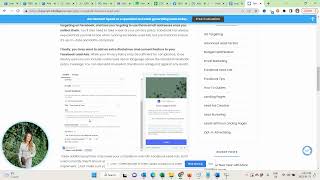
In this video I want to show you how to create the lead form, the custom opt in form for your lead generation campaign. You need to be in your ad where you have added your visual and your copy. Scroll all the way down to destination, you'll see instant form and then you click on create form name it accordingly to your free resource. So free business plan and then the form type is more volume. Next we go to the intro and we actually remove the greetings because we want to prompt people directly to the question it asks for the email Remove full name I personally recommend only asking for the email address because you'll have a much higher opt in rate which outweighs the advantages of being able to send personalized emails in the portal. You have your template for the lead form copy.
And we always want to ask for people's best email address because on Facebook people have the email that they use to create their Facebook account or use to log into their Facebook account as the default. And if you don't specifically ask for the best email, they will just give you this older email that they sometimes don't have access to or not frequently reading emails. So this will harm your opt in rate if you don't call people to action to the action of giving you actually their best email. So here you see Free Business Planner Valuable resources and tips. What's the best email to send you that? Perfect. Now we have the privacy policy. You need to link the privacy policy from your website and ideally also add a custom disclaimer to be fully GDPR compliant. Now please note that I am not allowed to give any legal advice here. I'm not a legal expert. You need to consult with an expert if you're unsure about how to do this. I can just point you to a resource that I find personally helpful. But again you need to verify with ideally maybe the person that writes you your privacy policy, your lawyer. How you need to write this best so it's in alignment with your privacy policy and you are compliant with GDPR if you're advertising in Europe or you know there are also rules that might apply to your specific country. So you need to make sure to be aware of the privacy laws of your specific country and that you adapt your privacy policy and your disclaimer your custom disclaimer according to what's required in your country. So here you can see an example of what that looks like. You can add the custom disclaimer Email Usage and Terms we promise to only send the best emails full of useful content. But if you ever disagree, you can Easily unsubscribe anytime. Here you can see this is what this looks like. You again ask for confirmation if they definitely want to receive the email. So you need to specifically opt in here.
Once you've done that where you edit the additional disclaimer. So.
Here is your consent text.
And we actually have our lead from thank you screen. So this is the famous place that we can use to in addition to collecting people's email email addresses, grow our Facebook group or Instagram account as well. So here in the copy template you see.
What we would want to say there.
We would want to say thank you your freebie. So your free planner in this case.
While you wait tech out my Facebook community. Just click the button below to get their insight. There's a surprise gift for you.
You don't have to necessarily give them a surprise gift in your Facebook group. The idea behind this copy template is to make you understand that you would want to entice them and give them a reason why they should join. It could be a surprise. It could also be where you specifically highlight the benefits of your free Google. You say you find a ton of valuable information, free resources, connect with like minded peers in this free support community. So just give people a really strong reason for why they need to join and then you can here have visit website and this is actually where you would want to grab the link of your Facebook group, your free one and then paste the link in here and then adjust the copy here to say.
Check out the free community. Now you can fully customize this to your needs. And if you would want to send people to Instagram you would just insert the URL to your Instagram account in here.
And you would slightly tweak the copy tools like that.
So.
Let'S connect Instagram and here you can see in delete from templates you also have this copy here. While you wait, check out Instagram, follow your insert and DM me the word gift for a surprise. Again, you don't have to give like an additional free gift on top of the freebie, but you want to give people a really strong reason for why they would want to follow you and check out your account. Typically what what we see is people have really good cost per lead if they have a really good freebie and then if they have lower than 30% of people joining their group and if they just can't seem to get their follower count up on Instagram, it's because this copy is weak. So if you are not sure what you should write here, post in the group and ask for feedback, right? Because the problem is as soon as you click Publish, you cannot edit this. And if you want to edit it in the future because your follower count doesn't increase or your group doesn't grow enough, you know, in a high enough percentage, you would actually need to create a whole new lead form and you would need to re set up the integration with Zapier or make. Which is why I recommend if you're unsure about what to write here, definitely ask for feedback in the group. But once you're satisfied, then you click Publish and you're done. And the next step would be to actually publish the ad.