Playstation Portal - Do you need it?
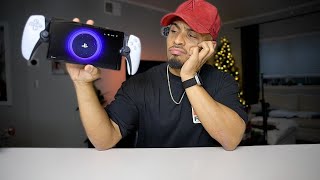
Sony's PlayStation Portal is an 8-inch handheld that streams PS5 games over Wi-Fi with virtually no input lag, but the visual quality often drops to 720p or 480p, it requires expensive Sony headphones, and at $214 plus headphone costs, it's a niche product for shared-TV households or gaming during downtime.
Chapters
Sup? So my last video, it was very interesting because feedback showed that the PlayStation unboxing was a hit. Going through all the comments, looking at what everybody said, loving the ambiance with everything, the footage, the style of the video, the content in general. I mean, okay, why not? Last video we did the PlayStation unboxing, the Slim version of it, and I enjoyed that video. So you know what? I figured we're on a theme here. It's almost Christmas time and people want to know about the newest products coming out, especially with Sony and their PlayStation. So today we're going to take a look at the PlayStation Portal. So I'm a little late with this. This was released on November 15th. I placed my order back in October, got it delivered to Best Buy for, for in-store pickup because I was going to pick it up on my way to work. However, Best Buy had different intentions for that. After a week has been gone by and there's probably numerous PlayStation Portal videos out there, I don't really care. I want to unbox it and get my own experience with it and take a look and share my thoughts with it. For a real quick sum up with this, if you guys do not know, this is a remote player. This is not like a PlayStation Portable PSP back in the day with the PSP Vita or the OG PSP. This is not like that. This is not a standalone console. This is an accessory, if you will, a remote controller to expand upon the PlayStation. So take note of that. And it also requires Wi-Fi to use. Upon looking at the box, you would think that this is what it is and you're going to be playing a PlayStation PlayStation 5 on the go by itself, but it is not like that. If you turn to the back here, they do put a PlayStation on the back of the box there indicating that, um, this does not work alone. It's gonna need a PlayStation. And also in the fine print here, PlayStation 5 required. So the boxing is feeling just like the regular PlayStation 5 box. Uh, I need to do both sides. Probably do both sides. Hopefully this is a lot easier to take out than the PlayStation 5 ones because that was a little brutal to take out. Okay, cardboard. Oh, this is a pretty sleek box here. Thick packaging, says PlayStation on top, and the little tabs here, which is pretty cool. A little attention to detail like this makes unboxing go a long way. Sliding out, it's almost like a shoebox. PlayStation on the front. And a little tab here to pull. Here we are. Of course, you got your cables in here. Now, this only comes with the USB-C, no wall mount adapter, brick, whatever you want to call it. But I mean, we have plenty of those. I don't really hate on it. Some people get annoyed that there isn't one, but it is what it is. And here we are. Okay, slide this bad boy out. I'm gonna hold it upside down just to show you guys first before I fully take it in myself here. But this feels just like a DualSense, literally like a wide DualSense. This actually feels— it's pretty light. It's not as heavy as it looks, and you would think it's kind of cheap just based on slapping a screen in between a DualSense controller. It's actually pretty comfortable in the hand and it feels, it actually feels premium. It doesn't feel like a knockoff or something off of Wish or eBay, but it does feel good. Ooh, sweet sound. I'm taking it and comparing it to a DualSense controller here. The joystick is a little smaller here, which I don't think, it feels different but not too different. Now with comparing the Portal to the Switch OLED, You can see it's quite a different hand grip difference there for the two. This is a lot wider. Then you're coming in here, narrow. I never really cared for playing the Switch handheld. My fingers just don't kind of— I feel like my hands are too big for this, so I do get some hand fatigue in this. Whereas you're gripping the DualSense and you just have that good comfortability behind it. And this is just all going off of feeling right now. I haven't even played it yet, but it feels substantially better in my hand, in my opinion, at least for me. Set this up real quick, take a look. It feels interesting because when you're playing this, it almost feels like you want to be on the Switch. So when you want to think circle is A, but yeah, it should be touchscreen too, right? The touchscreen aspect of it is pretty nice. I do like how it has the glowing LED here on each side, whereas the DualSense had it up here. This has it along the grips. Unfortunately, this does not have Bluetooth capability. In order to get wireless audio, you have to get Sony's proprietary headphones, which is the Pulse Explore or the Elite. Now an interesting thing about the LCD is that it is 8-inch like I was saying earlier, and it does have a resolution of 1080p which goes up to 60 frames per second. Downloading the update. Now we're going to install the update. Updating controller device software. Updating PS Link device software. Oh, that's right. So Sony is going to be doing their own, I guess, Bluetooth type support for audio, which they're using as PS Link. So I'm assuming that this is probably updating latency, probably lossless support. It's probably only going to be useful for the new headphones to come out. All right, now we need to scan a QR code here. So on our PlayStation app, we're gonna use this, the QR code. Looks like it linked both. I got two PlayStations, but this is the newest one. Success! Now it's connecting to my PlayStation. Can't connect. Oh, I guess I need to enable Remote Play. Alright, so I enabled Remote Play on the PlayStation. Let's see here. It's connecting. And here we are. So far latency is non-existing, honestly. This feels pretty good. So as you guys could tell, there's not much latency between the Portal and my TV, and I have an LG C1 77-inch. And this, I mean, feels— obviously I'm right next to my console, which is over there, but it feels pretty good. So if I jump in Spider-Man, do Miles Morales, oh, you can hear the crackles in it because the stream is— the quality of the stream is pretty Yeah, you can hear the crackle of it. The volume is pretty good. It's not very bassy, it's very treble. High-end heavy. Oh yeah, you can see like the artifact around Spider-Man as you're swinging. I mean, there's no latency as far as the controls go. I read MJ's front page about Simcaria. Not while you were swinging, I hope. I mostly got to stand around taking pictures. Sounds like a nice break, as much as the work trip can be. Oh yeah. Alright, so this feels pretty good. It's no lag in the actual game itself. The resolution just sucks. It's kind of downgraded. It's probably either 720p, but I feel like it's like 480p. It's not the 1080 that's on here, and I'm not understanding why. I'm literally by my PlayStation over there. Now, this isn't recommended to ever play, but let's give a try with Call of Duty. I mean, it's cool that you're having your PlayStation in your hand. It's all in one. You don't have to get a controller. You don't have to get your laptop or your phone. It's all in one. I don't know if you guys can tell, just the quality of the stream is pretty it. I'm pretty trash at Call of Duty right now. I haven't played this— I played like maybe 3 matches of this so far. It's been a hot minute since I played. I'm not gonna lie, it's kind of hard to see on the screen. Who's who? Trash, trash. I'm trash. You can feel the haptics in here, which is pretty cool. Oh, he got a scope. I mean, if you look at the screen up there, it's definitely a whole lot clearer. And without me looking at the actual remote play Launch the cruise missile. This feels really good. Here we go. Damn. First look at this, I don't hate it, but I can also understand where people are coming from with, if only you could do more. Now it is as it is, a remote play, and it's doing that, but it could be doing that a whole lot better. As you saw, I was standing next to the TV with my console right there plugged in, and I was still getting network issue. Quality was dropping down, and you could see it was a little choppy at some points. Who's this for specifically? As many people say, the dads, those who share a TV, somebody wants to play the PlayStation, but then somebody wants to watch a movie, or you have kids and you only have one TV. You get what I'm saying. This is for that person who can go sit in the other room and play PlayStation, play God of War, play not Call of Duty because it's a little dicey there, but play maybe an RPG. RPGs don't require much of that time-sensitive, well, turn-based RPGs should be good. It's for those people. For me, I have 2 TVs. I kind of do what I want to do. Don't tell Fumisis that. But I will give this a try for a week just to see. I might return this. I'm not 100% sure. I don't really remote play. The biggest thing for me honestly is for work because I'll go to work and sometimes I have some downtime and I want to play a game. I could easily play my Switch, but there's some games on my PlayStation I want to play. So I want to give this to try at work. Hotspotting, on the other hand, I— unless you have 5G and you have perfect connection, probably it works. I'm gonna test it for myself to see how it works in my conditions, in my area. It's not gonna work the same for everybody, so I'll see how it works at work. That's where I would utilize this the most. And if it doesn't work there, then for $200 plus tax, I think I paid $214 total, that's including the sales tax, without headphone access because you need another $200 or $150 to pay to use the headphones to connect to this. So you have almost a $400 accessory to your already $500 console. It's a lot of money to be throwing at just to play some PlayStation games, which already cost $70. This has just been a first impression on the PlayStation Portal. Comment down below, let me know what you guys think of this. Um, what do you guys feel for the PlayStation Portal? Do you need one? Why not? Why do you think it's good for people? Could Sony do better? Obviously bring back the PSP, which was a hit, but they don't want to make two different video games for two different consoles, which I can get. I just wish this could do a little bit more. I wish this could be unlocked hacked, and then you can stream YouTube videos and watch other stuff, maybe get on social media if you want to. I feel like this could be so much more, but as of right now, it's pretty limited. I'm trying to get 1,000 subscribers. Um, this is like my 4th, 5th recent video. We're gonna see where this goes. I'm excited. I like doing this kind of content. Thank you guys for watching. I'll catch you in the next one. Peace.
More from Justin










How Women Are Taking Back Control of Their Sourdough Bread (And Saving Hundreds).