The Nintendo Switch 2 – Unboxing & First Impressions!
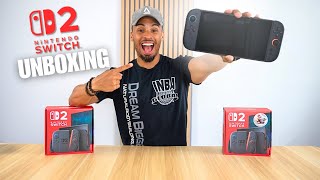
Justin Page unboxes the Nintendo Switch 2 and Mario Kart bundle ($499). The new console has a 7.9-inch LCD screen, 4K/120 Hz docked output, and 6.5-hour battery life. Joy-Cons are larger with a matte finish, and the bundle saves $50 on Mario Kart versus buying separately.
Chapters
Ah, what is up YouTube? It's your boy Justin. It's been a while since we've done an unboxing, but today is a very special one. Why, you might be wondering? Well, if you guys have been following the mainstream as far as the video game world, you know that today is the release day for the Nintendo Switch 2. So I got my hands on a couple of them. I may or may not have bought 4, but— Well, it is almost 1 in the morning And currently we are trying to secure some Switch 2s. But did we? We did! We got one Switch there, we got another Switch there, the missus got another Switch there. But biggest thing is, shout out to this guy right here, Jake Randall, right here. This guy here is the GOAT. Watch him every time that there's any consoles being dropped. This guy right here always knows what's going on, really educates everybody. Love bullets there to you too, bro. Thank you so much. We're still in it. We're 3 in. Let's get 3 more. Shout out to Jake Randall because that guy, bro, Jake with his live stream and how to be able to navigate to pre-order these— genius. Love that guy, super cool kid. Definitely give him a follow if you guys don't follow him now. But we're gonna get into this. I ended up going with Walmart. Walmart actually delivered these by 6 AM. Crazy, right? 6 AM, they were already at the front door. So I'm super excited, I'm pumped just came from the gym. Enough talking, let's unbox these. So here we have the Nintendo Switch 2 with the Mario Kart bundle. This one, it's weird why they did two different packaging. I don't know. So I got the Nintendo Switch 2, just the regular console itself, and then I got the bundle with Mario Kart World. Biggest difference is that it's $50 of a difference. Now you've got a $449 price tag for just the Switch alone here, but then you have a $499 price tag for the bundle, which is crazy because Mario Kart itself— these games are going at $79.99 plus tax, so you're looking at like, what, $85-ish for a video game when you could just get this for $50 added in here. So it was kind of a no-brainer to get this one if you were able to get your hands on this. These kind of sold out rather quickly but I was able to get my hands on another one so— I'm not a scalper just disclaimer! Needless to say let's get into this it's crazy to think that after a decade we've been waiting for another revision of the Switch to come out you know the predecessor then predecessor? Is it predecessor or precessor? Predecessor what's after... For the next generation console to come out it's here but what's new what's changed is it worth your money let's find out first off rip here Box looks good. Mario Kart, like I said, is included into here. It is a download code. So physical media seems to be going out, guys. It's— we're getting to it. It's all going to be digital at this point. So count your blessings with the physical. Wait. There we go. Nice, neat, and organized. Got our Joy-Cons. Oh, that feels satisfying. Good clicks there. These feel really good in the hands. Nice and smooth. Good texture here. I can already see that these will get scratched up just based off of the material. I don't know if you guys can see this here, but it does look like— I can already see some type of scuffs happening just because of how it's got like that matte finish, which I rather the matte finish over the gloss. Because I hate high gloss because of the fingerprints and all that. But you can already— I can already tell these are going to get scratched up here. Here we go. We're going to get into this in a second. You know, you always got to go through everything else in the box. Here we got our Mario Kart. It's got the download code. It's going to be a scratch-off and peel. Again, no physical media in this. Sad to see, but $80 game right here on this piece of paper. We have our HDMI Ultra Speed. This is going to be for our 4K resolution games that we're going to have now, boys and girls. 120 frames per second. This is going to run nice. That's actually one of the biggest things that we— well, I can't say we, but majority of the people have been wanting. It's just higher resolution. We got our grips here. So every Nintendo game that comes out, you know, they always have a gimmick. But for the Switch 2, we got these Joy-Cons acting like a mouse. So we're going to connect these in, color coordinated of course. Pops right in. That's satisfying. To remove it, there's going to be a little tab up here and you just push in the tab. Wait, I lied. What in the hell? Okay, some of you guys can tell here, this just literally clicks in. Boom, that's it. And this is going to be your mouse. It does have a little rubber It's not really rubber, it's like a soft plastic, almost, um, almost like a polyurethane type of feel to it. It's just going to be your mouse when you're playing your games here. I can see that scratching up things, so that's interesting how that's going to be. In here we have our— what is this called again? The last one felt really narrow, like you were kind of holding like this playing the game, so It was very uncomfortable. Oh, that was cool. It's magnetic. Oh, that's cool. Yeah. So there's a little eject button here. That's satisfying. Oh, man, that's— that's nice. Hold on. That right there alone has got me all— oh, to take this off, you don't just pull that off. Don't do that, guys. Don't learn from my mistakes. The eject button pops it off. Oh, that's so much better. Wow. That's actually really nice. This actually feels pretty satisfying. I don't know why that got me so hyped. I don't know. It's weird. We got our USB-C cable here, which is going to plug into— which connects to our charger. Of course, there's no brick, but psych, there is a brick. So now they have included an actual brick. This is pretty girthy. Pause. An actual brick instead of it being that long cable that came with the original one, you know, that probably got frayed, messed up, and you had to buy a new one. Now we have an independent wall brick here with our cable. Oh, this is nice. That's, that's premium right there. 100 to 240 volts. All right, here we got the dock. Oh, this looks futuristic. It's got gloss plastic on the inside. I don't know if you guys can see this. And you got your standard thing, just like the regular Switch. You know, it had the LAN so that way you can hardwire it for your wireless. It's got the HDMI output, and we also have 2 USB Type-A's on the side here. Interesting that they didn't put Type-C's, or maybe 1 Type-C and then 1 Type-A. Um, kind of curious on why they went that route. It does have vents, so it's letting you know that this is gonna be a little powerhouse. I'm trying to remember the other Switch if it did have vents or not. So here we go. Moment we've been waiting for. Yes! Switch 2. It already feels a lot beefier in the hands. Beefier? Pause. Kickstand's a whole lot better, it looks like. Oh, that's so much better than that little freaking tab that used to come out on the other, the original one, and then it kind of got better on the OLED. This is a little more friendly. It's not as flimsy. It's— I believe it's aluminum. It feels like because it's got some good, good give to it that's going to hold it in. I'm excited about this part. Oh, yo, that's a lot better. That's a lot better than the rails. Oh, that's a lot better. And then this actually feels a lot bigger. Holy cow. Wait a minute here. This feels almost— feels like the PlayStation Portal. Like, it's got— this feels nice in the hands. Wow. I actually wasn't expecting this. Really sleek, really slim. I do like the all black. That's sexy, Nintendo. This is sexy. Wait a minute. I like this. Yeah, yeah. I'm feeling this right here. Okay, cool. USB-C on the top. Oh, they have one on the top as well as on the bottom, so you could charge from the top that way. Oh yeah, so if you're sitting down here, you guys had the issue when you're charging it and you kind of got to angle it because the charging cord is kind of stupid, so they put one at the top. That's cool. Volume button at the top as well as the power button. And that— I can't get over that. So you do have a 7.9-inch LCD screen. Compare that to the OLED, which had a 7-inch screen. But if we head over to Nintendo and we check out their technical specs. And you take a look at the screen here, and you got the 7.9-inch screen, 256 gigs of data that's baked into the actual console. I think it goes up to 2 terabytes worth of storage if you get an external. Wi-Fi 6. I'm not really sure why we're doing Wi-Fi 6. I mean, we've already been through Wi-Fi 6E, and we're now in Wi-Fi 7. So future-proofing yourself with this, Nintendo? I mean, granted, the games aren't that heavy as far as online Sure, Mario Kart. It's not like you're playing Call of Duty competitive, I guess, whatever. Let's see here, we got sick 4K up to 60 frames TV mode, supports up to 120 frames restriction, but it doesn't say if it does go up to 120 on handheld or tabletop, so it's interesting there. 5.1K audio, we got that good. 2 USB-Cs, which we have on the top of the console as well as the bottom. Got your audio jack there too. Battery life here, 6.5. I believe it was 8 hours on the OLED, so we're going down. Is that because of the LCD versus the OLED? OLED probably uses less energy. I'm not 100% sure, but I do know that— well, I don't know this, but I'm pretty certain that they're going to come out with an OLED model of the Nintendo Switch 2, because I mean, come on, Nintendo, it's a company, they need business. People are gonna buy. I'm I mean, yeah, that's just— I, I foresee that in the next 3 years. Let's turn this bad boy on. You know what I realized? It didn't come with a screen protector on. You know, if you get a peel off that plastic to get that satisfying— none of that was there. So it's interesting that they didn't put that on there. I already got fingerprints. I suck. Powering on here. Yeah. It's a little vibe. Oh, we are going to view the agreement, but we already accept. This screen is massive. I like the screen. The bezels around here though, it does— I hate bezels, not going to lie. I really wish it was more to the edge, but I mean, that's— it's not that— it's not that serious, guys. But this actually looks pretty crisp. Oh, this feels so nice. Just the— it's satisfying. But this menu vibe, if you guys remember that Wii menu, you know that was that— that was that jam back then. But this is more that modern lo-fi vibing, like it's a rainy day, we just chilling inside, I ain't trying to go to work, I ain't trying to do nothing. Uh, make you want to freestyle. Yeah, yeah, yeah, it's a vibe here. It's a vibe here. YouTube been right here. Bro, this is nice, bro. Dang, I like this. All right, so we're getting it set up here. Again, the music is a vibe. It's telling you how to connect the AC adapter to the top here, how to release the buttons. So like I said, don't do what I did. Pop it off there. Oh, what's on the screen? Oh, it's telling you how to do it. Oh, there's a little haptic feedback too. Eh, man, I ain't gonna lie, man, this is nice. It just feels really good in the hands, guys. I can't really get off of that. You know, some of you guys might be asking yourselves, is there a significant difference between the Switch 2 and the Switch OLED? Well, truthfully, the size itself already says enough. I mean, look at the difference between the two screen sizes here, 7.9 and 7 inches. Massive difference, and you may not think it is unless you got big hands or small hands. Small hands. If you got small hands, then it wouldn't matter. Actually, scratch that. Going from an OLED to going to the LCD, I mean, if you're always playing handheld, maybe. Well, probably not though, because the screen's a lot bigger. But if you're playing docked, you want performance, in my opinion. Just want to say that. There are some people who are wondering, you know, The docks, are they interchangeable? Well, let's test that out now. So obviously in the corresponding dock it is. It's a little wiggle room, it is what it is. Can you switch the Switch? No, you cannot put the Switch 2 in the OLED or the original dock. And you cannot put the OLED or the OG in the new Switch dock. Comparison-wise of the dock, you do have vents in this one. You don't have vents in this one, clearly, because this is not a powerhouse compared to what this is going to perform with the 4K and everything. In my opinion, this is a pretty big upgrade. First of all, the Joy-Cons itself is already big enough. I mean, look at the size of these Joy-Cons. On this thing. They're tiny, minuscule. It almost makes me feel like I have these gigantic hands, which compared to the Switch 2, it's— I mean, the Joy-Cons itself is already enough. I mean, this grip here, this right here compared to this, this feels so much better in the hands. Just feels much more premium. And again, wider screen. I like it. But that's just my two cents. So right now we are transferring data from my OLED Switch to the new Switch. It was pretty seamless. Once you update the Switch OLED, if you haven't already, it will say transfer to Switch 2. Super seamless. Put them right by each other and bam, here you go. Now we are at the setup here for complete. All right, we were at the home screen. So these are all the games that were on my Switch OLED. So looking at some of the settings here, getting into it, looking at some of the settings. We got our Switch Online. Remember how long this took? I wonder how— I wonder how fast this is going to be. Oh, it's actually pretty— it's pretty quick. It's right into it. Before, it used to load forever. I haven't used my Switch OLED in a hot minute, so I'm actually not sure, you know, what updates have been up there. If it— has it made it quicker, or is this like— is this just that quick? Oh man, I love this game. Oh, it's a free download! I will say that getting into the menu is Hella quick. Game chat. I don't have any friends, so now you can select your friends. I don't even know half these people, but we're gonna hit next. Create a chat. Of course nobody has game chat because nobody probably has the Switch 2, so I'm just by myself. I'm curious about the eShop because I remember it taking forever, so I'm kind of curious on how long it takes for both. Let's see. Oh, the icons are different. That's rounded, this is square. Little subtle things in the UI already in there. Look at that, already scrolling, everything's loading. This is still doing its original stuff, clunky, take forever to load. Everything here is just super seamless. It's all integrated. Look at that, and this is still loading. Come on, this is crazy, yo. Just, just this alone makes this update worth it. So let's take a look at this Mario Kart. Oh crap, this looks sick. Mario Kart World. Oh, this looks so dope. Get out of here, DK! If you guys are curious about the size of this compared to the Portal, it's, uh, it's pretty on par. Yeah. All right, so this is Nintendo Switch 2. This is what we've been waiting for. I don't know about you guys, but is it worth an upgrade? Hell yeah, this thing's worth an upgrade, bro. This thing is crazy. So much faster, so much sleeker. The ergonomics of the Joy-Cons, the speed of it, it looks sexy. Like, this Yep. Straw work, Nintendo. Highly recommend upgrading to this. I know it's a little pricey there. If you definitely can get your hands on one, I would definitely go with the, I keep saying definitely. I would 100% go with the bundle pack. That way you're saving yourself some money, especially with Mario being $80. Get it for $50 with the bundle pack. Not the wrong way to go. But if you want a physical copy, well, you're on your own with that. Highly recommend this. This is a little unboxing video here. Thanks for watching with you guys. Let me know what you guys think. Are you getting one? Did you get one? Should you get one? Let me know down below. It's Justin Page. Peace. Bruh, this song, dog. I don't know, I'm just setting up my Switch 2 and this thing comes on, bro, and it's like, how do you not try to rap while you set up your Switch 2? I got to say something. Uh, click, light it up, new screen, new phase. Switch 2 glowing this Got me in the haze, Joy-Cons in the hand, no cap, no delay. Boot it up, let your boy sit down, trying to play. Snap back to the menu, feel that breeze like I'm chilling in Belize. Cause that UI is so mean when I'm spitting and I'm heat. New heat, I ain't talking about the grease when we talking about the heat. Get the cartridge in, I click, clap.
More from Justin










How Women Are Taking Back Control of Their Sourdough Bread (And Saving Hundreds).