UNBOXING APPLE VISION PRO + SETUP!
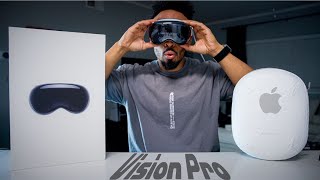
ER nurse Justin Page unboxes and sets up the Apple Vision Pro, weighing 620 grams with a 315-gram battery pack. He walks through the fit dial, Face ID setup, and Persona creation, then calibrates eye tracking while the device updates to version 1.0.2.
Chapters
Sup? Look, I know it's been a long time since I made a video, and there's a reason for that. Honestly, I work a lot. If you guys don't know, I'm an ER nurse and I work in the ER 4 or 5 times a week. And on the side, I do midlines and PICC lines, which I do outside of the ER. So I'm working every day, plus I'm being in the gym. So making content as I thought I was going to be doing, it's just not happening. So we have something special today though. As you guys could tell by the thumbnail, you already know why we're here. Let's get started. I don't know about you guys, but I'm really excited. Ah, this box is really heavy. Holy moly. Simple, but it's effective. I don't know how much this box weighs, but if you guys want size perception, Perspective. Perspective. Perception. I don't know why I said perception. You blew it. If you guys want size perspective, here's my 16-inch MacBook Pro box. Literally same height. So the box is simple. Box is really weighted. They said it's about 10 pounds, at least some people said when they were getting their orders. I actually went to the Apple Store to go get mine picked out, and that was an experience. First I got there, my appointment was at 9:30, and Nobody was there. I'm thinking it was going to be packed. There's going to be a line. Nope. All right, enough talking. Let's just get into it. Nice little tab here. You already know what we're going to do with the tab. Vision Pro on the side. Oh, there's another tab. Oh, fail. Yeah. Oh, I'm really excited. I don't even know why I'm excited, but I'm really excited. This is my first VR/AR— I just spat— first VR/AR headset I've ever owned, ever used in my life. So This is about to be a whole experience. Oh, it's so awesome. First of all, that's just so cool how it just pulls up like a shoebox. There it is. It's just chilling, just like on display. That is so cool. This has been rumored for so long. It's been in production for— I don't even know. I think I read something about the patent being done in 2007 and they've been working on this for over 10 years, 7 years, 10 years. I don't know. It's— they've been in the works for this for a while. And just to think this is a first generation product of something brand new that we have never used. For Apple, at least per se. I mean, I'll just say in general, because, you know, Apple is late to the party, but they like to do things the Apple way. So instead of Apple calling it their AR/VR headset, it is their Spatial Computer. Spatial Computer. Ah, it's got some weight to it. Ah, this is exciting. I can't wait. It's just weird that you have your own. You see the demos at the Apple Store and you're like, oh, those are cool. And then to have one in your own home is just like, this is mine. What? We're going to get into this in a second. Of course, you know, as a standard thing with any unboxing, we got to go through the box first and look at all the accessories. We'll pull this up here and we're greeted with two little boxes here. Let's start with the small box first. We have our— oh, this is the cloth, our extremely expensive cloth that I guess came with the other screens, but they're including it in this. And some say that this is a different cloth. Let me stand up for this because they say that it does say Vision Pro on it. I don't know if you guys can see that, but that does feel really good though. I'm sure gonna get cat hair and all types of dust in it. Oh, I'm sweating. I'm so, so excited. I don't know why. I don't even know what's going on. I don't know why, why am I really excited? This is weird. The pre-order, I was kind of like, yeah, I'll try it. I'll see how it's gonna be. Yeah, why not? $3,500 plus tax, that's a different story. But it's like, once I have it, it's like, this is I'm just excited. This is another light seal, it looks like. I'm trying my best not to rip all the packaging. I always save my Apple product packaging boxes. I don't know why, it's just a thing I do. I still have all the boxes from all my iPhones, all the way back to the iPhone 4, was my first iPhone. I keep everything, I don't know why. Light seal, extra cushion. I believe this is a thicker one than the one that's already in the box, so depending on your size, um, This is exciting. This here, usually I have a top-down camera, but you know, it's all right. We're gonna just do things different here. We're gonna have different angles over there and over here. Why not? Big one here. This is probably instructions. This is pretty thick. This is a thick booklet. Let's do a story time, guys. The way this see-through is here for the eyes, we're gonna get into that because that's, that's a very misleading thing there. But brand new product, so this is going to be very important with instructions, how to use this, because this is something we've never used before. For all the buttons and everything that's located. Well, not just where it's located, but the terminology. I mean, the top button is just a top button. It's nothing special. You know, they always have the side button, not the power button, those kind of things. This is almost like an Apple Watch hybrid. We don't use instructions, come on. We just use YouTube videos on how to do things, how to use this, how to do that. So this is the other headband. I don't know if there's a specific name for this. They call this the dual loop band. That is the terminology for this. It is actually relatively thick. Some people say it does look like a knockoff, something that you can get off Amazon, which I could agree because it's not very Apple-ish. And I do know that when the Vision Pro was first getting announced, a lot of people were thinking that this was going to be an additional price tag of one of like $100 just to get this. I'm interested to see what different knockoff brands on Amazon, what they're going to come out with. Battery pack. This, this is pretty heavy. It's got some girth to it. Great cable here. Battery pack. I think it's 2 hours, 2.5 hours worth of usage depending on what you're doing. It'll be interesting to see how you can really tax out the battery to see how much you can get out of it. Like if I'm going to be doing multiple things, editing videos, playing games, watching stuff, the different screens. It's, it's be interesting to test out. Aluminum, just like Apple's standard classic look. Pass-through charging here, USB-C, so you can always stay plugged in and the past too and still powers the headset while you can use this. You got a USB-C, C-rated cable here, and something that doesn't get included in many products these days, the brick. 30 watts? 30 watts. Unboxing Apple products is always fun because everything is just so well put together. The white, the aesthetic, everything's clean. There is a lot of cardboard here and a lot of paper. I'm sure it's got to be all recycled products, but it's Still, this is a lot of paper. What we all came here for, the Vigin Pro. Okay, all right. This actually feels really nice. It's extremely stretchy. The technology that they use to put this together, that commercial that they put up when they were going through and all the stitching with the machinery, I thought that was really awesome that how they, at least how they make this. Take this off here. The COVID is like a sock cap type cover. Handle with care. It's almost like a remnant of the— hold on. Just the thought of it, like Apple likes their bras. It's pretty hard. Material is— it's well put together. It's hardcover here. Super stretchy and microfiber inside, which you would obviously hope with this screen here. Is it washable? That's a very good question. I just thought of that right now. I don't know. Before we get into like turning it on and all that, you know, you just got to take a look at the product. You just got to— joy, the aesthetic, the look of everything here. Everything is connected by magnets. You have the, the seal here which is magnetically connected. Look at that, look at that. It does have weight. I will say it does have weight. How much weight? 620 grams is what I got here. I feel like the cloth is very important because this glass wraps all the way around and I already got a finger smudge on it just for from picking it up. The vents that suck up air, blows the air out there. I wonder if this gets hot. I wonder if it makes noise. There's so many questions I have. You guys are curious about how to take off the bands, which is interesting because when I was doing the demo— Coco, you okay? The girl didn't know how to take this off. I was telling her if you just pull the orange tab here, it'll release it. And I thought she was like, oh my God, are you like an Apple employee? I was like, girl. I thought that was funny though. So this right here is the Fit Dial. And as you put it on, it's real stretchy now, but as you twist it, it'll get tighter and then you can't stretch it no more. That's pretty dope. I got a medium if you guys are curious about what my size is. I do have a big head with hair, so— Take a look at that. That's just awesome. When you preorder this or when you order in general, you have to use a device that has Face ID because Face ID is using that scan and it's able to try to see what your size is for your head size, your face size for a proper seal. And when I woke up at like, what was it, 8 in the morning to do this for release day, for preorder day, waking up fresh out of bed and it's all dark, I'm looking like crap, and I'm like, oh my God, I gotta get my preorder in so I can get it in there. It was an interesting experience. That's why it's also important to get this done in the Apple Store, because I did have a lot of trial and error with what fits best for me with the seal, because I have a big head and I have a lot of hair. So luckily this worked. I think there was a slight change in my seal from my Face ID to actual fitting on it. So just be warned of that when you guys do take orders and have it delivered home. You do have that 14-day window to take it back to Apple and obviously get it resized or take it back if you don't want it in general. These are replaceable, um, I think they're like $100 online. And then, oh, this is a little cloth. I didn't realize this is a little cloth area there. There's little pockets there that slips in for that good fittage. Oh, so we're gonna get our battery pack here that is significantly heavier than your phone. Let's see, this phone is 233 grams. Battery pack is whopping 315 grams. This is not necessarily MagSafe. I don't think Apple called it MagSafe, but it does have like a magnetic looking type of gig to it. Dot to dot, maybe. Yep. And then we just twist it in and then turn it on. Oh yeah, there's Apple logo in there. The proper way of doing this is you take your thumb You're gonna grab underneath it. You pick that up and you're gonna put it downwards, stretch over your head, watch all your hair. You're gonna put it on and you are greeted with music and to tighten it up. And there's a picture of the goggles and it has dots all around it and basically it's trying to align your eyes with it. So it's telling me to press and hold the digital crown. And what it's doing is aligning the lenses. So right now I'm greeted with the hello sign that's on every Apple device. That's adjusting the lighting. So everything just dimmed. Look at the dot and tap your fingers to select it. So there's a dot that just appeared in the middle and it wants me to pinch. And then you feel the feedback in the headset whenever you pinch. So now different color dots appeared all around the screen. There's what, 5 dots that appeared? In different colors. There's a gray, turquoise, green, darker green, honey mustard, maybe dill pickle green, like a dirty dill pickle, maybe banana, banana pepper. So I just did all the dots. Now everything just like a glass gray fog and it's different color dots again. So this is just a setup for your eyes. You're going around looking at each dot and every time you look at the dot, You're pinching. And now I gotta do one more. Now it's making it really bright. So now it's all white and you have blue and purple dots. Same thing, looking all around. And it's just calibrating your eyes on how fast you're looking, where it's looking at. That is just so awesome. Just think about the future of what this could potentially be. I mean, we see like all the hologram things and the hologram keyboards that come out where we're using our phones and we're just doing this and then it's just right back to the phone. Like that could be the future. Right now we're capturing a persona. And it's in beta right now. So this is to help with the eyesight. Eyesight is how you can see the transparency of your eyes coming through there, which we're going to show once I complete this. So I know how to get started and it's going to be a video.
To set up your Persona, you'll remove Apple Vision Pro to capture your appearance. Take your time getting ready and make sure nothing's covering your face. To start capturing, hold Apple Vision Pro at eye level. Keep your arms and shoulders relaxed. Then follow the instructions. Turn your head to the right, to the left, and tilt up and down. Then you'll capture your facial expressions. Smile with your mouth closed, smile showing your teeth, Raise your eyebrows and close your eyes. When you're done, put Apple Vision Pro back on to see your Persona.
That actually looks— you can see yourself. Oh my God, I want to record this. That actually looks really, really good. Like, it really got my detail in my beard and my shirt. So you got Natural, you got Studio. In the studio, studio. So you could change the temperature of your look. I can make myself warmer, myself really bright, and I look like I am in peak golden hour. This is awesome. And then you can see your hands up there too. Oh my God. And it's like real time. You could see it. I mean, it doesn't look exactly like my hands, like, but— oh, then you have to select if you have eyewear, if you wear glasses. You can add that on there. Oh, that's cool. Kind of glass, they got square glasses, they got like Ray-Ban style, they got the Harry Potter looking ones. Oh, this is so freaking awesome. Let's see, software update requesting, questing, questing. So right now it's going to be updating to version 1.0.2. Had to think like version 1, version 1 of anything right now is This is so wild. Think of iOS 1. This is the infant stage of something that could potentially be something so phenomenal. And here we are today with just witnessing the foundation of what can be something in the future. So while this is updating, we're gonna let this hang out here. But this is just my initial reaction with the Vision Pro. There's so much to talk about with this. There's so much to show. There's so many possibilities of it. This is just initial unboxing with it. Sorry if this video is really long. I didn't know where I was gonna go with it and I just kept learning new things as I was going. And hopefully you guys learned something too. If you guys wanna follow me on the next journey of the Vision Pro, definitely hit subscribe button. Comment below if you guys got one, what's your favorite thing about it so far? How was your experience? Why you didn't get one? Why you did get one? I'd like to hear your thoughts below. Let's have a little chat down there. I know there's a lot of reviews out there and a lot of unboxings. I appreciate you guys for joining me with this today. I'm gonna go ahead and start editing this video so we can start getting on to the next part. Thank you again. This is Justin Page. Peace.
More from Justin










How Women Are Taking Back Control of Their Sourdough Bread (And Saving Hundreds).