In this Week 2 session of the Million Dollar Newsletters workshop, Nate Kennedy walks participants through mastering newsletter content. He begins by contrasting the curator model (research‑and‑summarize) with the creator model (original reporting), illustrating each with examples such as The Hustle (curator) and his own Uncommon Advice (creator). He then compares two platform choices: a full‑content website (which can host articles and generate ad revenue via AdSense and direct ad sales) versus a minimalist landing‑page/squeeze‑page that only collects email addresses. Detailed landing‑page best‑practices are covered – above‑the‑fold placement, concise headline and sub‑headline, social proof, minimal form fields, and removal of navigation links. Next, Kennedy outlines seven newsletter content formats – briefs, bullets, curated summaries, headline‑only blocks, daily analysis, topic deep‑dives, and shorts – and shows how they can be mixed in a hybrid layout to boost engagement (click‑throughs). He discusses cadence options (daily vs. weekly) and how the choice ties to business goals and advertising inventory. The second half focuses on workflow tools: Feedly and Readwise for content discovery and aggregation; WordAI for AI‑assisted rewriting; Copyscape for plagiarism checks; OpenAI and Google Bard for summarisation or article generation. He emphasizes a streamlined process where AI creates drafts, plagiarism tools verify uniqueness, and human editors polish the final copy. Finally, he advises participants to pick a content strategy, design their newsletter flow (e.g., using Beehive or ConvertKit), and set up landing pages before the next session.
Chapters
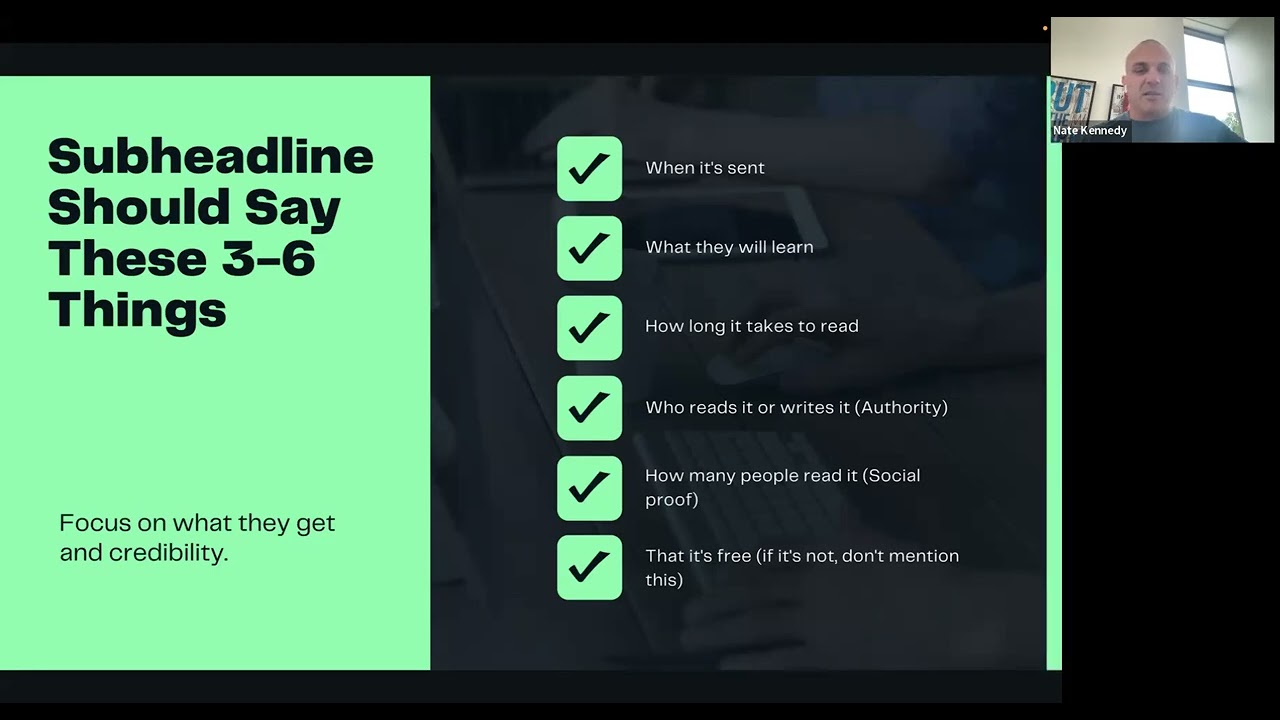
Cloud. And let's go. All right, so we're back at it. We are on week 2 here. So, uh, what we're going to get into this— as you guys know, we're in the Million Dollar Newsletters workshop, so we're going to dive in, uh, into today. We're going to get into content mastery for y'all. I'm excited for this. This is— I went through a lot of iterations to get to this point and what I'm gonna show you today. Ups and downs, trial and error, what worked, what didn't. Simplification. I'm a— simplicity is very important to me. So you'll see that as we go into this, I've simplified a lot of this to kind of like make it for the team to be able to do, make it duplicatable as well. And I'll also break down one of the bigger things that we learned along the way that saved us, saved us a ton of money through this newsletter business. We didn't do in the beginning that we're spending money on. So I'll get into that in the content side. So our focus today, we're gonna be on curation versus creation. I know we talked about that last week for you guys to kind of start thinking about what you wanted to be on that. Uh, we're gonna get into some different website options and we use two different ways that we do it. So I'll share those examples and then get into some newsletter layouts and kind of ways that you can build them out for yourself. Uh, talk about some sending intervals. Really, it just comes down to your goal. And how you're trying, what you're trying to accomplish with this newsletter inside your business. Then we'll get into creating content, what content to create and using AI for content. So a couple of tools, I'll show you exactly what we use and the team uses daily on that stuff as we, as we get towards the end here. So let's talk about the difference of a curator versus creator. So to reiterate what we talked about last week, so a curator is more of a person who is going to take content Uh, simplify, go baby, take 2 hours worth of content that gets researched and break it down into a 5-minute read. A creator is, you're more of a reporter. A creator for me, on the creator, curator side, you're more of a reporter. On the creator side, you're more of the person creating the content. So our own Common Advice newsletter is more of a creator, right? We're writing content daily that's original that's going out. So let's dive in a little bit bigger on that, a little bit deeper. So The curator is researcher or reporter. So, uh, I got an example on here of one of them, which is, uh, The Hustle. They, they're, they're somewhat of a curator on theirs. They do a little bit of both, but they do, they do a good job on both. And then we've got, uh, the— so the curators, uh, your value proposition is, hey, I'm going to save you, uh, 20+ hours a week by doing the research for you. So as you get into the where a lot of our newsletters fall right into this model. And from the conservative side to the health side to the business side, they tend to fall within this model where we're curating content and putting in front of them. Now the creator, which is my personal newsletter, Uncommon Advice, where you're more of the expert or the writer, right? So the creator's value proposition is you're gonna receive tactical articles on a specific topic or skill from me, right? Or from the expert. So you're creating the content, you're pushing it out, and you're building value in that manner. This one takes obviously a little bit more time, energy, and effort because you're writing the content. Unless writing's easy to— for you, then if you enjoy writing and writing's easy to you, then you're good to go and it, it, it might be a better fit for you. So with that, let's get into the content website. So we, I don't wanna spend too much time on that Curator Creator because I, I, we talked about last week, talked about this week as well. Goals for you right now, you should really understand kind of what model you're gonna start flowing to. So content websites. So Conservative Research Group is one of the brands that we have on the conservative side. We have a site, we put new content on that site every single day. We had two different editing processes that we go through, that we've gone through. The first time we had someone who wrote every single article for us word for word every day, spending a few hours a day putting content together for the site. And then now we've— the process I'll show you towards the end here is how we actually use AI to create that content now. So if you're creating your own site and you have your own content, you're going to build it out more like a blog, like a news media site. And the benefit, the benefit of you having this content website is you now have additional ad space that you can sell. So for example, on Conservative Research Group, we use AdSense. And then we also sell ad space to our advertisers that buy in our emails. So it does give you another level of advertising space that you own and that, that you can monetize down the road. Now there's also just having your newsletter being a straight landing page. So we've got a handful of these as well that are just straight landing pages. This is, we don't own this one. This is an example of one, 1440. And I wanted to also show you really the goal, and I'll talk about the landing page model here just in a second and what you wanna include in it. But really when they land on your page, they have the ability to subscribe. That's really it, right? It's the landing page model is more of a squeeze page model. They subscribe, they get your emails, your site doesn't really house any of the content. It's all really housed inside of your newsletter and that's where your advertising space is. One is much easier to launch. The landing page is, as you can see, is a much easier process to launch when you're getting started as opposed to the content website. So truly up to you what one you want to do. But if you're looking for speed of execution, it's a landing page model. And then as you get better and more fluid with what you're doing, you can always create the content website and go from there. So let's go into the next piece, landing page. Let's talk a little bit about how to structure your landing page for maximum conversions. And number one is stop position one above the fold. Right? So what you wanna do above the fold is I'll show— so join 1440, which just showed you that was above the fold. So really the above the fold is the part of the page shown before scrolling. Your copy, images, and forms should fit here. Some of you watching this are already in tune to all that and what that is and how to build these proper landing pages though. But just for the sake of reiterating it, 'cause you know what, sometimes we forget things that we don't, that we knew were easy. So reiterating some of this now, We actually on the newsletter prefer a lot of times we're just asking for email only. And because the more you ask for, the lower your conversion rate tends to be, right? And so we really are just asking for email in this. And then we have only two options on a landing page. So those two options are one is to enter the email and subscribe, right? The goal is to subscribe or two, it's exit the page. So our landing pages, we're removing links to the menu, about page, past newsletters, et cetera. So really on that landing page that you're driving traffic to is, is not gonna have any of those features. And then your headline, and I'm gonna get into some headlines and subheadline benefits here in a sec, but your headline should explain the value that you provide to your readers in a simple way. Like promise the reader something they want, show how your newsletter solves a problem. You want super quick punchy headlines. We don't need, you know, in the direct response world, our headlines are gonna be way more advanced and, and strategic. We don't really need to do that inside the newsletter space. Which is a nice feature, but you can also test some of the other stuff like more in-depth headlines, but this is what we've seen works. Subheadline benefits, we use multiple money things to, we use multiple subheadlines when we do this. So with that, so let's talk about subheadline should say. So there's 3 to 6, you want to use 3 to 6 of these things tend to be inside of your subheadline, you have your headline and then your sub. So your, your subheadline is super important because one, it's gonna tell people when it's sent, they're gonna learn what they will learn, right? It's gonna, what it, what is sent, what they will learn, how long it takes to read, who reads it or writes it, kind of the authority, right? And, and behind it, how many people read it, which is kind of, is a social proof feature. And another one is that it's free. If it's not, obviously don't use that one as well. And we want to focus on what they get and their credibility inside of this. So with that, let's emphasize how fast and easy it is for readers to get that value. So for example, here's a great Morning Brew. We've already talked about them plenty as a case study here, but become smarter in just 5 minutes. So when you see that on the headline, and then if you look at the subheadline, get the daily email That makes reading the news enjoyable. Stay informed and entertained for free. So it's got a couple of those pieces, but one thing I want to point out here is become smarter in just 5 minutes is better than become a smart investor, right? So there's a difference between those two. Now let's talk about another one. Make it believable. Use social proof and authority. So I've got Milk Road on here, which is another example. So an example here would be ways that you can add proof Hey, we read by professional investors at— go read by professional investor Goldman Sachs, BlackRock, Citadel, or trusted by 10,000+ investors. Those are two different things that you can use. And for example, I show Milk Road here because they also say join 250,000 subscribers. So they're telling you how many are there, but they also have read by top executives at some of the big crypto pieces, right? So, uh, Coinbase, and they got Binance, right? So that's some examples as well, that's how you can leverage that landing page. Now, one thing I do want to pop up back here on is, if you look here, it is, they're also using imagery and we do the same thing on some of, we do it on some, not on others. We've tested. So, you know, one thing is a nice image of maybe a, and of what the newsletter looks like when they get it. Obviously you can put that on there if you want to add some, some eye candy. So 7 newsletter content strategies. So that's the layout. Now I want to get into actual, or that's the landing page layout to get subscribers. Now I want to get into the content strategies that are going to be valuable for you going forward. So, uh, number 1, it's briefs. So Morning Brew does this, Hustle does this really well. Briefs are short stories about current events. It mostly consists of a headline and intro section that is 150 to 200 words. It could be a content piece, but if you look here, This, this section here is an example of a brief, the state of RTO, and it's a short segment breaking down exactly what's going on. It's 150-250 words talking about it. So the reader a lot can get the gist of what's going on in that brief. And then they can also read more if they want to go read a larger breakdown of what's going on. But that in itself is what a brief is going to look like inside your newsletter. These are really good. We use some of these in some of our newsletters. We kind of mix and match depending on what we're doing. And I'll use this brief, uh, in one of my newsletters where I'm the creator of, uh, this next section is bullets. So this actually is a screenshot of one of our newsletters. Uh, these are summaries of the news or different content that is fun or useful. We combine briefs and summaries in most of our newsletters for us. So, keeping up, so for us, this bullet, it's, as you can see here in these bullets, it's, it's just a quick bullet and we're linking out to the actual article. And then from there, these bullets are super simple. So these, these articles here can link to your site or they can link to someone else's site. It doesn't have to necessarily go to yours. If you have your own website and content like we talked about, then yeah, it, it would go to that. As bullets in themselves are really just quick and pointy, pointed to the point. So it's a little bit more than just a, it can be a little bit more than just a headline. And as, as you're building it out, right? So if you look around here, our bullets a little bit deeper than just in this one here, right? Some of them are short, some are a little bit longer, but you're kind of giving a description. They know what's gonna happen there. Now, Curated summaries. So this is our newsletter, Financial Maverick. What we're doing, it's a little bit bigger in bullets because it's more of a quick little summary, and I'm actually going to show you how we do these. Uh, super smart, simple. You link to an article in the headline and then you summarize a little bit below. So it's, uh, that really secret sauce is great curation. So you want to make sure that you're curating great content, and as you curate great content, then it makes this piece much, much easier. So You wanna keep it hyper relevant to your subscribers. Very, very important when you're doing the curated summaries. So a little bit longer as you can see in the content side, and then you can just do straight headlines. So this is another one of our newsletters. We really are just, we have put content on our site daily, and then from there we take the image of the blog post of the content piece and we take the headline and we build it out. So we're not, we're not, We're really just taking the content that we have, we're creating, we're putting the image in there, and then we're creating, just taking the headline of that article and put it in here. You see, we deliver it in 3 different ways. So we got image on top with the headline underneath. This is actually an ad, an email ad. We'll get into this section later as we get into monetizing. Now, then we've, as you see here, then we've got 3 different images and we got the headline next to it. And then underneath we've got kind of a headline section where it's just headlines and that's it. So we're giving them a lot of good content, and this is one of our better performing email deliverability and revenue driving newsletters, this layout is. And regards to the engagement, everything we get works really well with this. So it's super simple with the headlines. Now you don't have to, you can create this entire layout and it doesn't all have to be your headline or your content piece either. I've seen people do the same model. But they've linked out to articles that were outside of their website, right? So for us, we're taking 5, 6 articles for utterance and you link through. Now you might, I don't know if some of you may notice, some of you may not, but we also have, there's a couple components in this headline piece that are making us money. So this second article right here makes us money. This one right here makes us money as well. So there's different things in here that we can leverage to generate clicks for our advertisers or also generate revenue from us on a PPL or PPS basis is at the same time. And that same thing goes for these other— so the same thing goes for this curated summaries. Same thing goes for bullets. You can obviously build revenue inside of those. Now, daily analysis. This is— I'm coming back to Milk Bread because they, they are really just kind of the most recent case study. They did a phenomenal job. These are— they do a daily analysis of the industry. You need more of an expert, right? You're more of an expert in this, on the industry, and write a deep analysis of it daily. So Milk Road uses this newsletter style for— and sold, as we talked about previously, for 8 figures in 10 months because they went deep into the topics and the content, and they're writing their analysis of what's happening. So that works well in the financial space. You write the analysis of what's happening. If you have real estate, you can write on the analysis of what's happening in the real estate side, right? So If it's niche specific, you're really into the topic. This is kind of a deep analysis. Daily analysis can also be, you can be a more in-depth reporter on this process, right? Taking content of what's going on and writing your information and what you believe is happening inside the market, your commentary from that. So another great way to go about it. And then topic deep dives. So topic deep dives is more of the expert creator. Sections. So for us, we send a newsletter weekly called Uncommon Advice, and we have 3 different deep dives that we do inside of that newsletter every single week. Here's one, organic versus paid traffic. So, you know, these are different models. These are 7 different models that you can create content inside your newsletter going forward. But the— I know we're talking about content shorts, so Another one is Shorts, right? So for me, this is another creator. If you're the creator of the newsletter, if you're the creator yourself of the content, coach, consultant, I do this inside of Uncommon Advice and we send a weekly digital roundup of all of our content, not all, but our best performing content throughout the week that got the most engagement. And we're driving people back to those pieces as well. And all this stuff links to our social videos or any content or podcasts that launched, right? So we're doing that, and that's one, to drive more engagement over there as the Coach Consultant, but two, also to, to curate the content. Because sometimes people in your newsletter aren't following you online, so you can help them grow that. Now, this is something that you— we, we actually do this in our news on Sundays as well. We actually— so instead of some sending fresh content on Sunday, we will send the best of the week the best performing headlines, the best performing content, and give them, hey, we can review on our daily news stuff. So it's another way, it's a short email, super quick to put together. It's leveraging content that you happen to already sent through the week. So let's talk through that now with that, all of these models, we got the hybrid model. That's, we use a little bit of all these features and as we get into If you're using Beehive or whatever, ConvertKit or one of these other tools, we're, we're gonna get into building that out and building your newsletter flow out. And I, I'll show you some examples. Well, we showed you some examples in the screenshots. So for us, a great, and I'll be able to show you some, some additional ones here, but for us, like for, we like to use a hybrid model. We're gonna leverage a little bit of, of both of different features inside of those. So, and the reason being is it increases engagement. Which is the most important metric for us is clicks inside of email, right? The most important metric is clicks. And for us, we're gonna put a good high quality content piece in the front, on the front. Then we're gonna create a section where we have more of a summary and then we're gonna have a section where we just have some headlines and bullets real quick, right? So we like to leverage a bunch because it allows us to get some good high quality content inside of every newsletter. And the curator model to make sure that we've got the enough, one, enough content, two, high quality information, and three, you're going to increase kind of engagement through that process. So we use a hybrid model. We use, you don't have to just choose one of those seven. You can pick, right? So you can pick, hey, I want to use a brief and then I want to use some bullets and then I want to use a couple of headlines. So you can break your section out and build your newsletter out in any way that you see fit, that you prefer, that you want. So maybe on the brief side's gonna be something you write every day. In the summary section, it's gonna be content from other sites. And then the bullets and, or the headlines will be content from around the web potentially as well, right? So there's different ways that you can leverage it. It can be all your content, it could be a mix of your content, no one, it's other people content. It could be all other people's content. It's really just the model that you're gonna pick and choose. To run with. So a lot of people ask about sending. So let's get into the sending plan side here. This is, we send our, so if we have our news brands, we're sending daily and we send that, we, we send daily because the more we can stay in front of them, the more advertising space we're selling and, and whatnot. So weekly is another model. That I do my weekly one. So for example, I send an Uncommon Advice deep dive once a week, but then I also send a digital update, which I just showed you, a weekly roundup as well to that. So I'm, you know, a weekly, the deep dives tend to be something that is just once a week. Maybe you're doing more of a high quality deep dive into a specific topic once a week. You can do, send that weekly. Or if you're doing a, you know, one thing that we tested, actually tell you something that we tested that didn't work for us was on the conservative side, we were building out a second level of content, which were like in-depth, how to win our goal. And it was a how to win the argument. And so what we were doing was in-depth articles once a week that basically was breaking down, hey, here's the big topic. That's being debated in politics today and right versus left. Here is how to have a conversation to win that argument. And so we were laying it out with facts and figures on how they could win it. We did it. We tested that for a long time. It didn't quite work for us in the way that model, but it was valuable content. I've seen other models use it that are doing well with it consistently. So it didn't work on our conservative side, but it does work in some other niches as well. So And then you can custom, right? You can use what you can do a model of them. Maybe you wanna do a deep dive once a week like we do. Maybe you wanna send a digital summary and then maybe you wanna send a sales email if you're a coach consultant, or maybe you wanna send daily news once a week, right? Or send a recap of weekly news as well. So there's different ways that you can leverage that. Now, how to manage your daily content. So content can be overwhelming. Those are the different processes for content. But managing it can be overwhelming. I know it was for us. And so I had to find some tools that made it easier for us. And the first tool that we started to use was Feedly. And I talked about this previously because Feedly, you can now, and it's getting better with what they do, but you can import insights from anywhere, including news sites, blogs, and newsletters. So you can take content from any, any place out there, plug it in, you can grab their RSS feed and it's going to give you that information on a daily basis. So you pop this up and you say, hey, I want to look at my marketing content today, or I want to look at all the financial bucket today. And it's going to allow you to read all that information and see it so you can pull content. So Feedly, one of the two things, it's going to pull that content in so you can see it. If you're cur— and if you're a curator, you're able to go curate that content really, really quickly and put it into your newsletter. The best of the best. If you're a creator, it's going to show you what the hot topics are happening kind of for that day and other people are writing about, so you can add that to your flow. Now here's a tool that we just started using, I mean, real recent. And by the way, real quick, if you're not muted, please mute yourself. So Readwise is a tool that basically allows you to save everything in, in one place. So Feed that we've always used it with RSS feeds and different websites and blogs that pulls that content, news sites that pulls content in. With Readwise, we can pull an email, we can push email into it, we can push, uh, Twitter into it. We can get RSS feeds, we can get videos. So there's a lot of different things that you can pull and then you can later shortlist and then start building your content calendar out from it as well. So just a super simple app. Both of these are apps that you can use. Now, once you have all this content, how do you curate it? And this is what I want to talk, walk you through is how we're using AI to curate the content. And so one of them is Word AI. So Word AI, if you guys have not used this, this is going to reduce, this is what, this was a big find for us and it allowed us to create content faster. So we were able to create, take, we used to have a writer that wrote content for us every single day, 5 to 6 articles at multiple writers doing that.. And then we were able to say, all right, well, instead of writing, they were going out looking at what's happening in all the current news in the political space and then writing their own content around it. So what we started doing was, all right, there's got to be a better way. So we hooked up with WordAI. We then started, and I'm going to walk you through how we do this, would post that article inside of the— inside of— we'd post the article in AI, copy it in there. It would rewrite it for us and then we would go check it with this next tool. So it was writing fresh articles for us that have not been posted online yet. And the way that we did that to make sure that we were— the biggest thing is we don't want to plagiarize, right? If you're going to do this to put content onto your website, you don't want to plagiarize, you don't want to copy, it's just going to cause issues for you. So don't, you don't want to do any of that. So With that, it's, don't copy— Copyscape is a tool that's going to go out there across the web and see if it already— if that content already exists or if it matches too much and all that. So it's the tool we use, super cheap, just to make sure that our content is unique. So our writers went from having to write articles to being able to rewrite it with the push of a button with Word AI. Pop it into Copyscape, check it to make sure that it's not duplicate content. And then now they've become just quick editors, right? And then they edit it and build the content piece out there, make— because it's not perfect, right? But it does come in, you still want somebody who does understand writing and can read some of that stuff, read through it, make sure it looks right. When they build it on the website, they're putting their, you know, a headline here and they're breaking it up into paragraphs and all that. So So that's that. Now, ways that we also— so WordAI does that for full content pieces. And a lot of people are starting to use OpenAI or Google Bard, right? And so I want to show you how we use these to create summaries. These are two free tools that you can leverage to take content pieces and have them create summaries for you Or they, they can even create all brand new articles for you. The only challenge when they create articles for you is you wanna test it to make sure it's not, it didn't already write that article for someone else. You still wanna check it into Copyscape, make sure it's original, and then create your own flavor on it. But, from that, OpenAI is one, and then Google Bard are two that you can use that are free. So next steps for you guys before next week is important right here is you gotta pick your content strategy. You want to design Beehive if you're using Beehive, uh, lay out your newsletter and the content flow that you're going to use, and then set up your landing pages from there as well. So with that
More from Nate


Anxiety doesn’t have to control your life. @realcraigballantyne breaks down how he faced it head-on
Chasing someone else's version of discipline cost him everything. Success on the outside means nothi

Scaling your business doesn’t have to be a slow grind. There’s a smarter way to grow faster without

Starting a business from scratch isn’t easy, but rebuilding it all over again was the best decision