Rob Bagley shows how to add your photo to the Member Tools app by tapping Profile, hitting Edit, and uploading an image or taking a selfie. You can also get a mobile temple recommend by scheduling an appointment with your executive secretary instead of using paper.
Chapters
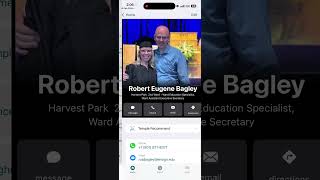
We would love to get photos in the directory of all the members of our ward. So if you don't have this app, you can go to your app store and download it. It's called Member Tools. And as you can see, if you click on the directory right now, there's some people that have photos, but there's a lot of families and individuals that don't have a photo. So if you go back to this screen, you've got two options. You see up at the top here where it says profile. On yours, it may be down below, but if you can find profile, that's one way to get to it. Or if there's a circle in the top right corner of your screen that either has a picture or just has a blank circle, you can tap that. And then you see where it says profile. That's another way to get to it. And if you click profile there, then this is the information that the, that the ward has about you. And up on the top right, you see where it says edit, so you can click edit. And then if you scroll down, that's where you can update your individual photo. And this is where you can update your household photo. So you can just click edit and you have two options. You can pick a photo that you've already taken from choose from photos, or you can use your camera and just flip it around to a selfie and just take a picture of yourself and then Save that, and then same thing, go pick a photo or take a photo of your family, save that. And then when, um, when you click directory, we'll be able to see, you know, what you look like. One, one other thing, then now you can do your temple recommend on your phone. So do you see where it says temple recommend? So if you would like to get your temple recommend on your phone, just make an appointment with the executive secretary, um, to come in and speak with a member of the bishopric, and we can, uh, transition you from a paper recommend to a mobile recommend.