AI Webinar Blueprint That Generates 7-Figures | Full Claude Build
George Foley shows how to build a 7-figure webinar using Claude and AI image tools. He uses Jason Fladlin's webinar framework, feeds transcripts into Claude for slide copy, and generates dozens of image variations in seconds with Hixfield instead of paying $20k for manual design. The whole setup costs about $200-$300 monthly and produces 300-400 slides for a one-hour webinar.
Chapters
Hey everyone, George Foley here. I'm going to walk you through how to create a 7-figure webinar that looks exactly like this. This I built for Agency Blueprint. I used AI to create every single one of the slides here, as well as the copywriting. And this, this crushes well over 7-figure business annually, multiple, multiple 100Ks per month for this, this webinar. So we do this on a monthly basis. I'm going to walk you through the tools that you need to create it. So first one's going to be Claude. Which you will all know, Higgsfield, which some of you may not have used, which is crushing it for AI at the moment. This actually uses Nanobanana, which you're probably familiar with, but I'm going to show you how to do it much quicker. So if you're using Nanobanana at the moment, it's really slow. This will speed it up. And most importantly, I'm going to show you how to get the positioning and the offer correct so you can book lots of meetings or close people direct on the webinar. So the first step for creating a successful webinar is just to understand conceptually why we're doing it and the structure. Now, I'm not going to do like too much of the basic 101 stuff here, but I will just give you an overview of the format and structure that I follow for webinars. Now, I will say this out of the box. All of this comes from this guy here, Jason Fladlin, who is the webinar goat. He's the best at webinars. So if you're wanting to learn and understand more about the copywriting and positioning, just go subscribe. This channel is massively underrated. He's done Iman's webinars, Formozy, worked with Formozy, pretty much anyone crushing it on webinars. And so his structure that he follows is hook. So you have to hook them at the start, and that's by far the most important part, because if you don't hook them in the first 5 minutes, then they'll turn away. Pain. These— now each of these, like, this might be 3 to 5 minutes, and it might be, I don't know, 50 slides, for instance. This here, the pain might be 5 to 10 minutes, but you understand the point. So what I'm trying to emphasize here is we're not just guessing the order of the structure of the webinar. There's actually a format that we can follow. Now, the way, the way to learn this quickly, you can go spend, you know, 10, 20 hours or even longer learning webinars and structures is to use this trick here. So come into Jason's channel, sorted by popular, best webinar formula. So we're going to open that up. Any of the ones that look related to, yeah, how to do great webinar introductions, even for offers. He's really the guy that inspired Hormozy's offers and the playbooks that Hormozy does. So, you know, watch those as well, but really what we're going to do is just come into the video, pause that, show transcript, and you're going to copy the transcript. And this is going to train Claude. So you can do it two ways. You can highlight all of this here. The quick way I do it is just copy transcript. I'm going to name this, uh, day when So this is a project, and then I'm going to add text content, paste, and I'll just call that 1. So now that has the information. I can grab this one as well. Copy. 2. You can put something basic in here. Like, you are an expert few writer inspired by Fred Lim. It helps to create 7 and 8. Very nice. That'll do. Cool. What's the structure? Of a successful webinar. Now I'll use Opus 4.7 for this, just maxed out, $100 per month for this plan. Sometimes it's useful to see. Yeah, so hook, pain, excite. So it's going to figure out effectively here. So you don't need to learn any of this stuff. You can just feed it in. Now it is missing Ts. Maybe that particular video, Jason hasn't put it in there, but I would train it on multiple of these. So get like, I don't know, 10 to 20 videos from here. You know, probably start with creating your offer first. If you don't have a good offer, that's going to be the first thing. Cool. So then just going to quickly jump through these here. Where are we? Close that like that. Okay. So you can say, my info product is for barbers who want to leave and start their own road haircutting business. Give 15 hook ideas. And you're just going to go through it. Always ask AI to give you 15 hook ideas. The reason is because then it's effectively A/B testing against you. Um, if that makes sense, like if you ask it just to give you a good hook and then tell it what is wrong, um, you're removing the element of all successful marketing, which is A/B testing. So have it A/B test this stuff, you know, 15 examples. You're going to find one in here that you like more than the rest, and then you can say double down on that. So I'm going to start this by admitting you shouldn't leave the barbershop. Okay. So that's like a reverse psychology thing. Two agendas walking out of that shop, right? So we've got all these different hooks. Cool. So now, um, yeah, I like this empty chair. Okay. So empty chair, make it a quiz. And write the slides like this. Now, the thing I like to do is use the slide as your script. Slide for script. Now I know nothing about this niche, like at all. Picture a barber right now, say a name. Yeah. Okay, cool. So now we've got this and what you'll do is you'll just keep going through each of these sections. Like give me the suggestions for the pain, the excite, the position, you know, keep going through that. Now I'm going to show you how to actually create the slides for these. So picture of Arba right now sitting in an egg chair. Okay. Jump back over to Hixfield. Now Hixfield is kind of like an all-in-one box for doing AI images, video, audio. Really useful. The reason Hixfield is so powerful is because we can select through all the different AI models. So it aggregates them. But the key thing here that makes it really powerful is this batch size. So now if you've done it, you know, in ChatGPT Claude or even with Google Gemini Nano Banana directly, you might generate one, you have to wait 2 minutes and then it, you know, produces it and it looks terrible. So you can see here, these look amazing, but it's actually spitting out, you're a one trained person. This one has a mistake. This one has a mistake. This one has a mistake. This one doesn't. So I can produce 4 and just grab the best one. Again, coming back to that idea of like constantly A/B testing with yourself. So I'm going to reference, actually, let's just jump into this here. You are creating visual slides for a webinar. You'll receive the webinar slides that came before. So the main thing you're going to do here, I'm just going to copy that prompt, paste that in there. So you can use that prompt as well. And I'm going to reference that. So it has that visual. And reference this one. Cool. Now I'm going to copy this here again. Paste that in. And it does cost credits. So this can get expensive. Well, relatively expensive. You might end up spending $100 to create your webinar kind of thing. But if you think about the quality, Look how many slides we've got here. You know, if we were to do this manually, it's just, it would be tens of $20,000 to get someone who's actually good and understands the motion of slides and everything like that. So it's not, it's not even comparable, but just so you're aware. Cool.
And now we're going to, um, we've got the 2K, which does, um, good enough quality. 1K is not good enough. 2K is good. 4K takes too long and you don't really notice a difference. So now we're going to just hit generate. I like to click it a couple times. Scroll back up the top here. And we wait for these to generate. It can take a bit of time. Now you can boost speed and do all these other things, but you have to pay for that. So typically I just wait unless I'm in a real rush, in which case I'll, um, pay more. But usually, yeah, the main thing is you just want to get one that looks good rather than— so you want volume, I should say. You want to generate more. I don't mind waiting a little bit longer if I'm generating 18 at once and then there's a good one in there.
Cool.
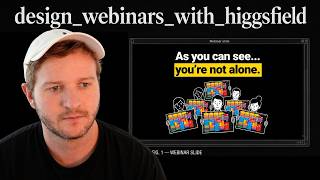
So we'll just wait for that to come through. We've got one option there. Depends what, like, um, if we're going for obviously an older audience, might be good, suitable. This one here is more the cartoon style picture of Ava right now sitting in an empty chair. All of these are just so captivating. Now you can obviously tell it to change the color, change the art style, whatever you want to do. Um, there's some that we've had in the past that are really like almost cinematic if you want to go for that look and that style. The main thing is just obviously every single slide needs to hit hard. So you can't have any, especially at the start, can't have any downtime. So we're going through these, this workshop is happening live. Let's see who's in the room. We wait for them to respond because it's a quiz, but the, you don't want to spend too long. Like, let's be honest, average recruiters, we just completely hit Kay Olick, as you can see, you're not alone. This is the average recruitment found this week. So you're, you're, you're moving through these quickly. You'll, you'll probably need 300 to 400 slides realistically for an hour, hour-long webinar. Cool. So this one's pretty good. And then onto the next, right? So you would copy that. Paste that in here.
Hit generate.
Now the, the only next step I do is I do download these and then paste them in here. So this is just an image that gets pasted into the slide. I like using Google Slides. It's easy to share with people. Easy for play. Yeah, it's just trusty and reliable. And surprisingly, it handles having like these image sizes can be quite large, handles it like perfectly fine. All the images just stay in and you can share your screen and it's familiar. So I recommend just pasting them in. I've tried different things like Apple Slides and Preview and Gamma and stuff like that. For the webinar, like slides, Google Slides, and then just paste these in. It's going to be the best because you don't want that to go wrong. Obviously you've paid a lot of money to get the people to show up. Cool. And now we've got the next slides. So you can see how I can repeat this process. You could have a VA pasting them in as well. And then you come through and just pick the ones that you like. But if I had to pick, I'd say picture a barber right now sitting in an empty chair, that one there. Which again, they're visualizing it. Between appointments, phone in hand scrolling. They can probably relate to that.
Right.
So without knowing anything about the niche, I've tapped into some, you know, sort of emotional standpoint and we're creating images that resonate with that audience too. Cool. I'll cap it there for this one and I'll see you in the next one.