In this instructional video, Joshua Nelson of the 7 Figure Agency walks viewers through building a low‑to‑mid‑budget home office video studio suitable for webinars, Zoom calls, and recorded content. He starts with lighting, recommending a softbox positioned above the subject, turning off overhead ceiling lights, and adding inexpensive LED light sticks on the sides to eliminate shadows. He then discusses camera options, from a basic Logitech C960 webcam (with free control software for brightness, contrast, and intensity) to higher‑end DSLR setups that require HDMI adapters and more configuration. Next, he covers audio, focusing on the Blue Yeti USB microphone—explaining gain settings, pickup patterns, and alternative lavalier options. He finishes with framing advice, urging a tight head‑and‑chest shot with only a couple of inches above the head. Throughout, he emphasizes cost‑effectiveness (a few hundred dollars total), the importance of consistent settings, and provides a downloadable gear list via the Local Agency Success Facebook group.
Chapters
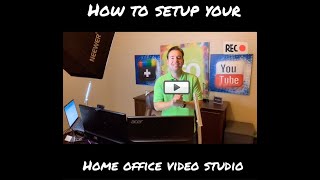
Oye, this is Joshua Nelson with the 7 Figure Agency, and I just got finished setting up our in-office video studio. Kind of setting up the lighting, setting up the camera, setting up the audio so that the videos look good and they sound good. And one of the questions I've been getting from a lot of digital marketing agencies is, how do I set up my studio, whether it's their home office or their actual office, —so that it looks good, so it looks crisp. Like, what kind of light should I use? What kind of camera should I use? How can I get all that set up? And so since I just spent the better part of like 2 and a half hours with my videographer setting mine up, I figured why not spend a couple minutes, kind of share with you guys this setup so that you can replicate something in your agency. So, so let me walk you through it. Again, if you're, if you're going to be doing webinars, and I really believe you should be doing one webinar per month in order to really create positive momentum for your database, to create great content, you wanna make sure that you've got a decent setup, especially as it relates to your video and your audio. So, I asked Norton, what's the sequence of events you need to think about as you set up your in-home video studio? And he said the very first thing is your lighting, right? If you're not well lit, you're gonna have all kinds of issues, it's not gonna look right, and so you wanna think about how the lighting is set up. So what we have set up here is a very basic soft light. So I'm gonna kind of sit as you look at that. So we've got the soft light pointed down. And when you do it, let's say you've got your webcam mounted on top of your monitor and you've got this light kind of over top of you, you wanna make sure your ceiling light is off. So if you're in an office and there's LED lights above you, you want that turned off because it's gonna create downward light, which creates shadow and creates this big, you know, black ring underneath your eyes. If you've been watching my videos for the last 6 to 9 weeks, I had all kinds of lighting issues. My audio wasn't right, my lighting wasn't right. I had changed some stuff. I moved into a new house. At the office, we put a black backdrop behind me, and so everything was just kind of out of sync. And these are the things I want to help you avoid so you have really high-quality, professional-looking video when it's time to show up and perform your stuff. So we've got the softbox up above, we've got the ceiling lights off, and then you wanna have some kind of light to the sides of you so it kind of evens the lighting out. These are very low-cost LED light sticks that I bought on Amazon. You can get them for as little as $15. I'm gonna provide you guys with the links to get this stuff if you want to replicate this exact setup. This softbox, I believe it's by Cowboy Studios, or one of these— newer, newer, newer. So I'll give you a link to that. It's something like $30 for a softbox light like that. And you'd be amazed, having decent lighting setup like this can make a massive difference in how you look on camera when you do your webinars and your webcam type videos. So that's the first thing, you wanna get the lighting right. The second piece is the camera. And there's lots of things you can do with the camera in your home office. Everything from a webcam like this, which is just your basic Logitech webcam, all the way to higher-end DSLR-type cameras. And there's ways to use a DSLR camera through an HDMI adapter where you can actually have a really high-quality, multiple-thousand-dollar camera sitting on top of your monitor, going through a hub, and actually acting as a webcam for your, for your webinars and things. The, the challenge with that is, first of all, there's all kinds of settings you need to understand how to use. It's not plug and play in most cases. You got to buy a bunch of adapters, you're going to spend several hundred dollars, and you're going to get an incremental improvement in quality. The big improvement in quality is if you've got a black background or you've got all kinds of funky lighting going on, With those DSLRs, you have better control. But with better control comes more complexity. What I'm using at this point is just a basic Logitech 960 webcam. Plug and play. And it's very plug and play. Literally, you plug this into your USB port, and it autofocuses, it works right out of the gates. One thing to pay attention to, I had no idea that this was even a thing, is your Logitech webcam has software that you can download that's free, but that gives you control of the settings. So as an example, if you kind of come around, when I initially was shooting inside this office, I had really bad quality. I had bad lighting, and it was the same exact setup as we have currently on there. But what happened was, when we installed the software, we have the ability to control all kinds of different variables. So you can control your brightness back and forth. This is just built into these webcams now. You can control the contrast. You can control the light intensity. And so when you've got these settings installed, you can kind of dial this into the right place, set it up once, and every time you need to step up to the camera, you know that you've got good quality. So if you've got, you know, if you've got a really black background, then you need to bring the contrast up a little bit. If you've got some, for some reason you've got a window and light's coming in, you can play with the light intensity. And so you wanna download that software so you can control the quality of the output. Makes a really big difference. So lots of options with cameras. I'm using a basic, Logitech C960, about $100, does a great job when you've got these settings configured and you get the lighting in place. The third really important thing is audio, right? If your audio is not good, everything falls apart. Because what we're going to do with the audio is, of course, we're going to use it for the video, we're going to use it for the podcast episode, we're going to use it for all of our split-up clips, and And if the audio is not good, nobody wants to listen. Nobody wants to watch. So what I've got is a, is a Yeti Blue mic. This is a wonderful mic, costs about $100, very high quality. Also plug and play. Just plug it right into your USB, choose it as the audio. So when you're doing Zoom webinars, when you're doing, um, like ScreenFlow type videos, it gives you really nice audio. A couple of things you want to pay attention to on this front. Are these settings right here. Two settings. Again, before today I didn't even know this was a thing. Norton was kind of educating me on this. You've got gain, which is going to control the, the amplification of the audio. You want to turn that gain down, probably to something like 10 or 20%. So that's like all the way at the bottom and then like maybe like a couple rings up. That way it's not creating a big echo, it's not amplifying your audio too much. The other thing is there's all kinds of settings here for patterns. So you've got your— you get a bunch of different patterns. Some of these are so that you can do like someone sitting here, someone sitting here. You've got patterns where it can capture all the audio in the room. What you want to do for your webcam videos and for your webinars is use this setting right here. Basically, that's you talking directly to the to the mic. And by doing that, you can get really clean audio with as little echo as possible, right? So you want to think about that. Now the last piece is your framing, and this is important. It's probably one of the most basic things, but I see people mess it up often. And that's when you sit at your webcam and you're ready to do your webinar, to record whatever it is you're about to do. Oftentimes I see the, the distance above your head you know, way up here, you know, and I was trying to do this when we created these new backdrops. I wanted to have my whole logo showing in the background, and so I had this massive gap above my head, and that looks very unprofessional, right? So you want to make sure you've only got about 2 inches on the camera above your head and about down to a little bit below your chest. When you frame in like that, it looks professional, it looks high quality, and And you wanna be professional and you wanna have high quality. So those are the key things, right? Your lighting, don't overspend. You know, if you're gonna go high-tech, that's a different thing. I'm talking about your home office, your basic home video studio. Couple hundred bucks for that. A webcam and/or a DSLR with an HDMI output. I find that when you get the software installed, you can get the same quality through through your basic HD webcam as you do through a high-tech DSLR. Especially when you consider you're going to be using this on Zoom, or you're gonna be using it on GoToWebinar, or you're gonna be using it on like a ScreenFlow type recording. You don't need that massive quality, right? It's gonna be streaming through the internet on a Facebook Live or something like that anyways. And then you wanna make sure that your audio's dialed in. I like the Yeti mic. The other option that's probably maybe even a little bit better is a lavalier, which is just a wired mic that clips right here on your shirt. They sell them, Rode has a really great one that's less than $100, plugs into via USB. This way it's right close to your mouth, you don't have to worry about your mic showing up in the shot, and you can just sit and deliver, right? And so when it comes to setting up your basic video studio for your home office, this is what I have in place. Spent a couple hours with a professional kind of mapping this out, getting it drilled down so we have a nice quality shot, so we get good audio. And I just thought I'd share that with you. If you'd like to get the, the gear list, um, Norton went ahead and put this into a Google document for me. Uh, and he's just like, okay, here's the webcam, good, better, best. Here's the lighting, good, better, best. Here's the audio settings, good, better, best, with links to buy it on Amazon. So how does that sound? Would you like to get that gear list? If so, um, all you have to do, um, is join our Local Agency Success Facebook group. Great group. We're sharing lots of ideas, strategies, and techniques on how to grow successful digital marketing agencies, how to land clients, serve your clients better, get them great results. Um, when you join that group, and it's in the link below, um, I'm going to give you direct access to the gear list so that you can download it and you can swipe and deploy this entire setup at no cost to you other than the cost of the equipment. So hopefully this was helpful. Hopefully this answered some questions for you. Um, if you have follow-up questions, post in the comments. I'd love to engage with you. If you have other ideas you want to share, put them there. Otherwise, I look forward to seeing you in the Local Agency Success Facebook group. Talk to you later.