AI webinar builder [EasyWebinar]
This content was created by Casey Zeman. This content was uploaded by Casey Zeman. This is a YouTube product demo titled "AI webinar builder [EasyWebinar]" (created 2026-01-27). It is a single-speaker presentation by Casey demonstrating EasyWebinar’s AI builder and platform features: automatic generation of webinar funnels (registration, thank-you, countdown pages), slide scripts, emails, polls, templates, and a webinar profiler; support for webinar types (simulated live, live, evergreen); page builder and editable templates; and integration with an Easy CRM (lead capture, auto-dialer, follow-up workflows). The presenter walks through an example (an off-leash dog-walking webinar) and shows editing, publishing, and sales/CRM follow-up capabilities.
Chapters
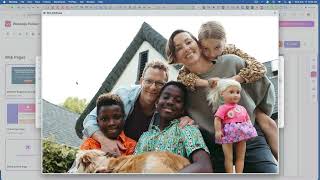
Hello everyone and welcome. This is Casey and I'm just doing a quick, I want to do a quick demo to show you some of the coolest things about Easy Webinar. You know. Now Easy Webinar is not just a webinar platform. It's so much more. It is your one stop shop. It's your console for sales and marketing. Scaling your expertise, scaling your authenticity. This is where you do it. Now there's a few things that you should know about Easy Webinar and what we've recently been doing. I wanted to flag up two very powerful things. Now there's a few additional powerful things, but two very, very powerful things. Easy Webinar now has a webinar, an AI builder, right. And this AI builder can literally build your entire webinar funnel for you. Okay. What used to take maybe 15, 20 minutes, you know, is now literally this is a five minute process. And what it, what it does is it actually builds your pages. Now inside Easy Webinar we Easy Webinar has its own page builder tool and in there we have high converting templates and various things like that. But if you wanted to skip the line and go straight to creating with AI, it will create basically everything for you. As an example, we recently did this. Now you'll see it says AI next to it. Those are the ones that are built with AI, the other ones are not. Will also tell you what kind of webinars they are. So simulated live are webinars that are streamed in one time zone. It's pre recorded with live chat. A lot of people love to use these when they are trying to still have an experience happen, but make sure that experience has less technical issues but still engagement in the chat. People use this and they do it for onboarding, but they also do it for sales and marketing. They do really well with it. Of course a live webinar is a live webinar and an evergreen webinar is when it's streamed in your attendees local time zone and they can register multiple times and it will change dynamically on the page at any time where they're coming in from any part of the world. Right. It's really convenient for anyone you're reaching out to, right. They'll watch the event in their local time zone. You can have multiple sessions, right? You 20, 30 sessions, all from one, from one landing page, right. That's how you, this is how you scale webinars. But I wanted to flag this up and bring you into the AI builder. So this is where you're going to build your AI webinar basically. So it'll build the web pages and the polls. So it'll give you a script, it will build out the emails, it will build out polls and the page, your pages for you, right? The pages of a webinar, from the registration page to the thank you page to the countdown timer page and things like that. There's two ways you could do it. You, you could go with a quick create right here or jump to the advanced create, which is where you dig in a little deeper and give it more, more of your attention. Now this one, the good thing about this one is that you craft more of your information into it, right? But if you wanted to go really quickly, you could easily jump into here and say, you know, I have a dog, I want to teach. Describe your topic. I want to do a webinar all about how to walk your dog without a leash. Okay, Generate. Now again, I am literally putting this out there, you know, not, I haven't, I've done a lot of attention to it, I haven't gone deep with it. But again there is that whole section that we have where you can go deep on the other side. It literally allows you to, to dig in and, and, and, and really craft what you know. If you have more detail, more specifics, you can do that. But in this side, that, this side will allow you to do this with one, basically one prompt. Now as you can see, it's built it out. Now I only kept it at 12 slides, but you can actually choose how many slides you want it to do, right? And the script will build it out to be for that length, right. So I did 12 at this point and here it is mastering the topic. Right? So we have the topic, the problem, Lack of control when dog is off leash in public spaces. A comprehensive 60 minute training webinar that teaches dog owners proven methods to build trust, et cetera. So you can see Mastering off leash Dog walking. Build trust, control and freedom. Welcome to the off leash dream. Right, welcome. And the off leash dream. Welcome everyone. I'm thrilled to have you here. If you've ever dreamed of walking your dog freely while still responding to your every command, you're in the right place. Today we're going to transform the dream into more that dream into reality through proven safe methods. Let's start with a quick poll about your biggest leash walking challenges. Right? So once that's done, you know, you can see the topic and details and stuff you go into. Continue. And now you're like, how do you want to do this, you want AI to do your layout for your web pages or do you want to choose a layout? I'm just going to let AI do the thing. I don't want to think about it too much. I'm going to go with a modern, playful look because it's dog walking AI. I'm going to let that choose the theme. And now it's crafting the web page for us. So you can see it's building everything, optimizing the page design, applying page design themes, creating interactive elements, fine tuning page details. Again, there are ways to dig in and do this in a much more detailed way. We give you two tracks. One is to just, you know, if you want it to just crank it out quick with AI with very little prompts, you know, it can do that. But what we also have is a webinar profiler. So you can actually build out the webinar profiler in a much more detailed way. Right. And that detailed way you can get more nuanced around your specific story or, you know, any, anything like that's the power of that, right. This is going to be building it off of not really knowing your story and things like that, but you can pepper in your story and make it more of your own. So here we go. You can see it are it now it's created. It's the first. As you can see, the, the, the, the webinar reg page. Right. And the cool thing about this is that it's fully editable so you can, you know, add an image in and things like that. You know, this is, you know, a speaker, a speaker image. So you can go in, you can find an image. Okay, yeah, let's just grab that. There we go. That's my family. Save and crop. All right. Yep. And so now I'm gonna get rid of this one. Okay. Meet your expert speaker. 1. I'm just gonna put Casey right. So you can edit this whole thing and family, right? And you can basically edit this whole entire process, whole entire thing. Add, add these, add content. As you can see, you can add headlines, paragraphs, links, quotes, code lists, tables, buttons, all sorts of stuff. And, and you can manipulate the layout and everything. Of course, as you can see, it creates your registration page, your thank you page, your waiting page and, and then you can of course look at it in mobile and desktop and you can edit, edit it in those spaces as well. And it's already linked to your webinar. So you're just going to click, continue to generate emails. And now it's generating your emails for you. Okay, there we go. So now it has the emails and those are being saved. The 24 hour one, the one hour before. I think it's a 15 minute probably and then follow up emails. We'll probably have a couple here. And of course you can always add more to this. Right. This is just giving you sort of like the baseline of what you need and it's kind of doing all of it for you. So the one hour reminder is done. Now it's writing the 15 minute one. It's going to start on the follow up email soon and this is how you can do this. So as I was saying though, because we also have a page builder and we have templates, we already have high converting templates. That's a completely different route you could be taking as well. And continue now we may have to wait. Okay, now it took me from emails to now polls, right. And it's giving you options. What kind of polls do you want? Right. Increase engagement and better attention or what do you want the poll to accomplish? Gauge interest in the offer, Gather background. There we go. I'm going to generate the polls now. Okay, so now it's going to work on getting those polls gathered. All right, here are the polls and I'm going to say, yeah, I'll go with these. This. The timings are of course not set yet. You know, if the, if this is an automated webinar, you can set polls to be, to come at certain times. Now that that's done, we have our entire webinar right here. Now that is using our AI builder. But again we have an entire page editor with customizable templates that are high converting. So if you wanted to control the narrative a bit more and do your own pages, do your own copy everything you can. Right. This is one of our templates. This is just the default template. Right. It's kind of a blank template actually. So this is a default registration page and you can. Here are some of the other templates that we have. Okay. Again, if you select this template, you can see it'll populate and, and then you can change things around as you need to. Right. So this is what we, we have. This is kind of like the legacy builder that we have. This is not the AI builder, but this one you can really do quite a bit with, with creating cool templates. And again, once you have some templates, you can actually save them in your, in your own template folder and, and then use those again and again and again. Right. Again, some of the one, one that's really Great is just the default builder here. It, it, it's fast. So you know, it's. All you have to do is click save and publish and boom, now your webinar is ready to go. Let's. And if you just use something like this, you don't need anything else. So I just want to be, to make that clear that the AI builder really gives you a lot of cool stuff that you can do with it, but you don't necessarily need it. You can just, you can come into here and build out all of what you want straight away inside the actual room itself. Right? So you can build out the registration pages, reminder emails, follow up emails based on, you know, you can send to people like those who registered or attended or no showed, but then you can send to those who did attend and you can say, send them specific emails based on action. So like if they, how long did they stay? You know, if they stayed five minutes, you can send out an email based on that, how engaged they were or if they clicked on offers. Right. And so there's a lot of cool things you could do just built into the system. And then beyond that, we've now rolled in our Easy CRM. And so here we're coming into the CRM. And the CRM, as you can see here, is an entire sales CRM. So it's. So when the webinar is over this, you can take people into here where you're keeping the conversation going, you schedule calls with people, you follow up with them and you make more sales. Like the whole idea of the reason we even have this is that we want to make sure that you're gaining as much sales potential as possible. Everybody who comes and registers for a workshop is a potential lead. And all those leads you can now call, you can even auto dial them through this, through this auto dialer. So all the leads from your webinar are pushed automatically into the CRM and depending on how, what their actions were, you can know if they're hot, warm or cold. And based on that, you can assign maybe team members to call those specific people. Right. A CRM is so important because it helps you to now close the sales cycle in a. So in a much more powerful way. This is rolled into what you get with Easy Webinar. So if you want to, if you have any questions, you can hop on. Once you become a customer, come in here, sign up to book a call for the setup. We'll help you hook this up, we'll get you set up and ready to go. A couple of the things that I'm going to let you know about is that you can run paid webinars with easy webinar, as I said, simulated, live, evergreen, all the different types of webinars needed to close deals. And I hope this helped. I hope you were now able to see the power of webinar creation again. You can create a webinar here or create with AI. That is what we're offering up to you guys. So excited to have you on the inside. And let us know if you have any questions. Thanks.
More from Casey



How to Scale Your Business With AI | The Casey Zeman Show Ep#7 | ft. Gary Guseinov & Sean Whiteley
Terrible at Golf, Great at Building an Audience | The Casey Zeman Show #6 ft. Kira Peterson
Certainty Is a Lie. Clarity Isn't. | The Casey Zeman Show #5 ft. Keith Cowing