Colin Brown walks through a custom cash flow spreadsheet for small-business owners. Input your beginning cash and revenue sources like group classes and private lessons, and the sheet automatically calculates receipts, expenses, and ending balances. It flags cash shortfalls so you know when you need financing.
Chapters
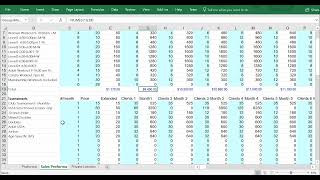
Hi everyone, I thought I'd create a little video to show you how to use this cash flow spreadsheet that I created so that it takes a little bit of the mystery out of it. So the first thing is you'll notice I have 3 tabs. This Pro Forma tab is the main tab and it has all of the information that shows you whenever you are going to be short on cash. There's really only a few things that you need to enter and customize on the spreadsheet. So the first thing, I put in color where most of the variables that need to be modified. And that's the first one is your beginning cash. So the rest of these fields are all calculated. And the way it comes up with this is you put in how much you have to start your business with, for example, or whatever you have in month 1. Then what I have, I've got it broken down. This is the cash flow section, and then I've got our cash receipts, and then I've got cash disbursements. So this is what we receive in revenue, and this is what we pay out in expenses. Okay, so the first thing to note is I am calculating the income from some other spreadsheets. If you'll notice, if I highlight over that, I've got a named cell that that's referencing to. So I would actually need to go to the Sales Pro Forma and look at Groups. And so in this example, we're going to have a Women's Workout from 9:00 to 10:30. It's gonna be on Monday. We're gonna have 4 of those per month. The price is $20, and so that's $80 per month. So if we have 4 clients, that would generate $320 a month. And then you add all those up, that becomes— this right here is the total. It's that Groups Month 1, and that happens to transfer over to here, and you'll see equals Groups Month 1. This will equal groups month 2. So you can reference these on a different page if you want to, to calculate or estimate how, how much revenue is going to come up for each thing. So for example, with tournaments, that's also referenced on the sales pro forma. We go down to tournaments, here's the tournaments we're going to have. We're only going to have one per month potentially, and then we just put how many clients we think are going to attend. So if we think there's going to be 35 in our club tournament, so forth and so on. Then it gets the totals of those and pulls that information over to here on tournaments. Now if I roll over this and it just says $800, I just put in $800 as a— but that's what I think we could bring in for court fees. And then privates. Now I've created a separate spreadsheet because that's a little more complicated. It's just not that it's complicated, but I put in how many pros we're gonna have. So Pro 1, who, who charges $65 an hour, he only gets to take home 80%, and then the 20% goes to the facility. And then we determine, I've just put in, you plug in, if you wanna change that hourly rate, you can. So that would be one thing to change. You wanna charge $63, for example, that will then change all of these numbers. So you can also change these numbers. So if this guy wants, you know, may not be as interested in working as many hours or wants to work even more hours. That's in a single month, so that's 80 hours a month. You have 160 possible hours in it, so that's working basically half part-time. That would be 20 hours a week in private lessons. Anyway, you total up that amount and that amount gets passed over to here. And then I have another one that I just put an estimate of what it would be. So this takes the revenue, or the, yeah, the revenue, the receipts, and it's going to then post that back up to here. Then it's going to, then I go ahead and I can just, these you can, even though it's not colored, most of these fields you can just put in your, what your fixed costs and expenses are, for example. In this case, I am referencing those private lessons from the Pro 1 and Pro 2 and Pro 3 back over to here. So there's Pro 1, Pro 2. So you can do that and then just put in all your expenses. It will total all the expenses and then pass those expenses up to here. So now you've got what you started with, what you brought in, what you've got to pay out, and your ending cash. And if there's any amounts that you're going to be short, it's going to show up down here. And this will let you know when you need to come up with cash or possibly a loan to get through the tough time. But in any case, you get the idea. This is really a handy spreadsheet. Hopefully it will benefit you and show you where you're having problems with your cash flow. And it's also a good projection to know where you're going to be, you know, how much you can make at the end of the year. So very helpful. Of course, again, you can customize this, put in your own expenses here, add them, subtract them, and add your own revenue, forecasted revenue, and it will generate everything else. So good luck, have fun with it.