In this instructional video, Colin Brown walks viewers through the process of adding and configuring staff members in eBizSuite. He demonstrates how to navigate to Settings → My Staff, click Add Employee, and fill out the various sections required for each employee: User Info (name, email, password, email signature), User Permissions (access controls), User Roles (admin vs. user), Call and Voicemail Settings, Default Availability (working hours for appointment scheduling), and Calendar Configuration (linking a Google or Outlook calendar). Colin highlights best‑practice tips such as setting an email signature, assigning admin rights to the primary user, and connecting calendars after initial setup. The tutorial concludes by emphasizing that the same steps can be repeated for any additional staff, virtual assistants, or team members who need access to eBizSuite.
Chapters
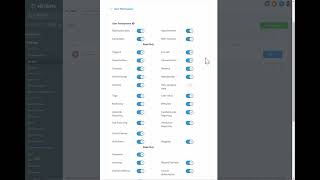
After we set up the business profile, we want to set up our staff. So click— this is under settings— click on my staff. Then you'll want to click on add employee. When you do that, you've got these sections. You've got user info, user permissions, user roles, call and voicemail settings, user availability, and calendar configuration. For the sake of saving us some time, I'm going to go ahead and click on Edit, but you'll add the first employee so you can see an example of this. You're going to put in the name, their email, give them a password. I would recommend that you set up an email signature that can be sent automatically through with all your emails sent from this person. It's going to be sent with all outgoing messages. You can also turn it on to have the signature be for quoted text in replies, and then also select a calendar that you have already set up. If you don't have that set up, you can come back later and do that. The next section after User Info is User Permissions. This is where you can turn on user access to determine what they can see and cannot see. Then you also have user roles. And roles, for example, you have an admin which would have all rights, and then you have a user which would have limited rights. So if you're adding yourself and you're the primary user, you want to make sure that you have that set to admin. Then you can also set up the call and voicemail settings for this particular team member or user or employee. And then you can also set up their default user availability. This is the times that they're available to schedule appointments on their calendar by default. And then you have the user calendar configuration. You will need to have a Google or Outlook account added for this team member in the current location for it to show. That doesn't need to be set up initially, but eventually you want to connect that once you have your calendar set up. Once you set up those options, you are all set up as a user, and then you want to create each one of these for any additional employees you might have, or people— maybe it's a virtual assistant, or anyone you would like to give access to this information, and then specify what role they play, and what access, what screen access they have for each of the options that are available in eBizSuite. And there you have it. That's how you set up your staff.