Colin Brown breaks down home studio essentials: the Logitech C922 webcam for 1080p under $90, a dedicated mic like the Samsung C01U with pop filter and boom arm, and a $96 LED ring light from AliExpress. Skip 4K webcams, they're bandwidth hogs for streaming.
Chapters
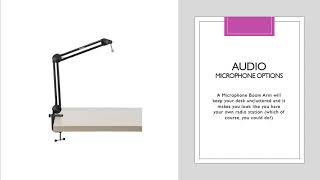
In this section, we're going to go over setting up your recording studio. We're going to be talking about equipment that you probably should have. So the first thing we're going to go over is the equipment We've got video, audio, we're gonna go over headsets and microphones, and then we are gonna talk a little bit about lighting. So let's jump in, and video is very important, obviously, the quality of the video, because we're streaming over the internet, there can be issues. You obviously can use your monitor's video or your laptop's video camera that's built in, that webcam, but to be honest with you, for less than $90, you'll have better quality the C922 from Logitech. This is a very high-quality video streaming device that delivers excellent results, and you can use other webcams obviously that support 1080p, but this one is the best for the money. And while most streaming is at 720p, you'll still get better quality with a 1080p webcam. And of course, there are 4K webcams that are out there, but they still take up too much bandwidth and on the internet, and so they're still not a real viable option for streaming. So probably the best for the price point is this Logitech C922. If we talk about audio headsets, webcams do have audio built into them and they do work, but you will find that the quality of the audio will be better if you use a separate audio source. Headsets are really going to give you the absolute best quality. The Logitech H540 USB is an excellent choice. It is a wired headset, meaning that you plug it into your USB connection on your computer. The Bluetooth aren't quite as good. They are wireless, which is kind of handy and nice so you don't get all tangled up, but but the wired headsets still work better, and you will get the best quality through a headset. The nice thing about a headset is, of course, as you turn your head, then you still have good quality audio, whereas if you're using a microphone, it tends to drop off a bit. The next option we're going to talk about is actually microphones. If you don't like messing up your hair, then having a microphone is still going to improve your audio by tenfold over just a webcam. And the only thing you need to remember is to just face the microphone when you're speaking. I happen to be using in this particular presentation the Samsung C01U studio condenser microphone. I also added a desktop stand, a pop filter, and a spider shock mount for around $129 if you find it in a kit. So let's talk about some of the options you can do with a microphone. One thing is a pop filter. A pop filter will reduce the vocal popping sounds that occur during speech with high and harsh letters and words like P's and T's. A pop filter will reduce that. Another audio microphone option is a shock mount. And a shock mount is designed to enhance isolation from mechanical noise. So because it's suspended in air, it doesn't— you don't have the mechanical noise that you'll gain if it's just hard attached specifically to hardware or metal. Another microphone option is a microphone boom arm, and of course that will help keep your desk uncluttered, and it makes you look really cool, like you have your own radio station. So those are also very nice. Handy. I actually have one on order right now even though I'm currently using a desktop stand which I've used for many years. Finally, we're going to talk just a bit about lighting. Lighting is super important because it can just be all the difference. The particular webcam that we're recommending, the Logitech, it does great in low lighting but a lot of our offices and home studios, wherever you're putting this, the lighting isn't super great, and having great lighting will make a big difference in your presentation. So lighting has become a lot less expensive than in the past. I personally own probably 3 lighting kits that cost over $2,000 apiece. Today you can get a lighting kit like you see in this picture. I got I got this particular kit. It cost about, I think it was $96 through AliExpress. So it is being ordered through China, but it's inexpensive and it's LED, so it doesn't take halogen bulbs like all the old lighting kits that I have. And it's light and super efficient and effective, and you can control the light source. So it's very, very nice. You can even change colors. So those are probably the base equipment requirements to do outstanding and professional-looking webcasts and webinars and live streaming events. So if that's something you're going to be doing to help your business grow, I would definitely recommend that you invest in some good equipment. So here's my recording studio. You can see I've got a Wacom ArtPad right there for annotation. You can use the pen to do that. You've got a Logitech mouse, thumb mouse to help with carpal tunnel, Logitech keyboard. You'll see that I've got the Samsung microphone with the pop filter and the camera there. That's the Logitech that was mentioned earlier in this presentation. And as we go back out, you will see I've got Bose speakers, and then there's the light, the ring light. So that's all you need.