Colin Brown shows how to set up eCopy Suite AI with an OpenAI API key, then create a saved offer with product details and target audience. The tool auto-generates sales copy using frameworks like Hero's Journey or Problem-Agitate-Solution, producing professional copy in minutes instead of years.
Chapters
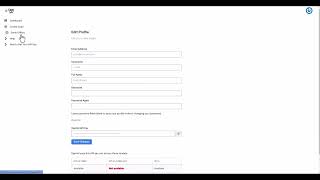
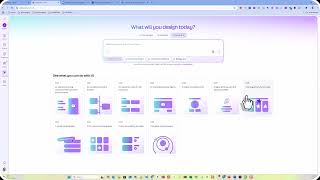
When you first come to eCopy Suite, you're going to be given the dashboard. First thing you'll want to do is make sure you have your API key set up. There is a cost to use OpenAI's API. That cost has to do with running the servers that are required to run ChatGPT and OpenAI's API. We would have to charge for this software if we didn't allow you to get your own API key. So to do that, you can click on this to follow some instructions, or you can just follow me here. First thing you want to do is go get your API key. The way you do that is you go to platform.openai.com. You'll need to sign up with an account, even if you already have a paid account with OpenAI. You'll then need to go to platform.openai.com/api-keys, which will take you to this screen. You're going to click on Create New Secret Key and then follow the steps. You only have to put in $5 to get that started, and ultimately it's only going to take a few pennies. So the likelihood that you'll ever have to top off your account with more money is unlikely. So when you get that API key from OpenAI, you'll then go to that little button there, which is your profile. Click on profile, and then down here you're gonna paste that OpenAI API key here, and then click save changes. Once that's set up, you can go ahead and begin. First thing you wanna do is go to saved offers, and you're gonna click on add a saved offer. So this is where you, put in the offer that you're trying to create the copy, ad copy for, the sales copy. So you're going to give it a name, product name, target audience, desired outcome, a timeframe, some pain points, a unique selling proposition, some features, some benefits, some impacts, an epiphany or a turning point, some supporting statistics, a case study and a testimonial or two, some offer components, a guarantee, upsells, offer price, and so forth and so on. Go ahead and hit submit on that. I'm going— for the sake of time, I'm going to go ahead and choose one that I've already done. Let's choose this one. So I've entered in the elements that I'm aware of. If you don't have an idea about what you have for supporting statistics, even if you don't have any, you can just leave it blank and then you can click submit. Once that offer has been saved as an offer, then you can go in and click on create copy. And you can give it a campaign name, select the AI model that you want to use. I'm going to leave it there, and then I'm going to select the framework, and I'm going to choose some sales— actually, I'm going to use the Hero's Journey. Nope, I'm going to use Problem, Agitate, Solution. So these are the different frameworks that you can use that are all set up. You just select one then you can select the offer that you've already created and it will fill in all of these for you so you don't have to do that every time. This will allow you to create multiple versions of ad copy or sales copy that will have a different spin every time you use a different framework. Then click on Generate Content and you can see that it has created our sales copy here. If you don't like it, you could go ahead and have it rewritten, and you can give it some additional instructions. Maybe you want to make it more punchy or more professional. You can actually just type that in there, click on Rewrite, or you can just regenerate it from the start. You can also click on Save and give it a new campaign name, and it's saved. And of course you can just copy and paste this into your website or sales letter or whatever it is that you're going to use this for. This is going to save you many, many hours of writing sales copy, which is very time-consuming, very challenging, and to get good at it, you— it does take years. But we have taken all of the best copywriters out there and the best frameworks and have put that into a system that allows you to do this in just a couple minutes. I can't wait to see what you create.