Colin Brown demos Syncnet, an AI platform that generates complete go-to-market strategies in minutes. Starting from a business description, it creates a 9-step program, messaging, visuals, and hundreds of digital assets like email sequences, sales scripts, and social hooks that would normally take months to build.
Chapters
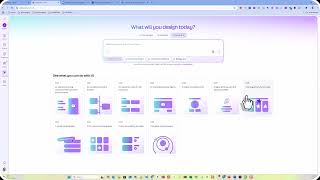
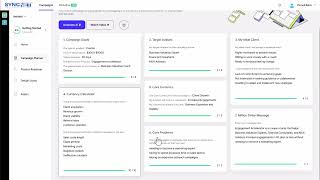
I wanted to give you a demonstration of some new software, my product roadmap software, and it uses AI to come up with the direction for developing a program or like a coaching program that I think could really benefit experts in their individual field. So, the first thing you do is you just go to generate. So, the first thing you need to do is generate your strategy and you do that by describing your idea. The AI will then take this description of your idea and then generate potential program around it. It's smart enough to decipher what the product is or what it should be about, who your ideal customer is from just from the description and the specific results your program are going to achieve. So if you do need to make some adjustments, they have some options. It could be a course, coaching program, consulting service, a bootcamp event, or a virtual event. We also had some additional client targets. We're going to stick with business valuation expert. That's our primary target. And then what we want to see them achieve is increased engagements. Of course, that's client acquisition and business growth and lead generation, all those things. But primarily we want to see them increase their engagements. So let's continue and say next. You can see that it's developed a 9-step program. Now you'll want to review these to see if they're actually valid and if they do match what you'd like to teach your target audience so that it's on point. Looking through this, it looks pretty good. You could go ahead and change a specific area if you'd like.. You can simply just type in or modify a section if you'd like. You can also regenerate. You can go ahead and try a new generation of the 9-step program until you get the right mix. But for now, I think that looks good. I'm going to go ahead and click on Save and Next. The next step in the process, it's going to come up with some roadmap names. You can go ahead and accept these or regenerate. You can make them more catchy, more professional, more accessible.. But looking through these, I quite like these. So I'm just going to go ahead and say save and next. This can take a couple minutes, but considering what it's doing, it's going to save you a couple of months of work. So be patient as it generates best practices in the industry to give your clients the outcome they're seeking. You'll know that it's completed its generation of content based on it showing these 5 out of 5, 3 out of 3. You can also look at the product roadmap and it's 15 out of 15. Looks like these have completed. So let's go back here and it's gone ahead and filled out what it presumes would be an ideal way to message and market this particular product. So what you'll need to do is go through each of these and change them based on your actual use case. So for example, it's named the product ValuationPro Engagement Accelerator. So you can make any adjustments. I'm gonna— I think there might be a product called ValuationPro, so I'm just gonna call this the Engagement Generator, business valuation, client growth, and go step by step through each of these and just make sure they're accurate and the way you want it set up. Okay, I like that. Can't help someone who rejects these. Client acquisition, revenue growth, brand visibility, referral rates, customer retention. Like that. I'm going to decrease the sale cycle, client attrition, marketing costs, negative reviews, and ineffective outreach. Excellent. By the way, this is all generated by AI and it is using the entire written language from the beginning of time to develop these ideas and concepts on the fly. Core currency of this campaign is client growth, increased engagements, business expansion and stability. Like it. Main struggles, need to become a marketing expert. Those are their main struggles. I like that. If you have some additional ideas about what you could do, you could go ahead and obviously modify each one of these. You just simply click inside and take out whatever you want. Change it, but those look pretty good. Okay, I really like this. So I'm going to go ahead and click on finish. And you might want to go through each one of these and take you step by step, allow you to change anything that you'd like. This looks pretty darn good. The next step, once you accept or approve all of these, it's going to be generating a bunch of content for you. We'll go into the product roadmap and this is going to help you to define or identify what you're going to do in each of these sections. So for example, in the target market identifier, identify your target market and services offered. I'm going to change this like that. That's really solid stuff. So you'll want to go through each one of these and just verify that you like the steps that you're going to take in each one of these areas. And then ultimately, once this is all done, you can go to the design studio. The design studio is going to go ahead and turn this into a visual format so that you can communicate what it is you're trying to help your client with. So I'm going to go ahead and pick a design layout. I'm going to pick this one for now, and it's going to design the entire program for me. You can go ahead and put your logo on any of this, put a call to action, can apply to all. You can do that for every page. You can audit and change each of the steps and how it's communicated. Ultimately, now comes the fun part. So we've designed this program. Now we can actually create digital assets. So let's take a look and see what those are. You can create lead magnets, you can create a course, you can create a lead nurturing email campaign, you can create a one-page map that's visually appealing to your client base. It gives you video scripts, sales scripts, lead magnet delivery sequences, scheduling reminders, onboarding. There's 27 more emails that will help nurture a list. Got a booking application. There's 330 hooks and headlines. It's got all the emails for webinar confirmations, webinar invites, video sales letter, webinar registration, webinar closing and replay, and there's more coming. All of that is generated in this short period of time that would've taken months, possibly years for some people to create. So I hope you've enjoyed this quick demo and you can see the power of this great tool that can help accelerate all of your programs and really refine your thought process for creating new products. And it gives you a complete go-to-market strategy. So I hope you've enjoyed this.