Turn your Accounting Website into a Lead Generating Machine
In this 45‑minute presentation Colin Brown, a digital marketing veteran, shows accountants how to transform a typical brochure‑style website into a measurable lead‑generation engine. He begins by critiquing real‑world accounting sites, pointing out missing calls‑to‑action, insecure connections, thin content, and poor messaging that sabotage SEO and conversion. He then introduces the concept of leverage: spending the same budget on a website that is optimized for capture and nurture can multiply client engagements. Using a classic marketing‑funnel framework, he breaks down the buyer‑awareness spectrum (3% ready to buy, 17% gathering info, 20% aware of a problem, 60% unaware) and argues that most firms are stuck in the education phase. He outlines a step‑by‑step digital‑asset strategy—traffic from social, ads, and search → opt‑in/lead‑magnet → webinar/online course → booking or sale—supported by email nurturing and analytics. The bulk of the demo showcases eBizSuite, an all‑in‑one platform that provides a unified dashboard, conversation hub (email, SMS, phone), calendar integration, CRM pipelines, invoicing, payment gateways, marketing automation, site/funnel builders, reputation management, and reporting. Colin demonstrates how easy it is to edit pages, set up automations, and manage contacts, emphasizing that the system removes the overwhelm of juggling many separate tools. He concludes by urging accountants to adopt this integrated approach to turn their website into a client‑acquisition machine.
Chapters
Thanks for joining me today. My name is Colin Brown, and I've been helping businesses thrive online since 1995. Today I'm going to show you how you can turn your website into a lead generating machine so you can get more client engagements. So let's get started. The fact of the matter is that most business websites are nothing more than brochure sites. To prove it, I went out to Google just before this presentation and did a Google search for business valuation near me, which would be a typical search term an everyday person might use that knows they need a business valuation. Here's what I found. Now, just so you know, my intention is not to beat up on anybody here, but clearly these sites could use some TLC. So let's go through each one.
You'll notice on this first one, we've got the logo here in the left corner. You've got some navigation, which is very hard to see based on this background. And you've got some text here in the middle stating that the business valuation and forensic accounting firm experts you can rely on. Now here's the problem with this. This is what you can see when you go to their website. So it's above—
we call it above the fold.
It's what you can see without having to scroll down, and there's no way to contact them. There's no call to action. There's no clear direction. There's no next steps, and the messaging's quite poor. It doesn't give me a lot of confidence that they are truly the experts that we could rely on.
The next site I went to looks like they use the exact same template.
So this is a WordPress template because it's got the logo up here, it's got some navigation, it looks very similar, and then of course it has a big image. Now in this case, it looks like they do have a chatbot, which is nice, but But once again, it says Contact Us, but it doesn't show how to contact us above the fold. So once again, no clear direction, no next steps, no call to action. And the messaging is extremely poor. There's not even any text here to describe or explain what it is that's going on.
The next one I went to was on the list actually gave me this: the connection to your site is not secure. So all they're missing here is setting up a digital certificate so that their site will be shown.
This is a simple fix, but no one would ever want to go to this site because it does say that it's not secure.
So continuing to that site would be a mistake.
And of course they're losing a lot of business.
The next one, this was actually from a paid ad.
And in this case, it does go to a page that is specifically about business valuation. So they explain what business valuation is. And then ask the question, what is your business worth? I will give this probably a 2 if we're talking on a scale of 1 to 10. And the reason being is once again, there's no call to action. There's no clear definition of what the next step is that you should take. It does explain what you do, or at least explain what a business valuation is and ask the question, but there's nothing that would, you know, without scrolling or clicking through some things, you wouldn't really know much about this. And once again, you've got about 3 5 seconds to capture someone's attention when they come to your website. And if it's not captured and if there's not something compelling to keep them there, they're going to leave and the likelihood of them ever coming back is very, very slim.
In this case, since they're paying for ads, this is definitely a mistake.
They're losing thousands of dollars on this particular site.
The next site was a little bit better.
So there's a lot of things I do like about this. It does have a chatbot so you can interact.. It does want to try and schedule a consultation immediately. A couple mistakes they did make here is that I tried to click on this link to schedule a consultation and the link doesn't work. So that's something they'd want to fix. Their call to action is book a free consultation. So they've got a couple different ways to do it, but the main call to action here in the middle doesn't function. So once again, these guys are spending a lot of money on ads and they're actually losing quite a bit of money. So it's just wasted.
A couple other things to note about this, especially on these pages is because they have limited content, there's not a lot of text. Google can't figure out what your site is about without text because when they send their spider there, it's looking for text that will tell them what the site is about. So this can actually negatively impact your search engine optimization, or we call it SEO. And so you do need fresh, relevant content so that your site will appear in the search results.
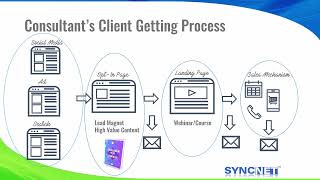
So let's review the current consultant's client getting process.
This is basically what everyone is doing.
They're getting traffic through social media or paying for ads or in the search engines, and they're sending it to their main website, which is basically a brochure site.
Now remember, your website is often your first impression a client will have of your business. So ensuring it's interactive, up to date, and optimized for search engine can make a significant difference in attracting and retaining clients. I want you to consider the concept of leverage. Let's say you're paying $100 a month for someone to host and maintain your website. And let's say you currently get 10 client engagements a year from your website, which you're totally happy with. But now let's apply the concept of leverage. What if you could spend the same amount of $100 a month, but you had your website optimized to capture leads and nurture prospects, which you can't get with a brochure site? Same cost, but now you have a higher conversion rate, more traffic, and now your website generates hundreds of clients per year. The same concept of leverage can be applied to ads. Let's say you budget $1,000 a month for Google Ads and the click-through rate is currently 1%. You can still spend $1,000, but create better ads that create better click-through rates of 5%. Your sales would immediately skyrocket. Marketing is one of the greatest areas of leverage you can have in your business. You just have to get better at it or get better help. In this diagram, it shows the buyer categories. I originally saw this in a book on marketing, but I've since seen it published in many different locations, so I'm unaware of the original source. So I didn't cite it here. But in any case, I have found this to be my experience in the 36 years of being in business, that at any one time when someone comes to your website, only about 3% are ready to buy at that time. 17% are gathering information. Another 20% are aware of a problem. And then 60% of the people are actually even unaware that there is a problem or of what the problem is. This is where you realize that you are in the education business because you must educate the bottom 97% of the market, whereas all your competitors are focused on selling the 3% that are ready to buy now. And a tip here is that you sell the problem more than the solution, which I won't have time to talk about today, but I'll create in another training on that topic alone. So what is your overall strategy if you need to educate your client? Let's dive in. So here we have your website.
In this case, we've also created an ebook. Or a physical book. You've got traffic where you get traffic from social media, search, and ads, and then an online course or webinar. Now, a website can be used to promote your book. A book can be used to promote your website and also an online course or webinar which will educate your clients.
You can also use social media to sell your book, to send traffic to your website, and to send people to be instructed or educated on your particular expertise and how you solve client problems. So these all integrate together. And if you consider that each one of these is a digital asset and think of it as a digital asset and realize that, for example, you post something on YouTube and it is a digital asset that will continue to drive traffic for many, many years to come. So here is the new model to help you get more clients. First, you have traffic. You can get traffic from primarily these 3 sources: social media content, you can pay for ads, which is quite expensive, and you can get traffic from search, which is publishing great content on your website and blog. Second, you then send that traffic to an opt-in page. This could be your main website or to a specific page where you offer a high-value piece of content. We recommend that it be an ebook, checklist, spreadsheet, or something that your target audience can get immediate benefit and something they perceive as high value. At this stage, you've captured a prospect or lead that you can follow up with. Next, you send them to a landing page, which could be a recorded webinar or course that will demonstrate that you are indeed the expert on this topic. Now that you're seen as the expert, they can be invited to take the next step, which is either scheduling and booking a call or consultation or actually buying something depending on what you're offering. Notice Notice that in each of these stages, we are educating our prospect on how we can best help them solve their problems or achieve their goals. And at any time that they fall off, we will continue to nurture and provide education that will benefit them. Also note that this is a long-term strategy. In marketing, we call this a marketing funnel, which guides and directs our prospects through a natural evolution of becoming a client. And this graphic is another representation of the same process we just reviewed in the previous slide. What is cool about this process that it can be measured and quantified to help you make better decisions and figure out where you have problems. In the case of traffic, let's say you currently have 1,000 visitors per month to your website. How would you know this? Through web analytics, and using Google Analytics is the cheapest and easiest way to start tracking your traffic and where it's coming from. And if you stay to the end, I'll give you my SOP, or my standard operating procedure, for setting up Google Analytics on your website for free. Okay, So let's continue. Of those 1,000 visitors, assume we have a 3% conversion rate for those that want our lead magnet offer, which means 30 new prospects have been added to our prospect database. We next send them to the next page in our funnel, which is a recorded webinar that teaches our prospects something, but also helps them realize that we are indeed the expert. If we assume that only 50% watch the webinar, we are down to 15, and of those that book a call with us, only 30% become clients. As long as this model is kicking out cash, then we'll continue to optimize each section of the funnel and we'll nurture and educate any of those that drop off anywhere in the funnel. You can plug this into a spreadsheet once you know your numbers and you'll be able to know the number of clients you can predictably acquire each and every month. Every step in your marketing funnel is a point of leverage that you can optimize to get the most out of your website. When prospects drop off anywhere in the funnel, we put them in an email nurturing sequence. That will look something like this. We'll continue to provide education, tips, and tricks that they can implement in their business, and all the while we are developing a relationship with them that makes us the expert in their eyes. So when they're ready to buy, we are at the top of their mind. So why aren't you doing this now? Let's look at everything you need to do to get this set up properly. You're going to need a website. You're going to need to create a book or an ebook. You're going to need to create a course or a webinar. You need to set up analytics. You need a chatbot. You're going to need a 30-email sequence. You should be posting to social media every single day. You need to set up a lead magnet, a white paper, something that your clients are going to be interested in. You need to set up a sales funnel. You're going to need a video sales letter. And of course you're going to need all the tools that will create all these things. You're going to need a web builder. You're going to need a CRM. You're gonna need a lead capture or autoresponder. You need some workflow management. You're gonna be able to have to create and manage ads. You need reputation management, A/B split testing. You're gonna need Calendly to set up your appointments. You're gonna need to create PowerPoints for your courses. You're gonna have to learn to record video, and you're gonna need some graphic design. At this point, you should be feeling complete overwhelm. There is no way anyone would be able to put all those pieces together to create leverage in their business. There's just too much to do. So let me show you how I've solved this problem in my business. So let's dive in and see what a website can do today. First, we'll take a look at the dashboard. This dashboard is going to show all of your opportunities, the value, your conversion rates. It's going to show where people are in your particular funnel. You can have multiple funnels. You'll see all the tasks that are assigned to you, any manual actions that need to be taken, and your lead source report. It's also connected to your Google Analytics, so you can see all your Google Analytics directly here. You're also connected to your Google Business Profile, which will allow you to get local clients as you get ranked higher in your local area. It'll also connect to your Google Ads and your Facebook Ads as well. So you have a single location to get all the information that you need to make good decisions for your business. Next, we have Conversations. Conversations consist of text text, email, and even phone calls. And you'll see as they appear for every conversation that has taken place with this particular prospect or client. And of course you have calendars. This is going to connect to your individual calendar so that people can book appointments with you without you having to intervene. This is going to stop the phone tag and going back and forth to schedule or book an appointment, and your clients and prospects Can do that all without having to interact with anyone. You can also see your contacts and here you're able to select them individually. You could change their pipeline. You can add an automation to this selected group. You can also send an SMS text blast, an email blast, and you can also add a tag. A tag allows you to segment your contacts into specific markets or groups or lists.
Very, very useful.
And you can delete. You can also send review requests. That is going to help your reputation management so that you get a higher ranking in the Google Business Profile. You can also export your contacts and import your contacts. So as you can see, it's very comprehensive. You can also look at your opportunities. This is very similar to the way Salesforce works in that you can see the stages of where people are in your pipelines, and it's as simple as moving them or typically a person is moved based on an interaction or some type of event that takes place, and it's done automatically. But you can also manually move these along your pipeline. You've also got invoices, recurring invoices. We have documents and contracts with digital signatures. You can see all of your orders, all of your subscriptions. You can actually take payments in links. So you could do that through a text, you could do it in an email. You can see all your transactions, set up all your products, you can set up coupons for discounts. You can also set up automatic receipts when payments are made. You can set up your taxes and notifications. It also integrates with NMI, Authorize.net, Stripe, and even PayPal for taking payments, and all the money's directly deposited into your bank account. On the marketing side, we connect to all of your social media accounts so that you can create a post and have it scheduled automatically be sent across all of your social media accounts. You can also set up email campaigns. You can set up templates and set up trigger links. And there's even an affiliate manager so that you can enlist an army of affiliates to go sell your products and services and you pay them a commission, all managed automatically. Then there's automation. And this is probably the most powerful feature of the entire system. It allows you to build automations that will automatically take place based on triggers that you get to set up. So in this case, when somebody fills out the contact form, it's going to create a tag and a lead in the system. It's going to create an opportunity. You can see how easy this is. It's going to put them in the lead pipeline.
They're going to be a lead. If I wanted to add an opportunity name and a source and lead value, I could do that as well.
It's then going to automatically send out an email.
I can have it use a template, then I'm going to have it wait. I'm going to have it wait for 3 days, and then I'm going to send out another email.
At that point, I'm going to have it add a task, and it's going to be assigned to a specific person, and it's going to be due in 1 day. Then it's going to wait for 2 days, and then it's going to send out another email. At that point, it will remove this particular person who has triggered this event from this workflow. But as you can see, the actions that you can take are extensive. So that's automation and workflows. Now let's dive into the sites. So you have funnels and websites, and a funnel is a process that takes a prospect through a process to check out and make a purchase off your website. Then you have websites. You have unlimited websites and it's as simple as going in and clicking and you can set up as many pages as you want. You can see all your stats. You can see all your sales. You can put it in test mode while you're testing and then turn it to live. Once it's live, let's take a quick look at how to edit a page. You simply click on edit and in this case it's like a WYSIWYG editor. You can go through each one of these.
You select something something you want to modify, and the properties for that particular option is over here, which allows you to change it.
So if you want to change this image, for example, you select the image, then you go over to the image options, and you can see that you can change this image. You can change all the colors.
Just select the area that you want to change or modify. Very simple to use.
Once you're done, you can click on Save and then click on Publish, and your page is all up to date. It's so easy that you can even have your front desk ask people, make changes to the website, which sounds like a scary thing, except that it has change management built in so that if a change is made and you don't like it, you can always revert back to a previous version. You can also set up a client portal, set up your own forms. You can build them yourself. You can also set up surveys. There's a chat widget. It's all very easy to use. Under memberships, you can set up products, which are simply courses. So if you're a course creator or someone who wants to educate your clients, this is a great tool. You can also set up communities. Then there's reputation management. Reputation management is important so that you can be found in the Google 3-pack so that local prospects can find you easily. It is the best way to get traffic today by optimizing and keeping your reputation clean online. And it's all done automatically. Then we have reporting and you'll be able to see all your Google Ads conversions, your Facebook Ads, your call reporting, your appointment report, and everything you need to be able to run your business online. Now, the question I have to ask is, does your website do this? If not, it may be time to take a look at eBizSuite. Now, this is a very short and definitely not a comprehensive demonstration of some of the feature sets that come with eBiz, but we hope you'll take a look and learn more. Head on over to eBizSuite.com, and we hope you'll find great success online for your business.