Using your Accounts Tracker
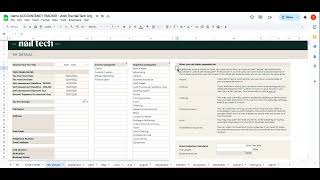
Amy Guy shows how to set up and use a business Accounts Tracker spreadsheet. Set your tax year and percentage, fill in your details and expense categories, log income and expenses month by month, then check the Dashboard for your year-to-date profit and tax savings. Only edit the white cells and use the hover-help flags.
Chapters
Okay, so we've reached another exciting part in the business program and that's where we introduce you to your next tracker. Now, so far you should be using the weekly business tracker and you also will have used our price list processor, which is our pricing calculator and our current income calculator as well. Now that should mean that you are quite savvy with using our trackers. They all work in the same way. They look very similar. They work very similar. So this some important things for you to know that are the same as the past ones. So things like you should only add data to white boxes. Anything that's in a nude box like this means that we have locked it. We've already added in the formula. You don't need to enter anything or remove anything from that box so you can leave those boxes alone. Now, this page here is the start here page. So this is what you'll see when you first load up your account tracker. Now it's got some important information on over here, just stuff about the tax year and also payments on account counts. If you move over here, it's got information about how to use also shares with you that there will be some boxes in this tracker that have a little black corner flag on them and I will show you one in a minute. If you see a little black corner flag in one of the boxes, that just means there is more information in them. So if you hover over the black flag, it will give you the extra information that is needed in order to fill in that box. Every single page has a little bit of writing on the top of it as well. That just helps you to fill out that page. You've also got your important dates here. So if you know that you're coming up to a deadline or you're not sure of what the deadlines are, you can either grab that information from the business program or we've kept it in here nice and neat for you. So you can always be aware of when important dates are coming up. So it would be good to just glance your eyes over this each time you come to the spreadsheet, just to make sure that you've not got any upcoming deadlines to meet. Okay, so I'm going to start off with the first tab, which is the My Details tab here. And this is where you will store all of your important overview information and also choose the categories that you're going to log. So I'll explain that to you in just a minute. But what you want to do first of all is start by entering the tax year that you are currently tracking right now. So each time you change this, it will also amend what is in this box here and it will change all of the dates for for you that are in the spreadsheet in line with whatever tax year you are currently working with. So right now you can see that the deadline for a paper self assessment is 31st of October 2026 based on this being the tax year. But if we change that to the next tax year, you can see that that date changes. So we've done this so that if you do a full year of tracking this and then you're ready to move on to the next tax year, you can just make a copy of by going here file and make a copy, make a copy of it so it'll give you a new one and then you can just change the date on here and re enter your info from there. So makes it nice and easy for you. Now the next section here is your tax percentage and this bit is important because depending on what is in this box, it will then affect the calculations later on in the tracker. So you want to just make sure that this tax percentage is right for your existing income, for your existing location. And if anything changes, you must make sure that you review your tax percentage that you are liable for and change change it in this box. Now if you are based in the uk, this is one of the boxes that has a little black flag on it which means there's more information. So if you just click on it, it brings up this extra info here and we've made it easy for you, if you are in the UK to understand what tax bracket you would be in based on your income so you can pop it in from there. Now if you make your way down, you've just got your important standard information about yourself and some extra bits about your business in here as well. Now the reason we put this in is because this is all the information that you are going to need. Either submit yourself assessment, tax, return your like yourself or if you are going to ask account an accountant to do all this for you, they will ask for all this information. So if you're able to fill in this my details page and then fill in all of these months as you go along. When it comes to the end of the tax year or it comes to a deadline, you'll have everything ready to go and ready to hand over to an accountant or do yourself, there won't be any information that you'll be scrambling around for which makes everything so much easier for you because trust Me, if you do not track this, then those deadlines and the times where you have to submit things are going to be so much harder. In fact, it could even be nearly impossible because when you don't have this information to hand, you're not able to understand and know what you know, what your realities are. So you can pop your personal information in here and then we move across to the income and expenses categories. And I love this section of the tracker because this is where you get to personalize it to you, to your income and to your expenses. Because every business is different. And what you are making your money through, Zo, might not be what the next person is making the money through doing. So you've got things like clients. So we make our money through doing clients. We can also make money through content creation, affiliate marketing, product sales. It could also be courses if you are an educator. So there could be multiple ways that you earn your income. You can just amend them in here, right? Add in whatever it is that you want and then that will pull through onto the other tabs, which I will show you in a minute. So, and then the same for your expenses. So you can personalize these expense categories to you and to what you usually spend your money on. And then it makes it easier later on for you to track and understand, you know, what categories are we spending the most in? Could we maybe make cuts somewhere? Which of our expense categories are the most lean and good for us? And it just gives us more information about our business as we move on through the spreadsheet. Now, next thing is what you can claim expenses for. So this is sometimes a bit of a gray area. So we've popped it here just so it's really accessible, really easy for you to access this information if you were to need it. And it's all of the expenses that you are able to put down as a business expense and any sort of ins and outs of that written in here as well. So that's all going to help you. And then lastly, we've popped in here a motor expenses calculator. So if you are doing some form of travel for work, so not your usual commute, but any other type of travel, then you are able to claim for your motor expenses. And here is a calculator. So depending on, you know, let's say you did 65 miles, it would tell you here how much you can expense for that trip. So, yeah, that's really exciting for you too. So let's move on. Now I'm going to skip the dashboard for just a Moment. And I'm going to go into each of the monthly tabs. So they start in the April and then they work their way right along, right through the tax year. So you are going to fill this in every single month or every single week and get in a habit of doing so. And here are the dates in the first box here. So you want to start off, let's say you are reviewing, I don't know, the 1st of April, 2025. So on this day you did a full day of clients. So we are going to pop in here, we're going to put, let's say 500 pounds and then you can pop any notes in here or the product or service that it was that you completed in here as well. These are more just for your own notes. So I could pop in here, I've done client's nails and it was £500 that day. And then you can add more in. So maybe the next day you might have had a day off, but you might have done some content creation and been paid for that. So let's say you did a real, and you were paid 600 pound for that. And you can pop that in here and then pop any notes in here that you might have. So you're able to fill in day by day what it is that you are bringing in and from which category. So if you receive payments from two different categories, for example, on the same day, you can just put the first of the fourth in here and still log it as you would anyway, because it's two different categories. So it just helps you to keep track of all of your income that comes into your account and when it comes in, and then the same with your expenses. And these categories are pulled through from what you added in your section here on your My details. So if you were to add courses, for example, in here, then if you were to go over to April and go into here now, you would see that courses has been added in. So whatever you pop in that section there is going to help you to be really specific when it comes to filling this in. And then like I said, the expenses work the exact same. So you will pop in. You know, let's say you paid your rent on the first of the month, so that might be in here, don't really need to pop anything in there, but you're going to just put the amount which was, let's say it was £500 for the month. Okay, so you can pop that in there and any other expenses, you would just pop the date and what it was that you paid out in here as well. So this allows you to track everything and it will tell you at the top it will start adding up based on your profit, how much you need to start saving for tax. So right here, your total profit so far based on this being your expenses and this being your income, your total profit is £600. And then whatever you've popped in the, in this box here, it's going to work out for you how much you should be saving based on that. And that will obviously change that number as you continue to fill this in. And then you would just move on to the next month and you might pop in here what you have earned. First day, I'm just going to pop something in so that it means I can show you the dashboards and how that works and let's say phone bill, 80 pounds. Okay. So you would start filling that in and it will start to enter all the information for you. So you will do this month by month. I personally will be doing this once a week. I would come to this and I would fill in for each day because then it's going to be a lot easier for you to manage. It's not too much of a commitment. But once a week you're going to fill in each day and it's going to be kept up to date. Then you can do this with your PowerApp Hour, you're making a non negotiable or if you're still going to be filling in your weekly business tracker, do it with that. Or you could do it even when you are joining the NCO Monday morning calls. You could then choose to do this at the same time. So it's all done at once, makes it nice and easy for you. So now I'm just going to show you the dashboard and this is the part that I absolutely love about this tracker because it's what you are then able to do with the information that you are adding in. So not only does this information give you an overview of exactly what your total income is, your total expenses, your total profit and how much you need to save for tax, which is all such important information about your business that you need to be knowing each and every month, but it is also going to give you a number of different ways that you can track this across the year, across the month in order to know, you know when you are making important decisions, what do you need to think about, what do you need to factor in? If you're in a period of growth in your business and you're looking at, I don't know, maybe, you know, expanding your business or getting a new seller on or launching courses or something like that. You can start to understand exactly where you are financially, to understand whether, you know, now is a good time to do that. You know, what does my year look like as a whole? What has my profit being? If I was to do the same again next year, what would my profit be then? And this is going to help you to build a picture of all of that. And I love this as well, because if you are a visual person, you're going to love this because it allows you to see in a clear graph and diagram what is going on in your business. I'm just going to come to one of the later months and I'm just going to pop something random in here. So I'm just going to pop in. Just so we've got something in here. I'll do 500 and I'll change this to 2000, just so we've got a better overview now on the dashboard. So the first part here is your tootle ink income. And this is based on the whole year. So everything that you start to put in here, it will tally it up and it will give you your total income for the tax year so far in this box. And then what it will do is give you a little graph here of what that looks like from a land perspective. So whether your income is, you know, plateauing and it's, and it's kind of steady month on month, if you are having huge spikes in your income and I guess this will look different depending on where you're at. So for example, when you're first starting out, you might have a lot of expenses because you're building up your kit and all of those things. But then you could also have a huge, you know, a course launch or a new treatment launch. And you could have a huge cash injection in your business because you get a sage of people booking in or you start offering something that's a little higher in price, then you would expect to see a spike in your income here. So this is just going to show you with your income what that looks like on a line graph month by month. And then if you come down here, it will give you a total across the year of your income versus your outgoings. So it, it will show you here that your income is 3,000 and here that your outgoings are 1080. And it will tell you that when you hover over it. Now, obviously what we would want is to see a huge gap between the two. We would want to see the income as the larger one. But if yours is the opposite way around and your outgoings are huge and your income is low, that's when we want to look at why is that? Is that the stage that I'm in, in my business? Or is there something wrong? Am I overspending? Can I make cutbacks? So that's going to be really helpful for you then you have got your income and expenses graph here. That is more of a bar chart. So again, if you are a visual person, it just helps you to see this clearly. And this is done month by month. So this is the whole year. This is a month by month breakdown. And then this is also a month by month breakdown of your total numbers. So in April you'll be able to look at this at a glance and know that in April Your income was 1100, your expenses were 500, your profit was 600, meaning you need to, to save this much for tax and national insurance. So nice and easy, just broken down for you to be able to see this at a glance. And then this section over here is all built around the categories that you entered in your personal details section. So in this graph, this will give you your top six income categories and where they are coming from. So for example, you can see here that on this table, this is what we're making from affiliate marketing, this is what we've made from content creation, this is what we're making from clients. And it will show you that based on what it is that you've entered. Okay. And then on this one it's the same but with your expenses. So right now the only expenses I've entered are rent and staff wages in these sections here. So it's showing me that they're a 5050 split. But this will change as you start to fill in all of these boxes down here. Really insightful for you. And then there's a breakdown of your expenses over the year and your income over the year as well. So this will give you an idea of how much you're making from content creation a year against how much you make from clients a year, so on, so forth, depending on, you know what it is that you offer and the same for your expenses. So I hope that you love your new spreadsheet. I absolutely love this. I think it is amazing. I think it is everything. Well, I know that is everything that you need in your business to start being organized to have your accounts, your finances and all of those things in order to just simply know what your is account expenses are against your income. Every month so you have an understanding of what your profit is and you also know what you need to be saving for tax so that you're not bitten later on down the line when it comes to them important deadlines. So I hope you love it, hope you enjoy it. If you've got any questions, just let us know and we will see.