Rob Bagley walks you through Studio 3: parking, smart lock entry with your phone number's last four digits, laundry, streaming, kitchen safety, the shared hot tub, climate controls, and Wi-Fi setup (network: Smart House, password: host's phone number).
Chapters
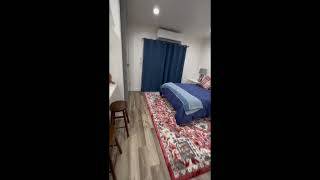
Hello! So you'll park in front of the sign that says, uh, "Welcome Guest Parking Studio 3," and then you'll come over here. This door will be shut. You'll— if you hold your finger, it'll wake it up. Put in the last 4 digits of your phone number, and this will unlock the smart lock. Come down these stairs. This is where the washer and dryer is. First come, first serve. If you use it, please set a timer so you remove your clothes promptly so somebody else can use it. Right here is Studio 2 and Studio 3. So this is, again, has a smart lock. So you wake it up, enter your, the last 4 digits of your phone number. And come into the apartment. So there's a, a desk that you can use. All the streaming channels are, are available here. As you go into one of these services, you'll want to pick a profile. And the profile that you will pick is either Studio or, in this case, if it has more than one, then pick the Studio 3. If you want to watch live television, if you go to Hulu, Studio 3, come over here, come up to Live, and then after that loads, push down. When you push down, then you've got the guide to what's playing right now. Kitchen is here. Um, the, the smoke detector is connected with the entire house, so you want to try to avoid smoking out the kitchen. So what we recommend is if you're cooking, make sure you turn on the fan on the microwave. If you want to be extra safe, you could open up this window. And you could also open up the sliding, uh, door that leads to the backyard. While we're talking about the backyard, if you want to use the hot tub, just come across over here. And here's the hot tub. It's shared with other guests, um, it's usually available. Enter in through here, you just lift up there and you can turn on the, uh, jets, turn on the lights. There's the hot tub. You can hang your towel here. There'll be some blue pool towels that we'll leave for you to use. These blinds you can, you can close with this slider, and you can shut them or let in a little bit of light if you want. The heating and cooling. So this is a, this is a sensor. This is the control for the heating and cooling. So you turn it on, if you watch right up top there, when I push the power button, the temperature here matches the temperature displayed up there. So there's different modes. Right now it's on heat, and so you would just adjust the temperature that you want higher or lower, and it will match up there. If you've just turned it on and it's been off, it may take 5 or 10 minutes before you get heat or cooling. If it's summertime, you could change from heat to auto and then you can adjust the temperature up and down. You don't want to use cool in the wintertime because this, uh, this unit powers Studio 2 and 3. They can both set their own temperature, but if one of you is trying to run the air conditioner, the other one's trying to run the heat, can cause some issues. So your wardrobe is in here. There's extra pillows in case you're using the pull-out sofa. The extra pillows will be up there. The blanket for the pull-up sofa is right there. On these side tables, there's some— there's a plug and USB ports in the back here that you can plug into. And if you want to use the pullout sofa, just pull out the, the cushions, grab that handle, pull the bed out. The Wi-Fi password It's right up there. Smart House is the Wi-Fi, and the password is my phone number. And I think that's probably all you need to know. If you have any questions, uh, you can text me. If it's an emergency, call my phone at least twice. Uh, and we look forward to you having a great stay.