A concise Spanish tutorial by David Castellanos showing how to configure priority levels in Gist workflows. The video demonstrates creating a priority option list (media, baja, alta), using a conditional plus the new automation action "cambiar prioridad" to assign a priority to an entire seguimiento (or to selected tareas), and manually assigning a priority to a single task via the side panel (ej., "muy alta"). A live demo (mantenimiento preventivo — folio 17 — cliente Javier) shows that a seguimiento-level priority overrides manual edits on downstream tasks and how to change the seguimiento priority under "ver detalle" so all tasks inherit the new value.
Chapters
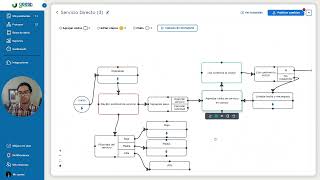
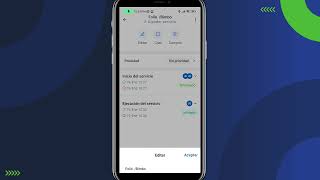
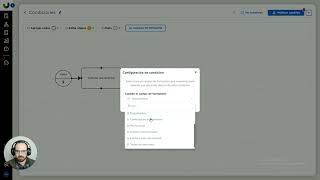
Hola ¿Qué tal? Bienvenidos a un nuevo tutorial de Gist. Hoy les voy a mostrar cómo podemos configurar prioridades a cada una de las tareas de nuestro proceso o al proceso por completo, ¿Sale? Entonces vamos directo al tutorial. Y bueno, básicamente las prioridades nos sirven para tener el listado de nuestros pendientes y poder filtrar por ejemplo por prioridad, entonces para que arriba tengamos los de prioridad urgente, media, alta, baja, etcétera. Entonces nos sirven para un indicativo de a qué tenemos que ponerle atención primero. Entonces yo por aquí tengo un proceso de servicios en donde dentro de la primera tarea de recepción le agregué esta nueva lista de opciones, que es un tipo de campo lista de opciones, donde le puse las prioridades de momento nada más puse media, baja y alta. Luego arrastré una condicional y le vinculé la prioridad del servicio y le conecté una automatización a cada uno en donde baja, media o alta, lo que van a hacer es que le van a poner, aquí tenemos una nueva acción en la automatización que es cambiar prioridad, fue la que agregué y ya te dice qué prioridades le quieres asignar, pues le puse baja y al seguimiento, este del seguimiento le va a poner la misma prioridad a todas las tareas del proceso, aquí dice, puedes seleccionar, si tú seleccionas este seguimiento es a todo el seguimiento o puedes usar la opción de tareas donde puedes seleccionar solo algunas tareas, en este caso le voy a dejar el seguimiento y listo. Ahora, ¿Cómo puedes también cambiar la prioridad de una tarea nada más? Por ejemplo, esta tarea de recepción, en cuanto yo la recibo, si le doy clic, doble clic o en el lapicito nos abre este panel lateral y yo le puedo asignar la tarea manualmente con la prioridad manualmente, entonces aquí le pongo muy alta, entonces esta tarea va a ser muy alta, una vez que yo termine esta tarea, ya todas las demás van a tomar la prioridad que diga acá. Y para que vean eso voy a poner esta siguiente tarea con prioridad también muy alta y van a ver cómo no va a respetar esta prioridad, sino va a respetar la prioridad pero del seguimiento que es la que le asignamos desde acá. Entonces voy a correr una prueba para que lo vean, voy aquí, iniciar una venta, es el mantenimiento preventivo, es una prueba, ¿Quién le va a dar seguimiento soy yo, es para el cliente Javier y el contacto Javier, listo, iniciar y esto va a ser el folio 17, miren como esta primera tarea que era la inicial si dice prioridad muy alta y yo la puedo editar aquí directamente porque tengo los permisos de edición? Ahora voy a terminar esta tarea y le voy a decir que sea prioridad media, terminamos y miren como ya la prioridad cambió a media y ya no me permite editarla, ¿Por qué no me permite editarla? Es porque fue una prioridad del seguimiento. ¿Cómo se edita la prioridad del seguimiento? En esta sección en ver detalle y aquí sí nos dice es la prioridad de todas tareas, de todo el proceso que está corriendo, o sea, todas estas que siguen van a tomar esta prioridad que está aquí media, si yo le cambio aquí a baja, todas las tareas que siguen también van a tomar la prioridad baja que la podemos ver aquí y listo, de esa manera entonces le pones prioridad al seguimiento, lo que te permite que no se pueda editar una tarea individualmente sino que tienen que ser todas o puedes modificarla manualmente cada una de las tareas sin poner esta sección de aquí que le pone el seguimiento o tú también podrías utilizar la función de que solo ciertas tareas en específicas que se les ponga la prioridad que tú selecciones aquí y listo. Bueno, este fue el tutorial de cómo crear prioridades y cómo asignarlas directamente a tareas o al seguimiento por completo, nos vemos en un siguiente tutorial, hasta la próxima.