A Spanish tutorial by Andrés Ruiz showing step-by-step how to add and fully configure task nodes in a process/workflow tool. Covers how to create a task node, open the edit panel (double-click or select+Edit), edit title and description (visible during execution), set and reorder priorities, assign responsables either as fixed users or via a user-selection field pulled from the database/process, configure reviewers, enable the "all must complete" option for multi-assignee tasks, enable "reportar ingresos" (select a currency field to push amounts to dashboards), toggle visibility of process information in the execution view, schedule task start and due dates relative to a process field or absolute dates, enable/disable a postpone button, and configure form fields and evidence as optional/mandatory. Demonstrates effects in the "Mis pendientes" execution view with examples (description display, postpone availability, process info visibility).
Chapters
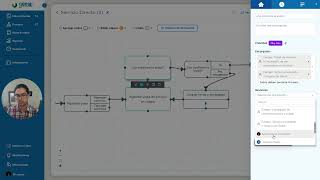
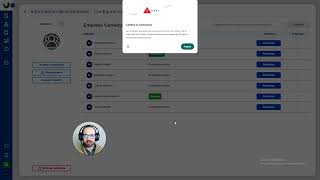
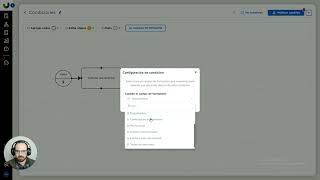
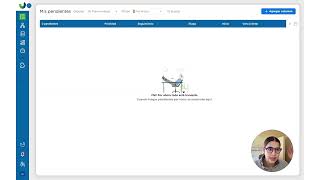
¿Hola qué tal, aquí Andrés Ruiz y hoy les voy a mostrar cómo podemos configurar y todo lo que deben de saber acerca de las tareas, entonces vamos directo al tutorial y les voy a mostrar todo lo que puedes tú personalizar dentro de una tarea y lo que tú como Process Master debes de saber hacer, sale? ¿Entonces este icono, primero cómo agregarla? Bueno vamos acá a la sección de nodos y arrastramos, soltamos y le asignamos un nombre y ya se crea la tarea, este es el primer paso, cómo agregar una tarea, ahorita la voy a eliminar y en lo que nos vamos a enfocar es en la parte de la edición, qué tantas cosas puedes configurarle y bueno primero le pueden dar doble clic a la tarea para que abra este panel lateral o le pueden dar un solo clic y le dan en editar acá lo primero podemos editar el título, si yo le hago algún cambio se ajusta directamente el nombre de la tarea, esta parte de la descripción la encuentran dentro pero de una ejecución, ahorita les muestro cómo se ve, si ustedes ponen una instrucción aquí dentro de una tarea activa que se encuentre ahí el flujo se va a poder ver esa descripción, la prioridad ustedes la pueden asignar manualmente aquí directamente la prioridad de esta tarea, también pueden crear nuevas prioridades o moverlas de lugar también se puede el tema de los encargados, los encargados se asignan aquí, recuerden que hay dos tipos de encargados, están el campo de encargado que serían estos del campo de monito, aparecen aquí de selección de usuarios, esos los encuentran ya sea en base de datos o aquí en el flujo como este tipo de campo selección de usuarios o pueden asignar tareas a usuarios siempre definidos, siempre fijo, por ejemplo si yo me pongo aquí, estos son los dos tipos de campo, es el usuario por default o un campo de encargado que puede estar definido en el proceso o se asigna conforme vaya avanzando el proceso como el técnico por ejemplo aquí y el tema de revisores es exactamente lo mismo, este campo de usuario o campo de selección o campo definido está este icono de todos debe terminar la tarea cuando ustedes tienen múltiples personas que reciben el pendiente, recuerden que si no está marcada esta casilla cualquiera de los que la termine se les acaba la tarea para todos, si está marcado esto, todos los involucrados deben determinarla para que avance el flujo. Está esta casilla de reportar ingresos que generalmente se utiliza en las secciones de cobro para habilitar y mandar la información hacia nuestros dashboards en donde se puede visualizar en la gráfica de ventas, esto es muy importante, al habilitarlo solamente puedes seleccionar un campo de tipo moneda para el que quieras que se reporten esos ingresos y se puede visualizar como les digo en dashboard. Esta es la información de proceso, esto también se ve en la sección de ejecución que pueda ver la información del proceso, ahorita les muestro tanto este como el de la descripción para que lo vean. Bueno esa es la parte central de la casita, luego pasamos acá a la parte de programar cada una de las tareas, ustedes tanto programar su inicio como su vencimiento, en este caso por ejemplo esta es una tarea de confirmación de la visita después de la tarea de agendar, entonces le dijimos que inicie esta tarea de confirmación un día hábil antes de la fecha y hora de la visita agendada que se llena en un paso antes, entonces esta es para programar los inicios, puede ser respecto a una fecha o puede ser respecto al inicio del proceso y el vencimiento igual ustedes pueden decirle desde que se inicia tu tarea cuánto tiempo tienes para que si pasa ese tiempo se va a poner como vencida y también puede ser respecto a una fecha, por ejemplo ustedes desde que inicia el ticket si tienen 24 horas de atención por ejemplo pueden calcular esa fecha en el inicio del proceso y le vinculan para que sus tareas tengan 0 horas después de la fecha pero de cuando inició el proceso o respecto a una fecha. Y este botón de la tarea se puede posponer también le habilita el botón de posponer dentro de un seguimiento activo, ahorita se los muestro esas partes y el de campos de formulario que ya toda esta sección bueno la verán también en otro video, pero aquí agregan la información que pueda visualizar el usuario en campos de consulta y en evidencias llenan la información que tenga que llenar el encargado de latar, si le dan clic aquí es opcional o obligatorio cuando está prendido en azul y listo, eso sería todo el funcionamiento de configuración de la tarea, ahora les voy a mostrar nada más rápidamente esa parte de la parte de la descripción, descripción de la tarea aquí pueden poner indicaciones o algún detalle y les voy a mostrar lo de que no se pueda posponer esta tarea, entonces público y voy a ir a mis pendientes, voy a agarrar una prueba aquí y voy a reiniciarla en ese punto para que vean lo que aparece. Entonces miren, la descripción es lo que aparece aquí arriba, si no la tiene no aparece, como estas de acá, no tiene descripción esta tarea, esta sí, ahora otra diferencia es lo del botón de posponer, esta otra tarea sí lo tiene, el folio 16 no la tiene, no la puedes posponer y por último era esta parte de aquí de información del proceso es la que se puede ocultar, si le damos aquí editar otra vez, mostrar información del proceso, lo deshabilitamos y si regresamos a mis pendientes, miren cómo, denme un segundo, listo, información de proceso no aparece, solo aparece la actividad, pero información del proceso, esta es otra prueba, esta sí aparece, entonces pueden ocultar esto si quieren, cliente, servicio, etc. Que son las bases de datos y listo, con eso sería toda la personalización de la tarea. Espero que les haya gustado, nos vemos en un siguiente video tutorial, hasta luego.