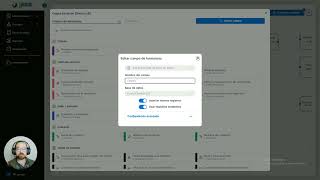
A concise Spanish tutorial (single-speaker) showing how to duplicate a process inside an app. The speaker demonstrates: open Processes, click the three-dot menu, choose "Duplicar proceso", and confirm. At confirmation a dialog lists databases related to the process and offers an option to duplicate those databases; selecting it creates separate copies so client records will not be shared between the original and the copy. The video warns that usually you should keep the same shared database when you want information to pass between processes, and recommends duplicating databases only when you need fully separate data (for example, separate fiscal information). The speaker also points out that form fields will indicate the database they come from, allowing verification.
Chapters
¿Hola y bienvenidos a este vídeo explicativo en el que vamos a ver cómo duplicar correctamente un proceso muy bien para eso vamos aquí a nuestra sección de procesos, seleccionamos los tres puntitos y aquí nos aparece duplicar proceso, nos pide confirmar y listo no es cierto? ¿Aquí tenemos un detalle muy especial y es justo por el que es este vídeo cuando nosotros le damos duplicar a un proceso nos aparece esta sección en la que nos muestra qué bases de datos están relacionadas a ese proceso OK, La manera o la forma más común en la que nosotros duplicamos o por la que nosotros duplicamos un proceso es porque queremos hacer uno su proceso que se conecte el que estamos duplicando con el siguiente, de hecho eso lo hacemos porque las bases de datos se conservan iguales y es muy fácil conectarlas OK? ¿Justamente en esta sección nos está preguntando si queremos duplicar las bases de datos y ojo aquí si nosotros seleccionamos duplicar se duplicará, esto va a provocar que clientes del proceso principal del que yo estoy haciendo la copia no sea la misma que del nuevo proceso OK? ¿Y generalmente no queremos eso, generalmente si queremos que se pase la información tendría que ser la misma base de datos OK? ¿Ahora vamos a ver qué pasa si yo le digo OK que éste se duplique, vamos a darle confirmar aquí ya tenemos el servicio servicio directo y copia de servicio directo en nuestra base de datos tenemos clientes que es la original y copia clientes inclusive si nosotros vamos aquí a copia de servicio directo y vemos en campos de formulario seleccionamos la opción de clientes que está aquí arriba ya nos va a decir que proviene de esa otra base de datos, me explico? ¿Esta parte es muy importante que la tengan presente en caso de que quisieran de verdad hacer una distinción entre los clientes que van a estar en el primer proceso en servicio directo y supongamos que este es cobranza, cobranza del servicio y lo copiamos porque queríamos pasar cierta información entonces el cliente ya no sería el mismo del servicio que el de la cobranza, eso sería un problema muy grande a menos de que quisiéramos hacer un campo de verdad de base de datos muy diferente, por ejemplo que tuviera una cosa es el cliente y que los datos fiscales tuvieran que estar en una base totalmente separada pues ahí ya tendría un poco más de sentido el hacer esta distinción OK? Solamente es muy importante Eso generalmente si queremos que primer proceso se conecte con el segundo, por lo general aquí vamos a dejarlo así, no se duplicará porque estamos hablando de que compartirán la misma base de datos. Si ya va a haber ahí una distinción y sólo queremos conservar incluso la estructura de la base de datos, pero que sea diferente, que no estén conectadas y no sea tan fácil conectarlas, pues bueno, ahí ya le pondríamos se duplicará. Muy bien, espero que esto les haya quedado claro y pues les sea de mucha utilidad para sus procesos. Nos seguimos viendo en el siguiente vídeo explicativo.