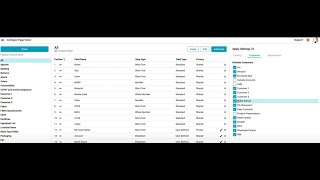
Shorefront lets administrators create custom fields for each customer alongside shared product data. Quotations and line sheets automatically pull in only that customer's fields, and the platform generates customer-specific collateral like CSV templates and layout designs in seconds.
Chapters
Administrators in Shorefront can create custom sets of fields and custom groupings for different objectives. There may be a set of common fields that you apply across your catalog and to all of your customer or PLM workspaces, but you can also create customer-specific sets of fields where you're collecting values across all of your products, but they're only going to be visible or interactable with those customer-specific pieces of collateral and within those customer-specific workspaces. So here you can see we've applied each of these customer fields to specific workspaces. When we move to our catalog, we can see that these products have both the common sets of fields as well as all of the customer-specific fields. Remember, the catalog is only accessible to your own team members. This allows us to see all of that data in one space and interact with all of that data in one space. Now I'm going to take these items and make a quotation for a specific customer, in this case, Customer 1. When we generate this quotation, only the data with respect to Customer 1's fields, as well as the common data fields, are going to be present on this quotation. Visible to both your team members in that workspace as well as your customer. You can see here the customer one specific fields on the data table as well as on the product details page, but it does not contain any other customer fields. Additionally, you can customize and automate collateral generated by Shorefront with respect to specific customers. In this case, I might select a specific customer's CSV or Excel template download. I can also create customer-specific line sheets and templates for each of those customers so that when I select products, all I need to do is select the customer-specific template and it will automatically retrieve the data that is relevant to that specific customer. It can also customize layouts for specific customers as well. Here I've been able to generate a line sheet with this common product data and the customer-specific data in just seconds. [MUSIC] [MUSIC]