How to Place an Order from a Quote on Surefront
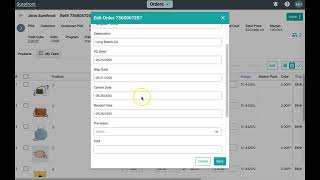
The video provides a step‑by‑step tutorial for users of the Surefront platform on how to turn a supplier quote received via email into a confirmed purchase order. It begins by opening the quote email, then clicking the line‑item icon to access the quote page. Users fill in business‑specific fields such as quantity, unit cost, and unit price, select all items, and click the Order button, which generates a green success notification and redirects to the newly created order. In the order view, the Edit button is used to add remaining details like ship dates and destinations, after which the user saves the order. The More dropdown’s “Send” option is then chosen, confirming the order on the buyer side. The supplier must log into their Surefront account to confirm, after which both parties see two green check marks indicating mutual confirmation. The tutorial concludes by encouraging users to repeat the process for multiple quotes and to use the Support button for any further questions.
Chapters
More from Luke









THE COMPLETE GUIDE TO PLM IMPLEMENTATION I PART 1: SHOULD YOU INVEST IN PLM SOFTWARE? (4K UHD)

THE COMPLETE GUIDE TO IMPLEMENTATION I PART 2: HOW TO PURCHASE THE BEST PLM SOFTWARE (4K UHD)

THE COMPLETE GUIDE TO PLM IMPLEMENTATION I PART 3: HOW TO IMPLEMENT PLM SOFTWARE (4K UHD)