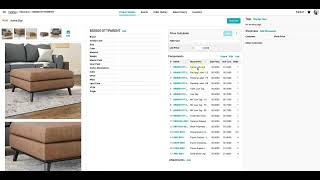
Learn how to build a Bill of Materials in SureFront by organizing components under a parent item like the Brookside Large Square Ottoman. The system automatically rolls up costs and prices by multiplying each component's price by its quantity, and any changes to a sub-part instantly update the parent total.
Welcome. Today we're going to look at a bill of material example for the Brookside Large Square Ottoman. As you can see, each part number or component of this ottoman can be set up in different portions of the product hierarchy to allow for materials library organizing or packaging organizing or component organizing.
Now, once I have each of those components and part numbers set up within the catalog, each of those components and part numbers are able to have a different set of attributes by their position in the product hierarchy. Then I can select the parent, the Brookside Large Square Ottoman, and select all of those components or parts and link them to that parent bill of material. Furthermore, once I have that link up here, you can see this component drawer will allow me to specify the quantity or ratio per measurement type or unit of measure for each one of those part numbers or components or packaging elements that go to build the overall bill of material for this Brookside Ottoman. Now, this is setting up that base ratio for each of these components or parts within the Brookside Ottoman, but of course you can change those when you're looking at the ottoman on an individual quotation or an order without affecting the core item setup in the catalog. Now that we've linked all of the components or parts for the bill of materials for the Brookside Ottoman parent item, we can see that full component list within the Brookside Ottoman, uh, page. We can also see a rolled-up cost of all of the components multiplied by their ratio or quantity per unit of measure to see what the calculated cost of the sum of all of these pieces are. We're able to adjust that so that it can move independently for the overall cost, but SureFront will automatically calculate both the rolled-up cost and the rolled-up price of all of the, um, components and parts that go into the Brookside Ottoman. Within that bill of materials table, of course, there's also a quick link to each one of those subparts within the bill of materials, and each one of those subparts can have a different set of fields where we're measuring just the fields that are relevant to that part number itself rather than the overall, uh, finished item. If you go in and change the cost or price of that part number that's involved at the bill of material level, it will change the calculation for the rolled-up cost or the rolled-up price at the parent level product as well.
Of course, after you've made this bill of materials, you can always add or edit those existing links to those part numbers or components. Thank you for joining us for this overview of SureFront's new bill of material association and costing functions.