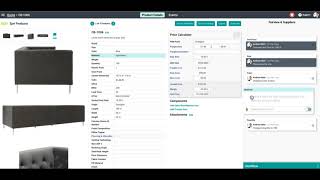
Luke Wang demos SureFront, a cloud platform that replaces email and spreadsheets for retail product development, sourcing, and wholesale sales. It includes shared project management with vendor collaboration, a searchable product catalog as a single source of truth, and a sales suite with a private showroom feature that lets partners order without logging in.
Chapters
Welcome to SureFront, retail's unified collaboration management system. Unified collaboration management means a shared tool for a shared mission. The better that we can work among our internal cross-functional teams and our vendor and customer partners to get her the right product at the right price at the right time, the more likely it is that we all win. Now, when we examine retail technology adoption over the last few decades, we see some really fantastic software systems to help us run our internal business processes better. However, we know that some of the most critical business functions happen in between us and our partner companies, where our team members like buyers and sellers have to rip information out of our internal systems and put it in lowest common denominators like email, Excel, and spreadsheets. This leads to a chaotic process where bringing just one new product to market involves dozens of touchpoints, many different file formats, and it leaves our teams feeling a little bit overwhelmed. When our product development and sourcing processes look like this, it makes our teams feel like they're just treading to keep their head above water. All of our most important data about products that we're considering, that we're actually buying, products that we decided not to go with are trapped in the ether of someone else's inbox, and there's no transparency for executive stakeholders and managers to quickly know where are we with each new development. Now, if this type of process feels close to home, remember, this is what it's like just to bring one or a few new products to market. When we actually have to bring millions of dollars and thousands of new SKUs across hundreds of suppliers to market we can see this type of chaotic iterative process has a real tangible and financial impact on our business as a whole. That's why we invented SureFront, the only tool with an optimized suite of features for all retailers' product development, merchandising, and sourcing to work collaboratively together among their internal teams, with their vendor partners, and with their wholesale channels to bring the right products to market with increased efficiency, full auditability, and all of the data you need. A few key aspects that set SureFront apart from other systems is: 1, it's completely cloud-based. Access it from your browser anytime from anywhere. 2, it has all the collaboration you need so you don't have to jump between platforms while referencing product data. And 3, by combining these things, we create an institutional asset that helps with knowledge transfer when team members are out or change over. SureFront has 3 distinct tool sets, starting from the beginning of your product development and sourcing lifecycle with your vendor partners, to building out a web-based catalog as a single source of truth for all of your product information and data, and then finally a full sales suite to engage your wholesale and retail partners and showcase to them all of the products that your teams have been working so hard on. Now, when we jump in to take a look at the platform, we're gonna start with that sourcing and product development cycle on the left-hand side. Taking a look at the system now, we're gonna start with the product development and sourcing tools. You can see we're in Fairview's furniture channel. These can be set up flexibly to match your company team structure. When we're in here, we have one shared project inbox for all of the team members that have been added to this channel. This allows each team member, whether they're on the design or product development or sourcing teams, to work on all of the same projects in all one workspace. At the project details level, we can jump in and change any of the attributes of the item. This is where design or development or product sourcing team members can all contribute the information that they're most responsible and most reliable for. When any of these team members makes edits to these products, who changed what, when, from what value to what new value is all comprehensively logged here. Workflow tasks with team members and due dates can also be assigned to this product so that we can plan and deliver on schedule. Each field on every product also has the ability to have field-by-field commenting so that the collaboration between teams can be seamless. At the whole project level, we can come and see where each product is on that workflow of product development, and we can select the products that are ready and send them out as requests for quotes to one or more suppliers. When we send out these requests for quotes, we can select which one or more suppliers we want to receive these quotes and send them a message as well as that request for quote. Those resulting requests for quotes will build out in a shared quotations inbox where we can see all of the active requests for quotes we have among all of our suppliers. We see them all in one place, but our suppliers will only see the specific quotation that they are dealing with, with us. To see more information about any specific quotation or to collaborate with a specific factory, all we have to do is click on one of the quotations. Each of the items on the quote also has a full item details page. This has all of the same commenting and workflow and editing and history tools that we already looked at, but this time this is shared by both our internal teams as well as our vendor teams. So we can rely on our vendor teams as well to come in here and input new information and see whenever they've made changes or updates to these items. All of the collaboration tools on this quote between you and your vendor or factory partner are meant to help align your teams and your factory as quickly as possible to get to the right item details, the ones that you want to move forward with. We see teams, as they start to finalize these items, take the items that they want to move forward with and save them back to their core catalog within SureFront. This tool will show any of the new updates that have been made to an item or let you know that you're about to save a new item entirely back to your catalog. In addition to building out new catalog items in SureFront, we see teams take the items they're ready to move forward with and create pro forma purchase orders using SureFront's ordering tool. Select the items that you're interested in moving forward with and then the program that you'd like to order these items for, and then you can create orders simply and easily that will live in Shorefront's order inbox. Going to Shorefront's order inbox, we can find those newly created pro forma orders, drill into the details of those orders, and then start to finalize them with all of the details that we need. While the order is in a draft stage, we can enter in the order-specific details, like dates and quantities, and we can even call out specific team members or managers to come in and give approval before sending out these orders to our vendor or factory partners. Now, whenever those orders look good, we can send them out to our vendor or factory partners with an email notification that will allow them to come in here and review and give their confirmation or request any changes that they may need to get this order information right. Finally, one of the other tools that product development and sourcing teams find highly useful is an overall workflow tab to compare all of your products that you're developing across all of your suppliers or projects and all of their stages in one centralized place. Now, as these products become final and ready to share with other teams in the business, we can go over to the catalog to see all of those new products we've been developing. Now that we're in the catalog, we have one central web-based repository of all of our product information that acts as our central source of truth. We can search, sort, or filter by any number of attributes or values to quickly find the product or products that we might be looking for. Of course, each of these products in the catalog has the same full item details that our product development teams worked so hard on developing. Now, once we found that product data that we're looking for in SureFront's core catalog of item data, we can leverage that data by using buying tools to either redevelop or reworkshop that product, or maybe place a reorder from our factory, or to leverage that data and share it with our retail or customer partners with a plethora of different selling tools to engage them throughout the different parts of the sales lifecycle. Utilizing the Showcase Selling tool, we can select which one of our customer or retail partners we want to create a private showroom and include all of these selected items for. All we have to do is enter in their email and a message that we want them to receive. Our wholesale or retail partner doesn't have to have a Shorefront login. They don't need to sign up or sign in. All they have to do is open this beautiful email that they'll receive from you with your message and your picture and click on Discover Products. This will drop them right into that private showroom you just made. From here, your wholesale or retailer partner can preview the items that you've shared to their private showcase. They can favorite the ones that they like, and they can even select the ones that they want more information on to request a quote and start deeper collaboration with your sales team. Once your wholesale or retail partner has sent this request for quote, they're going to have access to all of those same collaborative tools that your teams did with your vendor or factory partners. They can message your sales team directly for requests to see any similar items like the ones that they've selected here. They can see key item details to start to shape up quantities or pricing. They can dive into each of the items' full details to see the beautiful images that your team has worked hard on and make any kind of requests about the product data. And they can select the items they want to move forward with and place a purchase order in the system. Thank you for joining us on this preview of how Shorefront can help your teams go from the beginning of product development to offering your wholesale and retail partners a best-in-class experience with your brands and your products.
More from Luke









THE COMPLETE GUIDE TO PLM IMPLEMENTATION I PART 1: SHOULD YOU INVEST IN PLM SOFTWARE? (4K UHD)

THE COMPLETE GUIDE TO IMPLEMENTATION I PART 2: HOW TO PURCHASE THE BEST PLM SOFTWARE (4K UHD)

THE COMPLETE GUIDE TO PLM IMPLEMENTATION I PART 3: HOW TO IMPLEMENT PLM SOFTWARE (4K UHD)