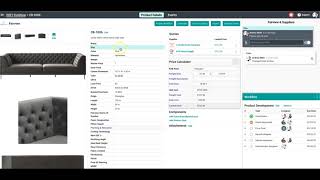
Surefront consolidates design, development, and sourcing teams in one workspace where you can edit product details, assign tasks with due dates, and track every change in an audit trail. When products are ready, you send RFQs to suppliers and manage all quotes in a shared inbox where each supplier only sees their own quotation.
Chapters
Taking a look at the system now, we're gonna start with the product development and sourcing tools. You can see we're in Fairview's furniture channel. These can be set up flexibly to match your company team structure. When we're in here, we have one shared project inbox for all of the team members that have been added to this channel. This allows each team member, whether they're on the design or product development or sourcing teams, to work on all of the same projects in all one workspace. At the project details level, we can jump in and change any of the attributes of the item. This is where design or development or product sourcing team members can all contribute the information that they're most responsible and most reliable for. When any of these team members makes edits to these products, Who changed what, when, from what value, to what new value is all comprehensively logged here. Workflow tasks with team members and due dates can also be assigned to this product so that we can plan and deliver on schedule. Each field on every product also has the ability to have field-by-field commenting so that the collaboration between teams can be seamless. At the whole project level, we can come and see where each product is on that workflow of product development, and we can select the products that are ready and send them out as requests for quotes to one or more suppliers. When we send out these requests for quotes, we can select which one or more suppliers we want to receive these quotes and send them a message as well as that request for quote. Those resulting requests for quotes will build out in a shared quotations inbox where we can see all of the active requests for quotes we have among all of our suppliers. We see them all in one place, but our suppliers will only see the specific quotation that they are dealing with, with us. To see more information about any specific quotation or to collaborate with a specific factory, all we have to do is click on one of the quotations.